Background Removal Pipeline 2026: BRIA, Photoroom & rembg
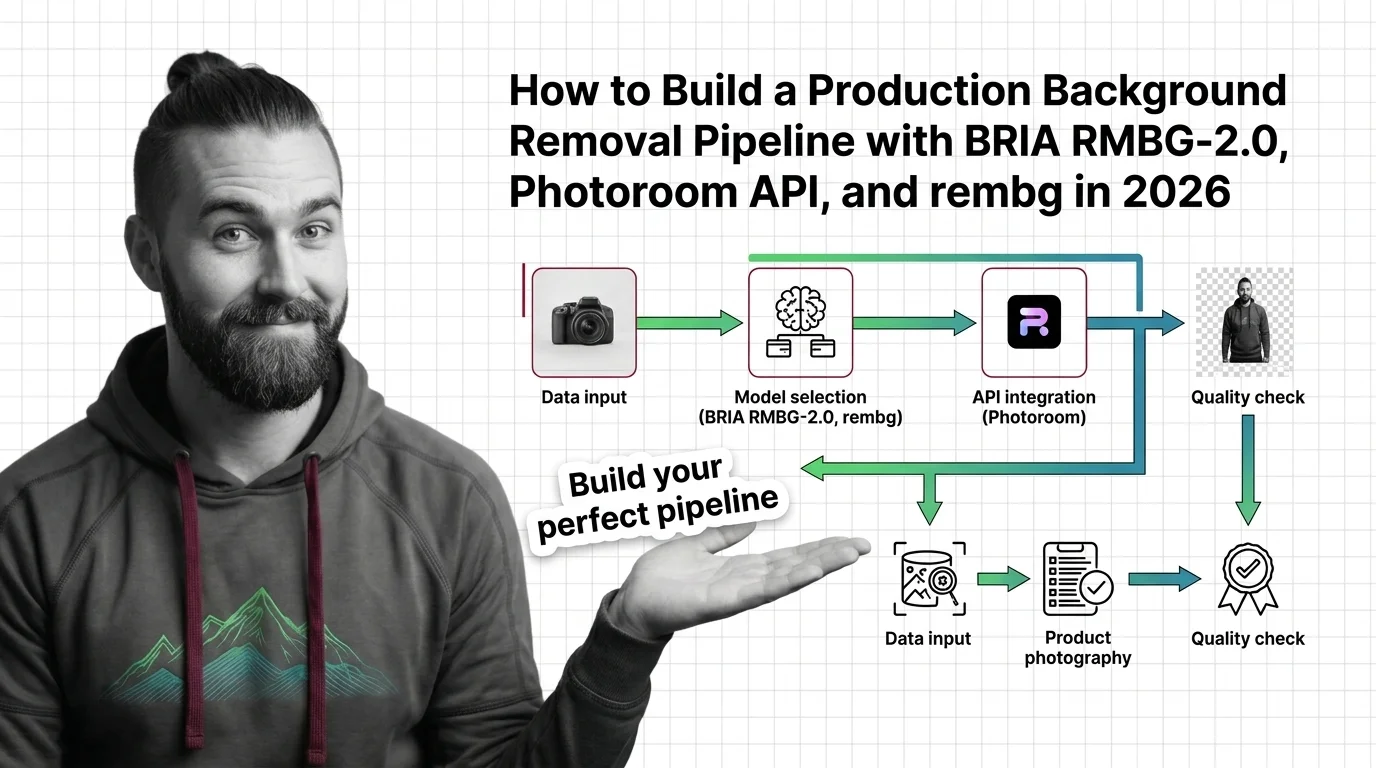
TL;DR
- A production AI Background Removal system is one router plus a small set of specialist cutout backends. Spec the router by image class, spec the backends by contract — never by demo reel.
- Photoroom, remove.bg, rembg, BRIA RMBG-2.0, and a prompted SAM 2 each own a different lane. Pricing, license, and edge quality move in opposite directions; one default for everything is a billing trap or a license violation, sometimes both.
- Validate at every seam: alpha-matte quality, hair and transparency edges, batch throughput, cost tier, and commercial-license compliance. If a boundary is silent, you are shipping halos and legal exposure under the same SKU.
A studio dumps a 50,000-SKU catalog into your queue Friday afternoon. Glass jars, fishnet stockings, hair against gradients, a sequined dress on a black mannequin. Your code calls remove.bg for everything because that is what the proof-of-concept did. Monday morning the free tier is exhausted, half the cutouts have white halos around the hair, and someone notices the rembg checkpoint you swapped in last week is BRIA’s weights running under a non-commercial license. Nothing crashed. Everything is wrong.
Before You Start
You’ll need:
- An AI coding tool (Claude Code, Cursor, or Codex) for specification-assisted implementation
- Working knowledge of Image Matting, Alpha Matting, and how Salient Object Detection differs from Semantic Segmentation
- A clear picture of which image classes your product actually receives — flat-lay product, fashion-on-model, transparent glass, hair against complex backdrops
This guide teaches you: how to decompose any cutout workload into one router plus swappable matting backends, so the model that produces a given alpha matte becomes an implementation detail behind a contract — not a load-bearing architectural commitment.
The 50,000-Image Drop That Cost a Studio Its Margin
Teams pick a background remover because one cutout looked clean in a tweet. They pipe everything through it. Nobody specifies which image classes that backend handles well, what the per-image cost looks like at catalog scale, what license governs the weights, or what “good” means for a hair edge versus a logo edge. The first batch looks fine. The second batch is mostly halos and the third batch ships under a license the legal team never signed.
It worked on Friday. On Monday, a fashion run came back with chewed hair, a glass-products run came back with the bottles painted solid, and the engineer who shipped the rembg upgrade had silently moved production to BRIA RMBG-2.0 weights — which are CC BY-NC 4.0 and require a paid commercial license for production use (BRIA Hugging Face model card).
Step 1: Map the Cutouts Your Product Actually Ships
There is no universal background remover in 2026. The serious open frontier is BiRefNet-based: BRIA RMBG-2.0 is built on a Bilateral Reference Network for high-resolution dichotomous segmentation and was trained on BRIA’s proprietary licensed dataset (BRIA Hugging Face model card). The serious closed frontier is hosted SaaS. Pricing and license shift by an order of magnitude between them, and edge quality varies by image class — not by aggregate benchmark.
Your pipeline has these parts:
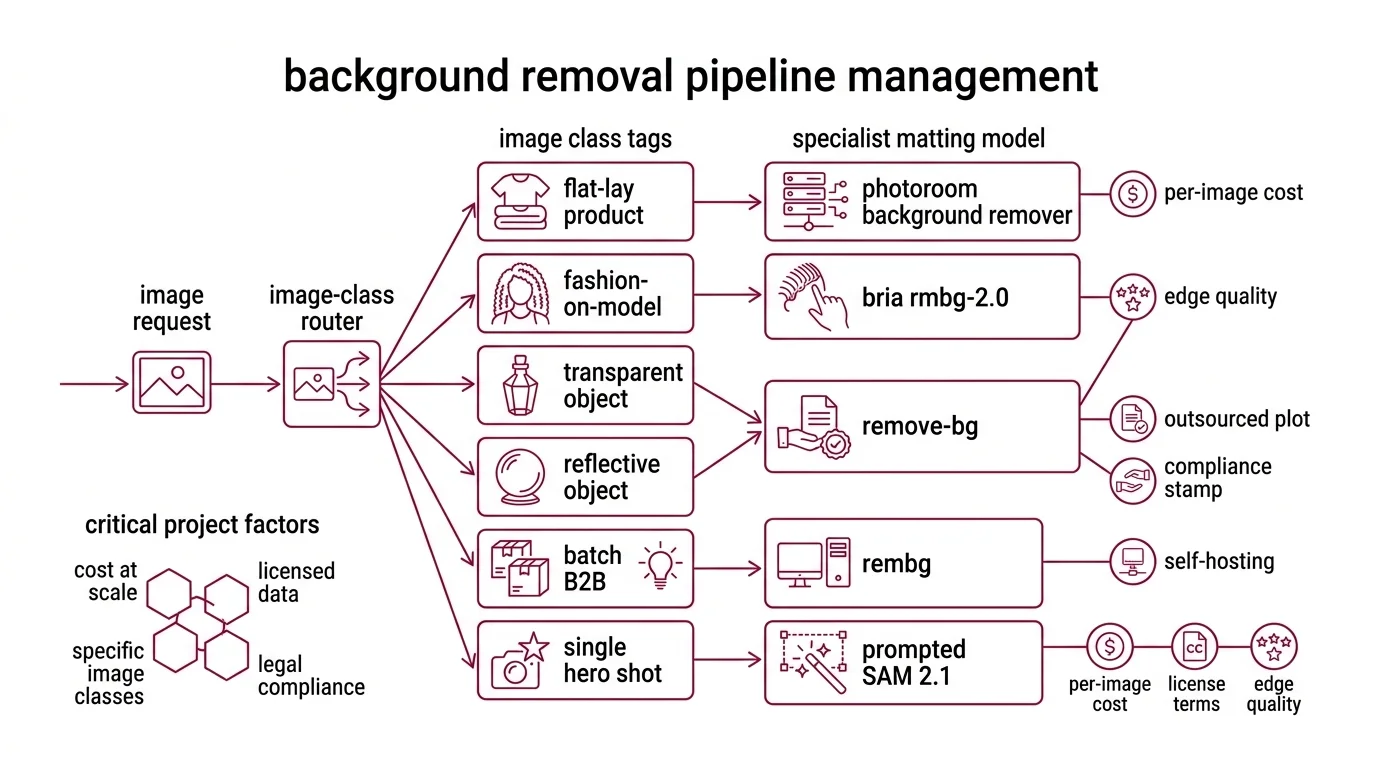
- Image-class router — takes a request, returns a class tag (flat-lay product, fashion-on-model with hair, transparent or reflective object, batch B2B with stable lighting, single hero shot)
- Cutout backends — the specialist matting models behind the router: Photoroom Remove Background for high-volume API workloads, Remove Bg for low-volume or compliance-friendly outsourcing, Rembg hosting an open checkpoint for self-host, BRIA RMBG (RMBG-2.0) when edge quality is the contract, a prompted SAM 2.1 when no salient-object assumption holds
- Asset plane — file ingest, resolution normalization (BRIA RMBG-2.0 expects 1024×1024 RGB and outputs a single-channel 8-bit grayscale alpha matte; Photoroom accepts PNG, JPEG, WEBP, HEIC and outputs PNG by default), reference-format enforcement
- Validation plane — alpha-matte coverage, hair-edge fidelity, transparency handling, cost tier, commercial-license compliance
A note on SAM and Diffusion Models: SAM 2.1 is a unified image-and-video promptable segmenter that runs about 6× faster than SAM on images and uses about 3× fewer interactions than prior video methods (Meta AI SAM 2 page). SAM 3.1 has been announced as the next-generation successor (Meta AI Blog). Neither is a drop-in background remover — both produce segmentation masks that need a prompting and post-processing layer to become a clean alpha matte. Diffusion-based matting exists in research, but the production frontier for cutouts is BiRefNet-shaped, not denoising-shaped.
The Architect’s Rule: one model per cutout class is vendor tech. One router per image class is your architecture.
Step 2: Lock the Contract for Every Backend You Dispatch To
This is where reel-driven builds fall apart. You spec the backend that ran in the demo and leave every other lane as “we will figure it out.” The AI coding tool fills the gap with assumptions from whichever doc page it saw last, and your pipeline ends up running the wrong model for the wrong image class on the wrong license.
Context checklist:
- Photoroom Remove Background API — $0.02 per image call, plans starting at $20/month (Photoroom’s pricing page). Inputs: PNG, JPEG, WEBP, HEIC. Outputs: PNG (default), JPEG, or WEBP (Photoroom Docs). This is the price-per-image leader on the closed-source short list and the right default for high-volume e-commerce cutouts where the input is a JPEG and the output needs to be a transparent PNG.
- Photoroom Image Editing API — $0.10 per image call, plans starting at $100/month, with the pricing page noting that one Image Editing call equals five Remove Background calls in billing terms (Photoroom’s pricing page). Treat that as billing equivalence, not quality equivalence — the Image Editing endpoint adds AI Shadows (
shadow.mode: ai.soft, ai.hard, ai.floating, ai.auto-with-overrides), AI Backgrounds (text + image prompt, model v3 default), AI Relight (lighting.mode, capped at 3,500 × 3,500 pixels), and AI Expand (Photoroom Docs). Spec when each AI feature actually fires; do not collapse “remove a background” and “relight + composite” into the same endpoint just because the billing math allows it. - remove.bg — $9/month for 40 credits at roughly €0.27 per image, $39/month for 200 credits at roughly $0.23 per image, with a free tier of 50 API calls per month restricted to small preview resolution; one credit equals one full-resolution image, and unused credits roll over up to 5× the monthly limit (remove.bg pricing). This is materially more expensive per image than Photoroom Remove Background. The honest reasons to spec it anyway: an existing procurement contract, a workflow already wired through Kaleido tooling, or a compliance posture that prefers their data handling. Do not pick remove.bg on price.
- rembg v2.0.75 — open-source orchestrator exposing 16 backends via CLI, Python, HTTP, and Docker, including u2net, u2netp, u2net_human_seg, u2net_cloth_seg, silueta, isnet-general-use, isnet-anime, sam, birefnet-general, birefnet-general-lite, birefnet-portrait, birefnet-dis, birefnet-hrsod, birefnet-cod, birefnet-massive, and bria-rmbg (rembg GitHub repository). Install:
pip install "rembg[cpu,cli]"for CPU andpip install "rembg[gpu,cli]"for CUDA, with model checkpoints auto-downloaded into~/.u2net/on first use. Python support is >=3.11, <3.14. Pin >=2.0.75 in production — earlier versions ship CVE-2026-40086, a directory-traversal flaw in the rembg HTTP server’s custom-model-type path (Snyk advisory). - BRIA RMBG-2.0 — BiRefNet-based, expects a 1024×1024 RGB input and emits a single-channel grayscale alpha matte (BRIA Hugging Face model card). The weights ship under CC BY-NC 4.0; commercial deployment requires a paid commercial license from BRIA or use of the Bria API. BRIA does not publish a public commercial-license price list — your spec must say “paid BRIA commercial license required” and route the procurement question, not a number, to legal. RMBG-1.4 still works but is no longer the recommended BRIA checkpoint; RMBG-2.0 is the BiRefNet-era replacement.
- SAM 2.1 / SAM 3.1 — when a salient-object assumption does not hold (think: which of three overlapping garments do I cut out?). SAM 2.1 is the current shipped checkpoint with stronger handling of visually similar objects and occlusions; SAM 3.1 is the announced successor with roughly a 2× gain on Meta’s promptable concept segmentation benchmark for image and video (Meta AI Blog). Spec the prompt source, the post-processing matting step, and the latency budget — none of these are free.
The Spec Test: Trace one fashion-on-model cutout with hair against a gradient backdrop, output required as a transparent PNG, commercial use flag set, throughput target 5,000 images per hour. If every leg of that path is not spec’d end-to-end — backend chosen, license cleared, hair-edge validation defined, batch concurrency set — the contract has a hole wide enough for either a halo or a lawsuit.
Step 3: Wire the Ingest, the Primary Cutter, and the Fallbacks
Build order matters because each stage depends on the one before it. Start from “we are a Photoroom shop” and work outward, and you end up routing every image into the same endpoint and treating the misfits as bugs instead of as missing contracts.
Build order:
- File ingest and resolution normalizer first. The cheapest stage to change and the one every backend depends on. Convert HEIC and WEBP up front, log original resolution before any resize, downscale to 1024×1024 only on the BRIA path because that is what the model expects — never globally, because Photoroom and remove.bg accept higher inputs and a global downscale silently caps your output quality.
- Primary cutter second. The backend that covers the plurality of your image classes. For mixed e-commerce at API economics, Photoroom Remove Background is a reasonable anchor. For self-hosted production with a paid BRIA commercial license cleared by legal, BRIA RMBG-2.0 via rembg is the edge-quality anchor. Pick one. Ship it end-to-end before you add any fallback.
- Fallback chain third. The second and third backends the router can hand off to when validation fails on the primary — for hair, a BiRefNet portrait variant via rembg; for transparent objects, a prompted SAM 2.1 with a custom matting head; for compliance lanes, remove.bg or the Photoroom Image Editing endpoint with an explicit commercial-use flag. Each fallback owns its own contract and its own failure modes.
- Validation plane last — but already sketched. The assertions live across the pipeline, not inside one backend call.
For each component, your context must specify:
- What it receives (file blob, MIME type, original resolution, image-class tag from the router, commercial-use flag)
- What it returns (alpha matte, RGBA composite, latency, cost record, license attestation)
- What it must NOT do (no silent downscale below source resolution, no swap from CPU to GPU rembg model without re-validating edges, no use of CC BY-NC weights when the commercial-use flag is set, no logging of raw customer images to disk)
- How to handle failure (low-confidence matte routes to the BiRefNet fallback; backend timeout triggers the next link in the chain; license violation hard-stops the request and pages an operator)
The router does not hardcode “BRIA RMBG-2.0 is best.” It hardcodes “image class C routes to backend B with license L” — and lets the mapping update when your eval set, your pricing math, or the next BiRefNet checkpoint tells you to.
Step 4: Prove the Pipeline Doesn’t Silently Halo Edges or Bills
You do not validate a cutout pipeline by squinting at the last 20 outputs and nodding. You validate by asserting what should and should not happen on every alpha matte, on every request, forever. Assertions at every seam.
Validation checklist:
- Alpha-matte coverage — failure looks like: the salient object is partially erased, or background pixels are kept inside the object boundary. Assert the ratio of opaque pixels falls inside an expected range per image class, computed from a labeled holdout.
- Hair-edge fidelity — failure looks like: a haircut that ate the strands, or a halo of source-background color around fly-aways. Run an edge-band check on the matte; for fashion-on-model classes, hard-fail when the fine-edge variance drops below threshold.
- Transparency handling — failure looks like: a glass jar painted solid, a wine bottle’s see-through neck rendered opaque. Assert the output alpha contains an interior gradient on classes flagged as transparent — a single binary cut means the matter dropped translucency.
- Cost tier drift — failure looks like: every request runs through the Photoroom Image Editing endpoint at $0.10 per call when Remove Background at $0.02 would have done the job, because someone wired AI Shadows on by default. Log endpoint and feature flags per request. Alert when the Image Editing share drifts past your budget model.
- Commercial-license compliance — failure looks like: a BRIA RMBG-2.0 cutout shipping inside a customer-paid SKU on a deployment that never cleared a paid BRIA commercial license, or a CVE-2026-40086-vulnerable rembg HTTP server still running in a production node. Assert the license attestation on the route, not only on the output. Pin rembg >=2.0.75 in your dependency manifest and CI.
Security & compatibility notes:
- rembg directory traversal (CVE-2026-40086): Versions below 2.0.75 ship a path-traversal flaw in the HTTP server’s custom-model-type handling. Pin
rembg>=2.0.75in your dependency manifest and rebuild any container that was running an older release (Snyk advisory).- BRIA RMBG-2.0 license: Weights are CC BY-NC 4.0. Commercial deployment requires a paid commercial license from BRIA or use of the Bria API. RMBG-1.4 is superseded — keep it only as a fallback during migration (BRIA Hugging Face model card).
- SAM 2 / 2.1 / 3.1: Reference SAM 2.1 as the current shipped checkpoint and SAM 3.1 as the announced successor; treat both as promptable segmenters that need a matting head, not as drop-in background removers (Meta AI Blog).
Common Pitfalls
| What You Did | Why AI Failed | The Fix |
|---|---|---|
| One endpoint behind one API key | Halos on hair, solid fills on glass, and a single license posture for image classes that demand different ones | Route by image class; spec hair, transparency, and commercial-safe lanes separately |
| Ran rembg with whichever model the README listed first | u2net is a salient-object detector, not a hair specialist; output looks generic | Pick the rembg model per class — birefnet-portrait for hair, isnet-general-use for products, bria-rmbg only with a paid BRIA commercial license |
| Defaulted to the Photoroom Image Editing endpoint | Every cutout billed as 5× a Remove Background call, AI Shadows fired when no shadow was needed | Route plain cutouts to Remove Background; gate Image Editing behind explicit edit-type flags |
| Shipped BRIA RMBG-2.0 weights to production | CC BY-NC 4.0 license violation on commercial revenue (BRIA Hugging Face model card) | Procure a paid BRIA commercial license or migrate to a non-NC backend before deploy |
| Did not pin rembg | An old container in CI still runs a CVE-2026-40086 build | Pin rembg>=2.0.75 and re-image (Snyk advisory) |
Pro Tip
Write your router spec around image classes, not around models. When the next BiRefNet checkpoint lands, when Photoroom adds a new endpoint, when SAM 3.1 ships its production weights — you add it as another option inside an existing class contract. The taxonomy outlives the vendors. Models rotate every quarter; image classes change every decade. Architect for the slower cycle and your halos disappear into history instead of your changelog.
Frequently Asked Questions
Q: How to use AI background removal for e-commerce product photography at scale? A: Pre-classify your catalog by image class (flat-lay, fashion-on-model, transparent), route each class to the lowest-cost backend that meets its edge-quality bar, and validate alpha coverage on a labeled holdout. Photoroom Remove Background at $0.02 per image is the API economics anchor for high-volume flat-lay; reserve hair-fidelity backends for the SKUs that need them, not the entire catalog.
Q: How to batch process thousands of images with the remove.bg and Photoroom APIs? A: Spec a queue with bounded concurrency, exponential-backoff retries, and a per-image cost ledger. remove.bg credits roll over up to 5× the monthly limit (remove.bg pricing), so plan refills around predictable spikes rather than midnight panic. Photoroom does not publish per-call SLAs — measure your own latency on representative samples before promising throughput.
Q: How to self-host rembg or BRIA RMBG-2.0 for offline background removal?
A: Install rembg>=2.0.75 with pip install "rembg[gpu,cli]", let the chosen checkpoint auto-download into ~/.u2net/, and gate the bria-rmbg model behind a paid BRIA commercial license check (BRIA Hugging Face model card). For pure self-host with a permissive license, the BiRefNet general or portrait variants in rembg are the strong open path. Pin Python between 3.11 and 3.13.
Q: How to build a background removal pipeline step by step in 2026? A: Map your image classes, lock a contract per backend (price, license, edge spec), wire the ingest then the primary cutter then the fallbacks, and instrument an alpha-matte validation plane. The deliverable is not a script — it is a router whose mapping you can update when the next BiRefNet checkpoint or Photoroom feature lands without touching the rest of the system.
Your Spec Artifact
By the end of this guide, you should have:
- An image-class taxonomy — a list of classes your product actually receives, with a default routing rule per class
- A per-backend contract list — Photoroom Remove Background, Photoroom Image Editing, remove.bg, rembg (with explicit checkpoint and pinned version), BRIA RMBG-2.0 (with license attestation), SAM 2.1 (with prompt source and matting head) — each with inputs, outputs, constraints, license, and failure modes
- A validation checklist with assertions at every seam: alpha-matte coverage, hair-edge fidelity, transparency handling, cost tier, commercial-license compliance
Your Implementation Prompt
Paste the prompt below into Claude Code, Cursor, or Codex when you are ready to scaffold the pipeline. Fill every bracketed value from the contracts you wrote in Steps 1–4. Do not run it with placeholders still in place — the whole point of this guide is that the blanks are where the failures come from.
You are building a production background removal pipeline. Follow the
router-plus-backends architecture: classify image class -> route to
matting backend -> validate alpha matte. Do not deviate.

IMAGE-CLASS TAXONOMY
- Classes covered: [flat-lay product, fashion-on-model with hair,
  transparent or reflective object, batch B2B, single hero shot —
  edit to fit product]
- Routing rule per class: [one backend + checkpoint + license per class]
- Classifier: [rules-based on metadata | small model | LLM — pick one]

BACKEND CONTRACTS (one block per backend in scope)
- Backend + SKU: [e.g., Photoroom Remove Background]
  - Endpoint: [Remove Background | Image Editing — never both as default]
  - Input formats: [PNG | JPEG | WEBP | HEIC]
  - Output format: [PNG (transparent) | JPEG | WEBP]
  - Max input resolution before resize: [source | 1024x1024 for BRIA |
    3500x3500 for Photoroom AI Relight]
  - Cost per image: [Photoroom RB $0.02 | Photoroom IE $0.10 |
    remove.bg ~$0.23 per credit | rembg self-host = compute only]
  - License: [Photoroom commercial via plan | remove.bg commercial via
    plan | rembg model checkpoint license — bria-rmbg = CC BY-NC 4.0,
    requires paid BRIA commercial license for production]
  - rembg version pin: [>=2.0.75 — CVE-2026-40086 fixed]
  - MUST NOT: silently substitute checkpoint; deploy CC BY-NC weights
    on commercial-flag routes; default to Image Editing endpoint;
    log raw customer images to disk

ROUTER
- Input: file blob + MIME type + original resolution + image-class tag
  + commercial-use flag + throughput budget
- Output: route decision (backend, checkpoint, endpoint) + validation plan
- Fallback chain per class: [primary -> secondary -> tertiary]
- MUST NOT: route commercial-use requests to non-licensed backends

VALIDATION (emit assertions, not only runtime code)
- Alpha-matte coverage: opaque-pixel ratio per class within [bounds]
- Hair-edge fidelity: fine-edge variance above threshold on hair classes
- Transparency handling: alpha gradient present on transparent classes
- Cost tier: Image Editing share per 1k requests under [Y] percent
- License attestation: paid BRIA commercial license recorded for all
  bria-rmbg routes; rembg version >=2.0.75 enforced at deploy time

ERROR HANDLING
- Classifier low confidence -> [defined default route]
- Backend timeout -> [fallback chain]
- Coverage / hair / transparency assertion fails -> [reject + requeue]
- License violation -> [hard-stop + page operator]

Generate the pipeline module, the assertion suite, and a one-page
README explaining how to add a new backend without touching the router
or the validation plane.
Ship It
You now have a pipeline that treats “which model produces this alpha matte” as a routing decision instead of an architecture commitment. When BiRefNet ships its next general checkpoint, when Photoroom adds a new endpoint, when SAM 3.1 lands production weights and a matting head, when BRIA’s commercial license terms change — you add a contract, you route a share of traffic to it, you measure, and the rest of the system does not move. The names on the backends change. The router does not.
AI-assisted content, human-reviewed. Images AI-generated. Editorial Standards · Our Editors