How to Build a Production AI Workflow with LangGraph, Temporal, and Prefect in 2026
TL;DR
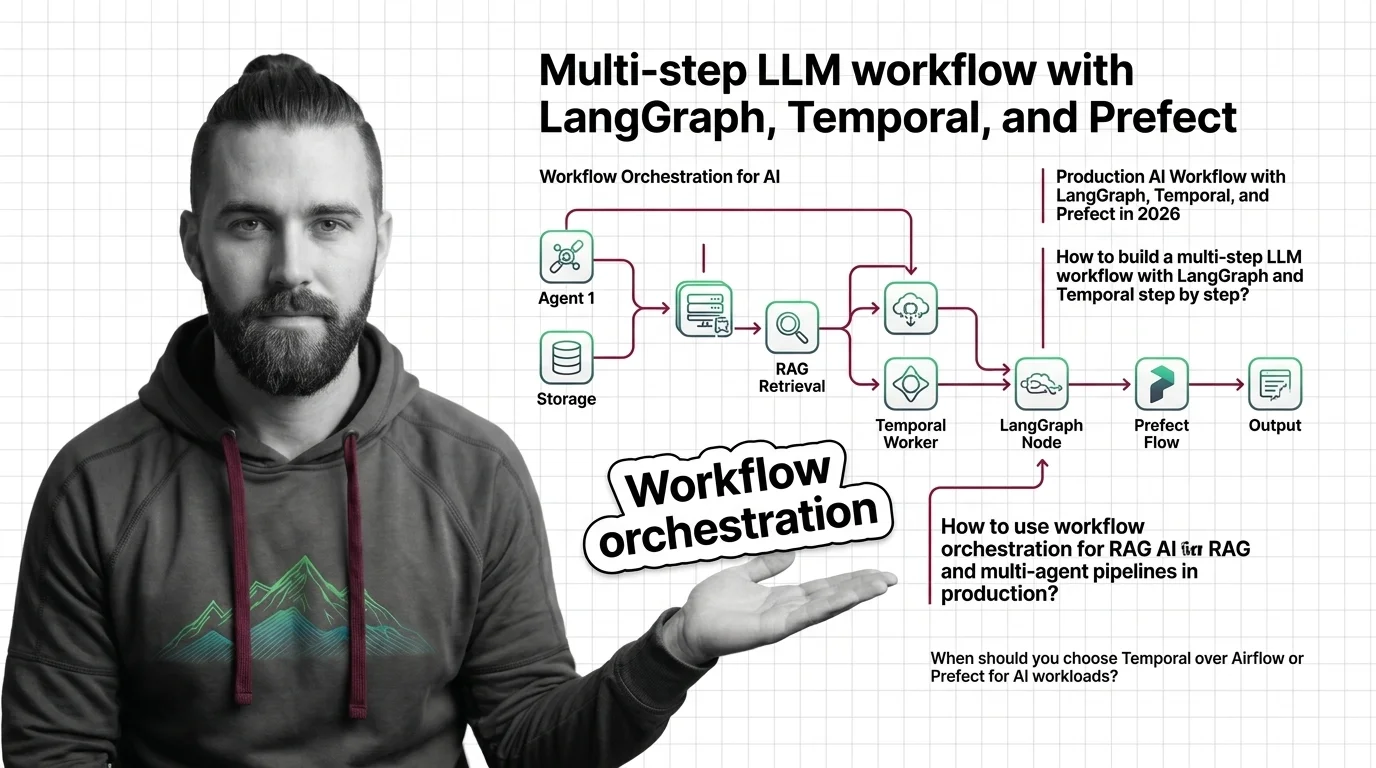
- Three orchestrators, three different boundaries. LangGraph owns agent state. Temporal owns durable execution across crashes. Prefect owns the data and ML pipeline around the agent.
- The failure mode you fear decides the stack — not the feature list. If your workflow has to survive a server restart, durable execution is the architecture. If it has to cycle through tool calls, a state machine is.
- A workflow without a checkpoint contract and a clean handoff between layers is a long script with extra logging.
Picture this. Your agent is in production. It calls a tool, waits for a human approval that takes three days, and on day two your worker process gets recycled. The workflow vanishes. The human approves an action against a workflow that no longer exists. That is not a bug in your code. That is the spec gap between “I have an agent” and “I have a workflow.”
Before You Start
You’ll need:
- An AI tool (Claude Code, Cursor, Codex) and a Python 3.11+ environment
- An understanding of Workflow Orchestration For AI as a layered architecture, not a single library
- A clear list of which steps in your pipeline must survive a crash, which must loop, and which are plain data work
- Familiarity with LangGraph as the state-machine layer
This guide teaches you: how to decide which orchestrator owns which boundary in your AI workflow, specify the contract between layers, and wire them in the order that lets each one do its job.
The 3 AM Pager About a Workflow That Stalled Mid-Run
Here is the failure pattern that keeps showing up.
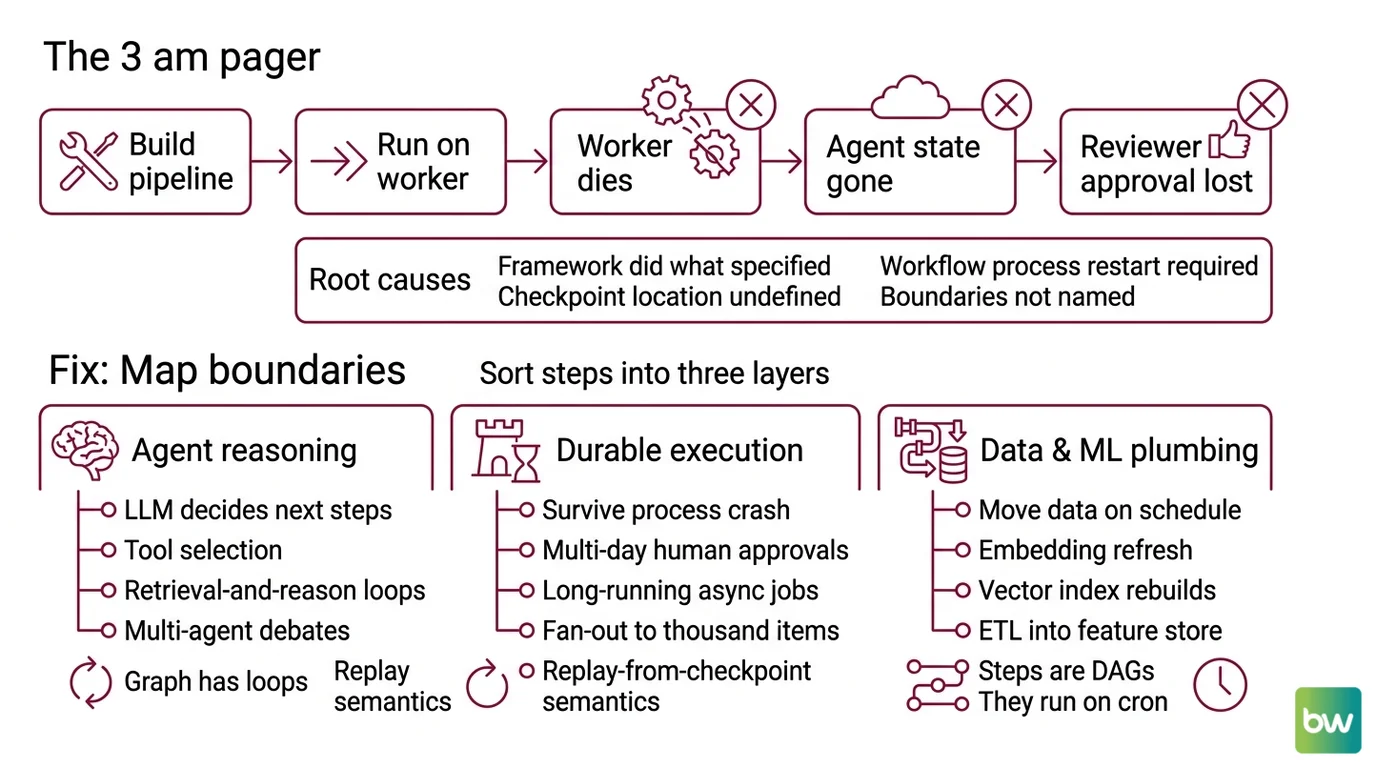
A team builds a multi-step LLM pipeline. The first step extracts facts. The second step calls a tool. The third step waits for a human reviewer. They wire the whole thing inside a single Python function and run it on a worker. On Monday morning the worker dies during the human-review step. The agent state is gone. The reviewer’s approval lands on a thread that no longer exists.
The team thinks the framework failed. The framework did exactly what it was specified to do. Nobody told it the workflow had to survive a process restart. Nobody specified where the checkpoint lives. Nobody named the boundary between “agent reasoning” and “durable execution.”
The fix is not a bigger framework. It is a clearer spec. Each step in your pipeline belongs to one of three layers, and each layer has a different job. Mix the jobs and the workflow becomes a long script with extra logging.
Step 1: Map the Three Boundaries in Your Pipeline
You cannot pick the orchestrator until you can name the boundaries. Sort every step in your pipeline into one of three buckets.
Agent reasoning — anything where the LLM decides what to do next. Tool selection, retrieval-and-reason loops, multi-agent debates, RAG with iterative refinement. These steps are cyclic. The next step depends on the output of the current one. The graph has loops, not just edges.
Durable execution — anything that has to survive a process crash or a multi-day wait. Human approvals, long-running async jobs, fan-out to thousands of items, retries with exponential backoff across hours. These steps need replay-from-checkpoint semantics, not just retries.
Data and ML plumbing — anything that moves data on a schedule. Embedding refresh, fine-tuning runs, vector index rebuilds, eval-set regeneration, ETL into a feature store. These steps are DAGs. They run on a cron or an event. They do not reason. They do not wait on humans.
The Architect’s Rule: If you cannot put each step into exactly one bucket, you do not have a workflow yet. You have a Python script that needs decomposition before it needs an orchestrator.
The error teams make is using the wrong layer’s primitive for a step that belongs in a different layer. Running a multi-day human approval inside a LangGraph node with an in-memory checkpointer will work — until the host reboots. Running a cyclic agent loop inside an Airflow DAG will work — until you need a backward edge and the scheduler refuses.
Step 2: Lock the Contract Between LangGraph and Temporal
Once the boundaries are mapped, you specify the contract at each handoff. The handoff that breaks production most often is the one between agent reasoning and durable execution.
Contract checklist — every layer boundary needs each of these specified before you write code:
- Input shape — what serializable payload crosses the boundary
- Output shape — what comes back, including partial-result and failure variants
- Checkpoint location — where the persistent state lives and who owns it
- Resume contract — what the upper layer sees when it picks up after a crash
- Idempotency key — how the system recognizes “I already ran this step”
- Timeout policy — what happens if the lower layer takes longer than the upper layer expects
The Temporal-plus-LangGraph pattern that has held up in production (Kinde Engineering) puts Temporal at the macro level and a LangGraph graph inside a Temporal activity. The Temporal workflow gives you durable execution across host restarts. The LangGraph activity gives you a state machine for the agent’s reasoning. The activity completes, returns a result, and the Temporal workflow advances. When the host dies, Temporal replays the workflow from its last completed activity — not from the start.
The Spec Test: If your workflow definition reads as one giant function with no clear boundary between “what the agent decides” and “what the runtime persists,” your future debugger is going to live in that function for a week. Split it now.
Temporal’s pitch is “Durable Execution” — workflows that replay from the last checkpoint after a crash (Temporal Blog). OpenAI uses this pattern in Codex agents that wait days for human approval and survive server restarts. Mistral AI launched its Workflows product on Temporal in 2026 to handle millions of daily executions (VentureBeat). These are not toy use cases. They are durability requirements you cannot satisfy with a worker queue and a Postgres table.
Step 3: Wire the Stack in Build Order
Build the layers from the inside out. The order matters because each outer layer needs the inner one’s contract before it can wrap it.
Build order:
Agent graph first. Write the LangGraph
StateGraphfor the reasoning loop. No durability yet — just the cyclic logic, the tool nodes, the conditional edges. Get it to run end-to-end in a single process. According to the LangGraph 1.0 announcement, the framework now ships with a stability promise — no breaking changes until 2.0 (LangChain Blog) — which means the API you write against today is the same one you debug a year from now. Production deployments at Uber, LinkedIn, and Klarna run on this contract (LangChain Blog).Checkpointer next. Add the persistence layer to the LangGraph graph. Use
InMemorySaverfor tests and a Postgres-backed checkpointer for anything that ships. The checkpointer is what makes the graph resumable inside its own process. It is not a substitute for cross-process durability.Temporal workflow on the outside. Wrap the LangGraph invocation in a Temporal activity. The workflow definition holds the macro logic — fan-out, human approvals, scheduled retries, multi-day waits. The activity holds the LangGraph call. The activity returns a serializable result. The workflow advances. The activity’s idempotency is your safety net for crashes.
Prefect for the data plane. If your pipeline has scheduled ML work — embedding refresh, eval-set regeneration, vector index rebuilds — wire those as Prefect flows that produce the artifacts your agent reads. Prefect 3.7.0 is the current stable release (Prefect Release Notes), and the open-source build is Python-native (Prefect Open Source page). It does not pretend to do agent orchestration. That is the boundary. Prefect feeds the agent. It does not run the agent.
For each layer, your context must specify:
- What it receives from the layer above
- What it returns to the layer above
- What it must NOT do (anti-responsibilities — the layer’s scope boundary)
- How to handle failure (retry vs. propagate vs. compensate)
Security and compatibility notes:
- LangGraph
langgraph-prebuiltdependency drift. Version 1.0.2 oflanggraph-prebuiltadded a requiredruntimeparameter toToolNode.afunc(LangGraph Issue Tracker). Action: pinlanggraph-prebuilt>=1.1.0withlanggraph>=1.1.xin your lockfile.- LangChain
AgentExecutor/initialize_agentin maintenance mode. Receiving critical fixes only, end-of-life signal through Dec 2026 (LangChain Release Policy). Action: migrate tocreate_react_agent()or a LangGraphStateGraphbefore then.- Prefect ControlFlow status unconfirmed. The repo appears under
PrefectHQ/prefect-archive/ControlFlowin search results. Action: verify the project’s current status before adopting it as your agent layer; treat Prefect itself as the data-plane layer and use LangGraph for agent reasoning.
Step 4: Prove Each Boundary Holds Under Failure
A workflow stack you have not crash-tested is a workflow stack you do not trust. Validation is not “did the happy path complete.” It is “what does the system do when the part I am worried about breaks.”
Validation checklist — run each test against the layer you suspect:
- Kill the worker mid-agent-step — failure looks like: the LangGraph graph resumes from its last checkpoint, the Temporal activity retries, the workflow advances. If the workflow restarts from step one, your checkpointer is not actually persisting.
- Kill the host mid-workflow — failure looks like: Temporal replays the workflow from the last completed activity on a different worker. If the workflow is lost, you are running Temporal without persistence configured.
- Stall the human approval for days — failure looks like: the workflow sits in a waiting state, no timer fires, no worker holds resources. If you see a process hung on a
sleep, your approval is implemented as a busy-wait, not a workflow signal. - Re-deliver the same input — failure looks like: idempotency key prevents the second run. If both runs execute, you do not have an idempotency contract.
- Run the eval-set regeneration twice on the same day — failure looks like: Prefect deduplicates by flow-run key. If two embeddings refreshes both write to the index, your data layer does not know what “already done” means.
Common Pitfalls
| What You Did | Why AI Failed | The Fix |
|---|---|---|
| Wrapped agent loop in an Airflow DAG | Scheduler rejects backward edges; cyclic reasoning does not fit a DAG | Move agent loop into LangGraph; let Airflow trigger the agent run |
| Ran human approval inside a LangGraph node with in-memory state | Worker recycle wipes the pause; the human approves a thread that no longer exists | Move the approval to a Temporal workflow signal; LangGraph runs inside the activity |
| Used Temporal for embedding refresh | Durable execution overkill for scheduled batch ETL; harder to maintain than a flow | Use Prefect for scheduled data work; Temporal for stateful long-running workflows |
| Skipped idempotency keys at layer boundaries | Crash-then-replay double-executes the tool call; agent sends the email twice | Specify an idempotency key in every cross-boundary payload; tool nodes check it |
Mixed AgentExecutor and StateGraph in the same pipeline | Two state models, two debuggers, two failure modes | Pick one — create_react_agent() or StateGraph — and write to its contract only |
Pro Tip
The orchestrator question is the wrong question. The right question is: what failure mode does my pipeline have to survive, and which layer owns that failure? Write the failure spec first — crashes, timeouts, human delays, partial fan-outs, duplicate inputs. Then pick the orchestrator whose primitives match the failures you wrote down. The stack falls out of the spec. Skip the spec and you end up with a tool stack that looks impressive on a slide and breaks in week three.
Frequently Asked Questions
Q: How to build a multi-step LLM workflow with LangGraph and Temporal step by step?
A: Write the LangGraph StateGraph first as a single-process reasoning loop, then wrap the invocation in a Temporal activity inside a Temporal workflow that owns durable retries and human signals. The handoff contract is a serializable input, a serializable output, and an idempotency key per activity call. Skip the idempotency key and a crash replay will double-execute tool calls.
Q: How to use workflow orchestration for RAG and multi-agent pipelines in production? A: Put the agent loop in LangGraph, the durable retries and human approvals in Temporal, and the embedding refresh, eval-set regeneration, and vector index rebuilds in Prefect. The agent reads artifacts the data plane produces; the data plane never calls the agent. Watch out for the temptation to chain Prefect flows into the agent loop — that path leads to a circular dependency in your scheduler.
Q: When should you choose Temporal over Airflow or Prefect for AI workloads? A: Choose Temporal when the workflow has to survive a process crash mid-step, wait days on human input, or fan out to thousands of long-running items. Choose Airflow or Prefect for scheduled DAGs that do not pause on humans. Apache Airflow 3.2.0 added a Common AI Provider with first-party LLM operators (Apache Airflow Blog), which closes some of the gap for batch AI work — but Airflow remains DAG-centric, not durable in Temporal’s sense.
Your Spec Artifact
By the end of this guide, you should have:
- A boundary map — every step in your pipeline placed in exactly one of three buckets (agent reasoning, durable execution, data plane)
- A layer-contract checklist — input shape, output shape, checkpoint location, resume contract, idempotency key, and timeout policy specified for each handoff
- A failure-test list — the specific crash, stall, and replay scenarios each layer must survive before the stack ships
Your Implementation Prompt
Paste this into your AI coding tool (Claude Code, Cursor, Codex) after you have written the boundary map and the layer-contract checklist. It mirrors the decomposition from Steps 1–4 and turns the framework into an actionable spec for code generation.
You are building a production AI workflow stack with three layers. Generate a Python skeleton that follows this specification exactly.

LAYER MAP (Step 1):
- Agent reasoning steps (cyclic, tool-call loops): [list each step]
- Durable execution steps (crash-survive, human-wait, long-run): [list each step]
- Data plane steps (scheduled, ETL, ML batch): [list each step]

LAYER CONTRACTS (Step 2):
- Input shape at agent ↔ durable boundary: [serializable schema]
- Output shape at agent ↔ durable boundary: [serializable schema, include partial and failure variants]
- Checkpoint location for agent layer: [Postgres / SQLite / in-memory for tests]
- Idempotency key strategy: [per-activity key derived from input hash]
- Timeout policy at each boundary: [seconds for tools, hours for human approval, days for scheduled retries]

BUILD ORDER (Step 3):
1. LangGraph StateGraph for the agent loop — pin langgraph-prebuilt>=1.1.0 with langgraph>=1.1.x
2. Postgres-backed checkpointer wired to the StateGraph
3. Temporal workflow that calls the StateGraph inside an activity, with retry and signal handlers
4. Prefect flows for [list scheduled data steps] producing artifacts the agent reads

VALIDATION (Step 4):
For each boundary, write a failure test that:
- Kills the worker mid-step
- Kills the host mid-workflow
- Stalls the human approval beyond the timeout
- Re-delivers the same input
- Re-runs a scheduled flow on the same key

Do NOT mix AgentExecutor and StateGraph. Do NOT put scheduled batch work in Temporal. Do NOT call the agent from a Prefect flow.

Output: file tree, module skeletons with type hints, and one failure-test stub per boundary.
Ship It
You now have a way to look at a pipeline diagram and name which layer owns which step before anyone writes code. The three-orchestrator stack is not about adopting three tools — it is about respecting three boundaries. Pick the boundary your failure mode belongs to, then pick the orchestrator whose primitives match it. The rest is just wiring.
AI-assisted content, human-reviewed. Images AI-generated. Editorial Standards · Our Editors