Build a Multimodal RAG Pipeline with ColPali, Jina v4, RAGFlow in 2026
TL;DR
- Skip OCR-first pipelines. A page is an image. Your retriever should see it that way.
- Pick one model for late interaction (ColPali family) and one for everything else (Jina v4). Don’t mix roles.
- RAGFlow is the orchestrator, not the retriever. Wire your embedding choice in — it ships nothing visual by default.
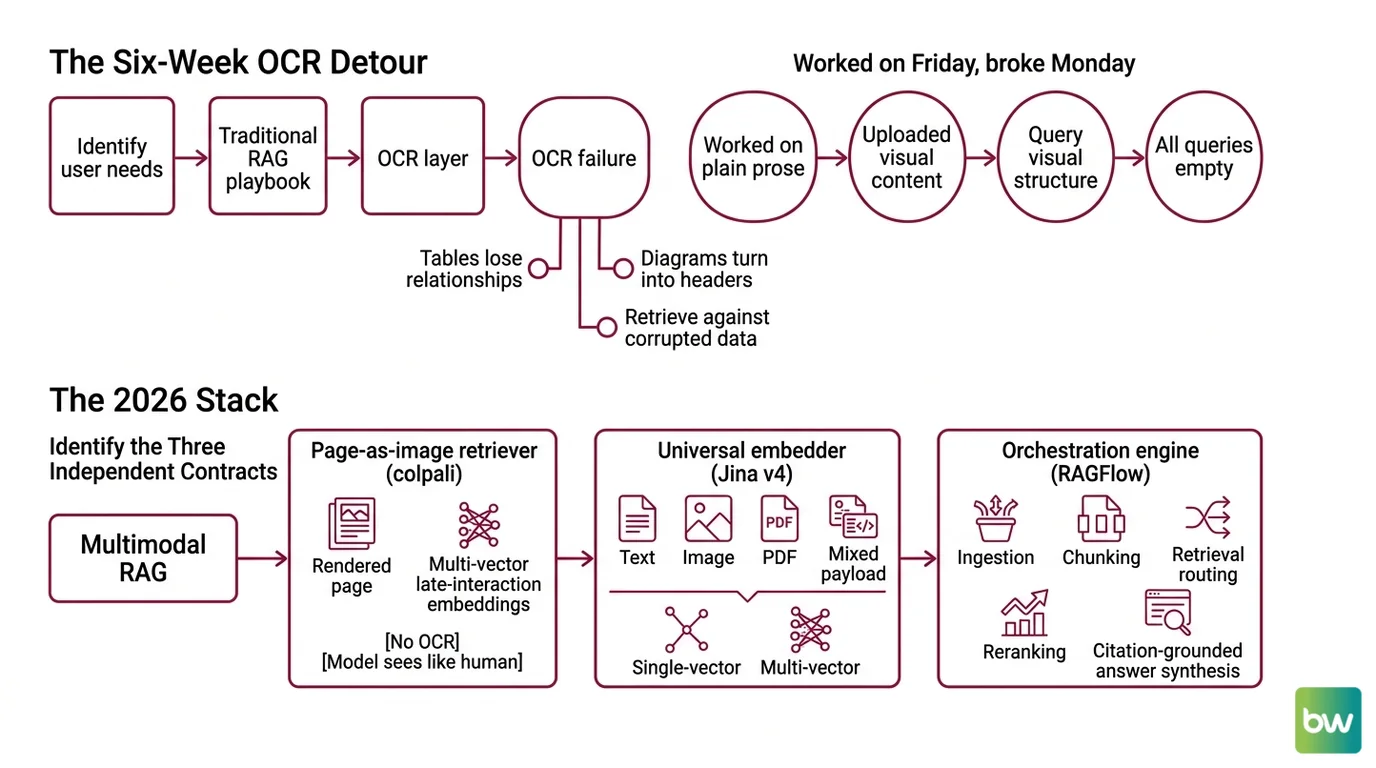
A team I reviewed last month spent six weeks tuning their OCR layer. Tables were getting mangled. Charts were stripped to captions. Screenshots returned blank chunks. They had built a beautiful text pipeline for documents that were not text. The fix was not better OCR. The fix was throwing the OCR layer away and treating each page as what it actually is — an image with structure the model can read directly.
That’s the shift this guide walks you through. By the end, you’ll have a spec for a Multimodal RAG stack you can hand to Claude Code or Cursor and get a working prototype.
Before You Start
You’ll need:
- An AI coding tool (Claude Code, Cursor, or Codex) with file access
- Working understanding of Document Parsing And Extraction and why it fails on visual content
- A corpus you actually want to search — slide decks, financial reports, technical PDFs with diagrams
- Docker ≥24.0.0 and Compose ≥v2.26.1 on the host that will run RAGFlow (RAGFlow GitHub)
This guide teaches you: how to decompose a multimodal RAG system into three independent contracts — page-as-image retrieval, universal embeddings, and orchestration — so the AI can build each piece without crossing wires.
The Six-Week OCR Detour Nobody Needs
Here’s the failure pattern I see most often. A developer reads “RAG” and reaches for the same playbook that worked on text: parse the PDF, extract strings, chunk, embed, retrieve. It works fine on a 10-K filing of plain prose. It collapses the moment a chart, a scanned form, or a slide deck enters the corpus.
The OCR layer becomes a lossy translator. Tables lose their column relationships. Diagrams turn into “[Figure 1]” with no semantic content. Screenshots of dashboards return as headers and metadata. The retriever then searches against a corrupted projection of what the user actually wanted to find.
It worked on Friday. On Monday, someone uploaded a quarterly slide deck with embedded charts, and every query against those slides came back empty — because the OCR layer had silently dropped the visual structure your prompt was asking about.
That’s the cost of not specifying which content stays as image and which becomes text. The 2026 stack lets you stop choosing.
Step 1: Identify the Three Independent Contracts
Multimodal RAG is not one model. It’s three contracts wired together, and the AI tool will conflate them unless you draw the boundaries first.
Your system has these parts:
- Page-as-image retriever ( Colpali family) — takes a rendered page (PNG/JPEG of a PDF page) and returns multi-vector late-interaction embeddings. No OCR, no layout pipeline. The model sees the page the way a human does.
- Universal embedder (Jina v4) — takes text, an image, a PDF, or a mixed payload and returns either single-vector (dense) or multi-vector (late-interaction, 128-dim per token) embeddings on the same Qwen2.5-VL-3B backbone (Jina v4 model page). You use this for everything that isn’t page-as-image.
- Orchestration engine (RAGFlow) — handles ingestion, chunking, retrieval routing, reranking, and citation-grounded answer synthesis through its DeepDoc parser (RAGFlow GitHub).
The mistake to avoid: treating these as interchangeable. ColPali-family models are tuned for visual document retrieval — they are not your universal embedding store. Jina v4 covers the universal case. RAGFlow is the orchestrator, not a retrieval algorithm.
The Architect’s Rule: If you can’t draw the data flow on a napkin in three boxes with two arrows, the AI will pick its own architecture — and it will be the wrong one.
Step 2: Lock Down the Embedding Contract
This is where most multimodal RAG specs leak. The AI tool needs to know exactly which model handles which input type, what the output dimensions are, and how the index is structured. Skip any of these and you get a prototype that “works” until production load exposes the mismatch.
Context checklist:
- Model versions, named exactly. ColPali variant naming is messy — ColPali, ColQwen2, ColQwen2.5, ColQwen3, ColQwen3.5, ColSmol. When you spec a benchmark or capability, name the exact variant (e.g.,
ColQwen2.5-3b-multi-v1.0), not just “ColPali.” - Embedding dimensions. Jina v4 produces 2,048-dim single-vector outputs (Matryoshka, truncatable to 128–512) and 128-dim per token in multi-vector mode (Jina v4 model page). Your vector store schema must match the mode you pick.
- Context window. Jina v4 accepts 32,768 tokens (Jina v4 model page). If your chunks exceed that, you have a chunking bug, not a model bug.
- Image input limits. Jina v4 handles up to 768×28×28 (~20 MP) per image (Jina v4 model page). High-DPI scans need downscaling spec.
- Task adapter. Jina v4 ships three LoRA adapters — retrieval, text-matching, and code, at ~60 M params each (Jina v4 model page). Pick the retrieval adapter for RAG and document it; the AI will not infer this.
- Storage budget. Multi-vector retrievers explode index size. The Tomoro team reported a 13× storage reduction with ColQwen3 at 320-dim embeddings versus traditional ColPali (Tomoro.ai) — name your dimension before the AI picks the default.
The Spec Test: If your context file does not state “use Jina v4 retrieval LoRA in single-vector mode at 512 dims for general text” and “use ColQwen2.5-3b-multi-v1.0 for page-as-image queries,” the AI will pick whatever it saw in its training data — usually a 2024-era stack with text-only embeddings.
Step 3: Wire RAGFlow Around the Retrievers
Build order matters more here than in a text-only stack, because RAGFlow does not ship Jina v4 or ColPali as default embedding models. Both must be wired through its configurable embedding-model panel (RAGFlow GitHub). If you build orchestration first and retrievers second, you’ll spend a day debugging why every query returns nothing.
Build order:
- Stand up the page-as-image retriever first. Use the illuin-tech/colpali repo for training/inference of ColPali, ColQwen2/2.5/3.5, and ColSmol variants (illuin-tech GitHub). Verify it can index a 10-page PDF and return ranked page hits before you touch anything else.
- Wire Jina v4 as the universal embedder. It handles text, images, PDFs, and mixed payloads across 29 languages on a 3.8 B-parameter backbone (Jina v4 model page). For pricing, point your spec reader at https://jina.ai/embeddings/ — vendor pricing changes more often than your spec file does.
- Stand up RAGFlow last. Pin v0.25.1+ — it added lazy loading and chunked parsing for PDFs over 50 pages, which is the default failure mode for any real document corpus (RAGFlow release notes). v0.25.0 also shipped seven prebuilt ingestion templates and sandbox code execution for the agent layer.
- Connect the retrievers as RAGFlow’s embedding backends, not as parallel services. RAGFlow’s DeepDoc parser handles document-layout analysis, OCR, and table-structure recognition — let it do its job for plain text, and route page-as-image queries to ColPali through the embedding configuration.
For each component, your context must specify:
- What it receives — text chunks, page images, or hybrid payloads
- What it returns — vector dimensions, multi-vector vs single-vector, similarity score format
- What it must NOT do — ColPali should not be asked to embed raw text; Jina v4 should not be asked to do page-level late interaction unless you’ve explicitly chosen multi-vector mode
- How to handle failure — retry policy, fallback model, what happens when Jina v4 returns a 429
Security & compatibility notes:
- RAGFlow versions below 0.25.0 lack the prebuilt ingestion templates. Pin v0.25.1+ for the >50-page PDF lazy-load fix (RAGFlow release notes).
- ColPali v1.x (PaliGemma-3B backbone) is superseded on the ViDoRe V2/V3 leaderboard by ColQwen2.5/3/3.5 — for greenfield builds, start on the newer variants (illuin-tech GitHub).
- jina-embeddings-v3 with
late_chunkingis the older multimodal path; v4 is the recommended starting point in 2026 (Jina v4 model page).- Hardware floor — RAGFlow needs ≥4 CPU cores, ≥16 GB RAM, and ≥50 GB storage to run reliably (RAGFlow GitHub).
Step 4: Validate Visual Retrieval Quality
This is where teams declare victory too early. They pull the first three queries, see plausible results, and ship. Multimodal RAG fails differently from text RAG — the failures are often invisible until a user asks about a chart.
Validation checklist:
- Cross-modal recall — pick a chart, a table, and a diagram from your corpus. Issue a natural-language query that names what’s in the visual. Failure looks like: the page is in your index but doesn’t appear in the top 5 results. That means the page-as-image embedding never ran, or ran with the wrong adapter.
- Citation grounding — every answer should cite the specific page and the snippet. Failure looks like: confident answers with no source page, or citations that point to text near the visual instead of the visual itself.
- Leaderboard sanity check — your scores should be in the same ballpark as the ViDoRe V2 leaderboard for the variant you picked. Point your validation script at the live Hugging Face leaderboard (ViDoRe HF) rather than hard-coding a number from a paper. As of mid-2026, ColQwen2.5-3b-multi-v1.0 reported 0.599 nDCG@5 on ViDoRe V2 (ViDoRe V2 paper) — your harness should land near this on similar data.
- Reported vs. independent benchmarks — Jina v4 reports 84.11 single-vector / 90.17 multi-vector on ViDoRe and 55.97 on MTEB-en (Jina v4 paper). These are vendor-published, not independent. Treat them as a starting expectation, not a guarantee.
- Latency and storage — if your multi-vector index is approaching disk limits, switch to ColQwen3 with 320-dim embeddings before you scale horizontally. The 13× storage reduction over traditional ColPali (Tomoro.ai) is the cheapest optimization in this stack.
Common Pitfalls
| What You Did | Why AI Failed | The Fix |
|---|---|---|
| One-shot “build me a multimodal RAG” | AI defaults to text-only RAG with OCR pre-processing | Decompose into the three contracts in Step 1 first |
| No embedding-model versions specified | RAGFlow uses its built-in defaults, ignores ColPali entirely | Spec exact variant + dimension in the context file |
| Treated ColPali as a universal embedder | Late interaction is expensive — text queries blow up storage and latency | Use ColPali family only for page-as-image; route text through Jina v4 |
| Skipped Metadata Filtering on retrieval | Cross-corpus contamination — finance pages match HR queries | Spec a metadata schema before ingestion, not after |
| Pinned RAGFlow < v0.25 | PDFs over 50 pages crash the parser | Pin v0.25.1+ in your Compose file |
Pro Tip
Treat the three contracts as separate prompts to the AI tool, in three separate sessions. Have it scaffold the page-as-image retriever first with no knowledge of the orchestrator. Then scaffold the embedder. Then orchestration. The AI is much better at building isolated components than at juggling three contracts in one prompt — and Knowledge Graphs For RAG layered on top later goes far smoother when each retrieval contract is already its own clean module.
Frequently Asked Questions
Q: How do you build a multimodal RAG pipeline step by step in 2026?
A: Map three contracts (page-as-image retriever, universal embedder, orchestrator), spec each in isolation, build retrievers before orchestration, then wire RAGFlow on top. The non-obvious step is naming the exact ColPali variant — “ColPali” is now a family, not a model. Use ColQwen2.5-3b-multi-v1.0 or newer; the older PaliGemma-3B backbone has been superseded on ViDoRe V2/V3.
Q: How do you use multimodal RAG for enterprise PDF and screenshot search? A: Render each page to an image, embed via the ColPali-family retriever, and store metadata (source, page, ACL tag) for filtering. Skip OCR on visual-heavy pages. Watch out for high-DPI scans — Jina v4 caps at ~20 MP per image, so downscale before ingestion or your embedder will reject the payload silently.
Q: How do you use multimodal RAG for chart, table, and diagram question answering? A: Route these queries through the page-as-image retriever, not the text embedder, and require citation grounding to the exact page. Do not pre-extract chart text — late interaction over the rendered page beats OCR’d table strings. The trap: if your orchestrator falls back to text retrieval when image retrieval returns no results, you’ll never notice the visual layer is broken.
Your Spec Artifact
By the end of this guide, you should have:
- A three-box architecture diagram with explicit input/output contracts for the page-as-image retriever, the universal embedder, and the orchestrator
- A constraint list naming exact model versions (ColQwen variant + version, Jina v4 mode + dimension + LoRA adapter, RAGFlow ≥v0.25.1) plus image and chunk size limits
- A validation harness with cross-modal recall tests, citation-grounding checks, and a live ViDoRe leaderboard reference for sanity comparison
Your Implementation Prompt
Paste this into Claude Code or Cursor at the root of an empty repo. Fill the bracketed placeholders with your stack values before you run it. The prompt mirrors the four steps above — if you skip a placeholder, the AI tool will guess, and the guess will be wrong in the way Step 2 warned about.
Build a multimodal RAG prototype with three independent components.
Do not start coding until the spec section is complete.

CONTRACT 1 — PAGE-AS-IMAGE RETRIEVER
- Model: [exact ColPali variant, e.g. ColQwen2.5-3b-multi-v1.0]
- Input: rendered page images (PNG, max [your DPI]×[your DPI])
- Output: multi-vector late-interaction embeddings, 128-dim per token
- Index: [your vector store, e.g. Qdrant collection "pages-multivec"]
- Use ONLY for page-level visual queries. Never embed raw text here.

CONTRACT 2 — UNIVERSAL EMBEDDER (Jina v4)
- Mode: [single-vector | multi-vector]
- Dimension: [128 / 256 / 512] (Matryoshka truncated) or 2,048 (full single-vector)
- LoRA adapter: retrieval
- Max image input: 20 MP — downscale before ingestion
- Max context: 32,768 tokens per chunk
- Index: [your vector store, separate collection from Contract 1]

CONTRACT 3 — ORCHESTRATION (RAGFlow ≥ v0.25.1)
- Docker ≥24.0.0, Compose ≥v2.26.1, ≥4 CPU cores, ≥16 GB RAM, ≥50 GB storage
- Wire Contract 1 + Contract 2 through the configurable embedding-model panel
- Use DeepDoc parser for plain text; route image-heavy pages to Contract 1
- Metadata filtering schema: [source, page_number, [your ACL field]]
- Citation grounding: REQUIRED on every answer — page + snippet

BUILD ORDER
1. Contract 1 first. Index a [N]-page sample PDF and verify visual queries return ranked pages.
2. Contract 2 second. Embed the same corpus with Jina v4 and verify text queries return ranked chunks.
3. Contract 3 last. Wire both retrievers through RAGFlow and verify metadata filtering works.

VALIDATION
- Cross-modal recall: pick [N] charts/tables/diagrams. Each must appear in top-5 for a natural-language query.
- Citation grounding: every answer must cite source + page.
- Leaderboard sanity: compare nDCG@5 on a held-out set against the live ViDoRe leaderboard for the chosen variant.
- Storage: log index size after Contract 1 — switch to 320-dim variant if it exceeds [your budget].

Stop and ask before writing any code that does not map to one of the three contracts.
Ship It
You now have mental model multimodal RAG actually requires — three independent contracts, not one monolithic pipeline. The next time someone asks you to “add image search to our RAG,” you can decompose the problem in five minutes and spec the right model for each contract instead of bolting OCR onto a text stack and hoping.
AI-assisted content, human-reviewed. Images AI-generated. Editorial Standards · Our Editors