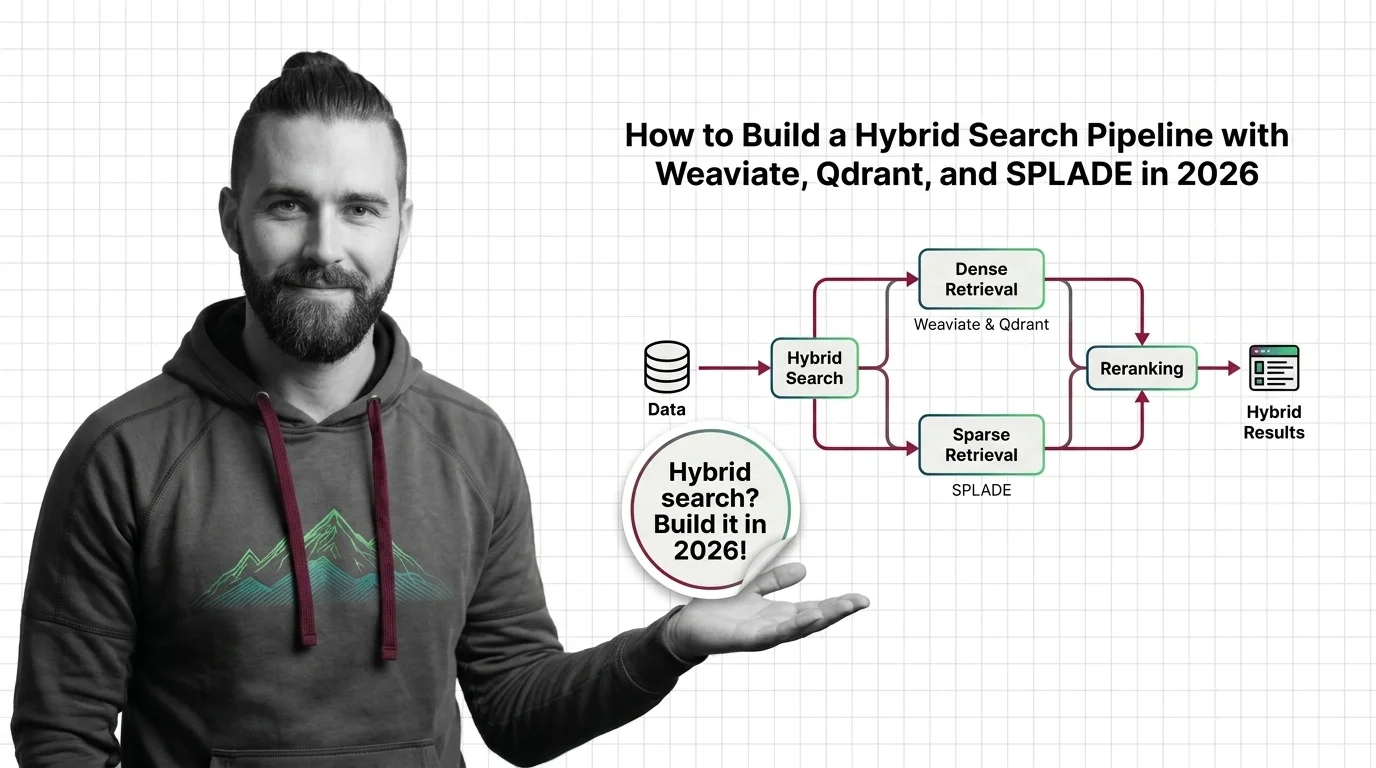
How to Build a Hybrid Search Pipeline with Weaviate, Qdrant, and SPLADE in 2026
TL;DR
- A Hybrid Search pipeline has three specification surfaces — sparse retrieval, dense retrieval, and fusion — each needs its own contract before code gets written
- Use hybrid when exact terms matter (legal statute numbers, drug codes, function names); dense-only is fine when paraphrase tolerance dominates the workload
- Spec the fusion algorithm and the
kparameter explicitly — the default changed in Weaviate v1.24, and copy-pasted tutorials produce different score distributions
You asked your AI tool to build a search layer on top of Retrieval Augmented Generation. It generated a vector store, an embedding pipeline, and a query function. Two weeks in, your legal team flagged that searches for case numbers like “Roe v. Wade” returned everything except the right document. The architecture was fine. The embeddings were fine. Your spec never said “exact match still needs to win” — and the dense retriever interpreted the query as a topic, not a citation.
Before You Start
You’ll need:
- An AI coding tool — Claude Code, Cursor, or Codex
- A vector database — Weaviate or Qdrant are the two with native hybrid support
- Working knowledge of dense embeddings (BGE, OpenAI text-embedding-3, Cohere embed-v3, or similar)
- A clear picture of your retrieval workload — what queries succeed, what queries fail today
This guide teaches you: how to decompose a hybrid search pipeline into three specification surfaces so your AI tool generates a retrieval layer that beats either lane on its own.
The Dense-Only Trap That Cost You a Quarter
Dense retrieval is the default story everyone tells. Embed your documents, embed the query, find the nearest neighbors. It works beautifully — until your users start typing things the embedding model was never trained to recognize.
Statute numbers. Drug codes. SKU identifiers. Function names. CVE IDs. Every domain has a vocabulary that does not paraphrase, and the embedding model treats them as noise.
It worked in your demo. On Monday, a paralegal searched for “USC §1983” and your dense retriever returned articles about civil rights theory. The exact statute number was nowhere in the top 20.
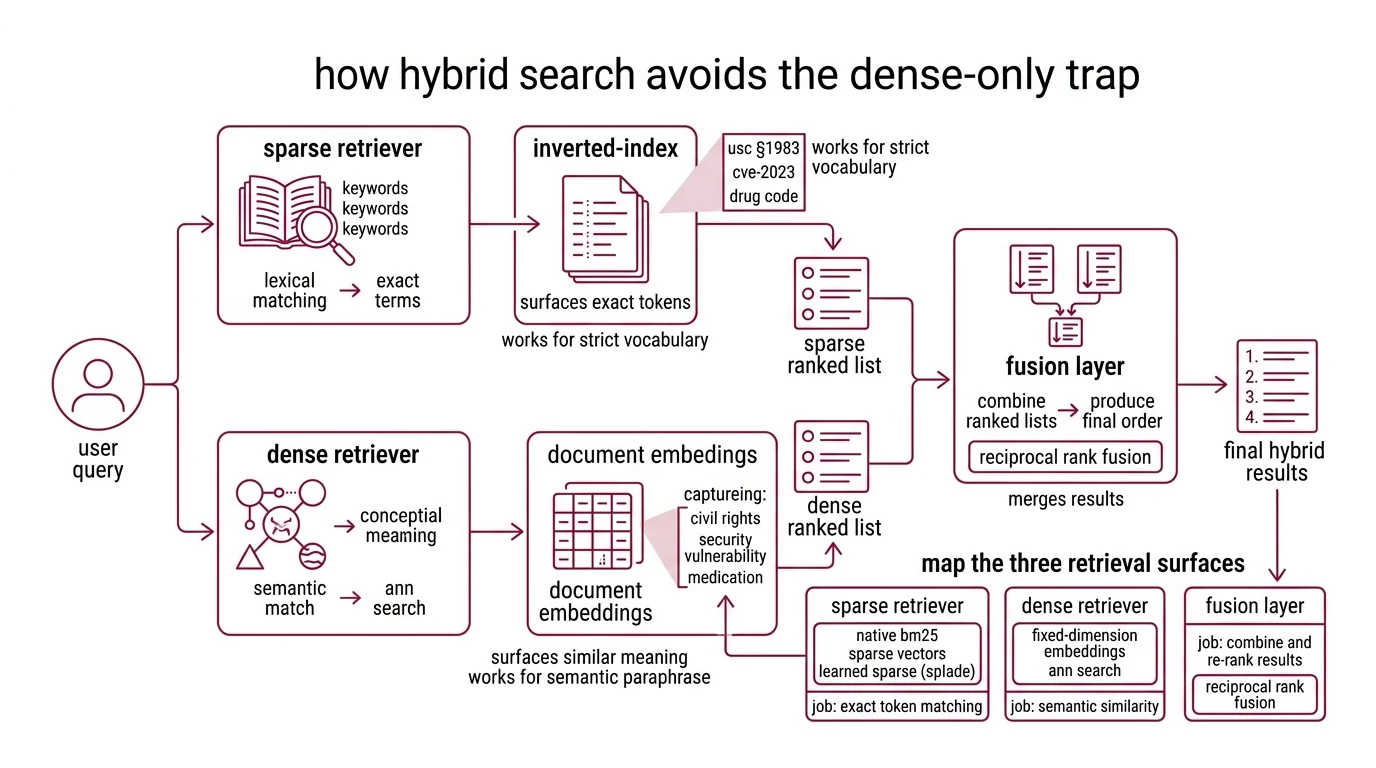
The fix is not bigger embeddings. It is a retriever that runs both lanes — sparse for exact terms, dense for semantic match — and fuses the results. According to the Weaviate Docs, hybrid search runs BM25F and dense vector retrieval in parallel, then merges them via reciprocal rank fusion. That is the whole architecture. The hard part is the spec.
Step 1: Map the Three Retrieval Surfaces
Hybrid search is not one retriever. It is three systems pretending to be one.
Your system has these parts:
- Sparse retriever — runs lexical matching against an Inverted Index. Native BM25 in Weaviate, native sparse vectors in Qdrant, or learned sparse via SPLADE-v3. Job: surface documents that contain the exact tokens. Stops working the moment vocabulary diverges.
- Dense retriever — runs ANN search over fixed-dimension embeddings. Job: surface documents that mean the same thing as the query, even with different words. Stops working the moment exact strings matter.
- Fusion layer — combines two ranked lists into one. Job: produce a final ordering that is better than either input list alone. The merge algorithm is where most pipelines silently regress.
The Architect’s Rule: If your specification doesn’t name all three surfaces and the fusion math, your AI tool will pick defaults that look reasonable in development and break under production traffic.
The retrieval direction matters too. Older tutorials show two separate API calls plus client-side merging. Per the Qdrant Blog, the query_points() endpoint with prefetch stages and FusionQuery shipped in v1.10 (July 2024) and is now the canonical pattern — single round trip, server-side fusion. Pre-1.10 recipes will not run on current SDKs without changes.
Step 2: Lock Down the Fusion Contract
What your AI coding tool needs to know before it writes a query function:
Context checklist:
- Sparse retrieval method — native BM25, sparse vectors, or SPLADE-v3 — and its tokenizer
- Dense embedding model and its dimension (BGE-large = 1024, text-embedding-3-large = 3072, Cohere embed-v3 = 1024)
- Distance metric for the dense lane (cosine, dot product, or L2) — must match what the embedding model was trained for
- Fusion algorithm — Reciprocal Rank Fusion (RRF) or score-normalized fusion — explicitly named, not assumed
- The RRF
kconstant if you choose RRF (default 60 in most implementations, per the Elastic Reference) - Top-k per lane before fusion (often 50-100 from each, then fuse to top 10-20)
- Filtering rules (tenancy, permissions, freshness windows) — applied per lane or after fusion
- Tokenization edge cases — case folding, punctuation, hyphenation, language
The Spec Test: Weaviate switched its default fusion algorithm from
rankedFusiontorelativeScoreFusionstarting in v1.24 (Weaviate Blog). If your context says “use Weaviate hybrid search” without naming the fusion algorithm, the AI tool will copy whichever one was popular in its training data — and your relevance scores will silently drift.
The math itself is small. RRF computes score(d) = Σ 1 / (k + rank_i(d)) summed across rankers, with k typically 60 (Elastic Reference). That single line dictates how aggressively you penalize lower ranks. Lower k makes the top of each list dominate; higher k flattens contributions. Pick a value. Document the choice. Stop tuning by vibe.
Step 3: Build in Recall-First Order
Components do not get built simultaneously. The build order matters because each lane validates against the previous one — and the fusion layer cannot be tuned until both lanes are honest.
Build order:
- Sparse retriever first — because it has zero training cost and gives you a recall floor. If BM25 cannot find a document by its exact tokens, no embedding will rescue it. Establish the lexical baseline before anything else.
- Dense retriever second — because it depends on the sparse lane for evaluation. Run the same query set through both. Measure which queries each lane wins. Document the gap.
- Fusion layer third — because it has nothing to fuse until both lanes exist. Start with RRF at
k=60, the field default. Measure. Adjust only if the data tells you to. - Reranker last (optional) — a cross-encoder over the fused top 50 can recover precision when the fusion ordering is good but not great. Spec it as a separate stage. Do not bake it into the fusion call.
For each lane, your context must specify:
- What it receives (raw query string, tokenized terms, dense embedding vector)
- What it returns (document IDs with scores or ranks)
- What it must NOT do (sparse must not silently drop rare terms, dense must not normalize away exact matches via aggressive paraphrase)
- How to handle empty results (return empty list, do not fall back to the other lane silently)
For learned sparse, the canonical option is naver/splade-v3 published March 2024 (arXiv:2403.06789). The model emits a 30,522-dimensional sparse vector per document — query side runs through the same encoder, document side has a faster splade-v3-doc variant that skips query inference (Hugging Face). If your stack already supports sparse vectors, SPLADE-v3 slots in next to BM25. If it doesn’t, BM25 covers the same role with no model dependency.
Step 4: Prove the Hybrid Beats Each Lane Solo
Hybrid search is not automatically better. It is better when both lanes are tuned and the fusion is honest. You need to prove it on your data, not on a vendor benchmark.
Validation checklist:
- Query-by-query comparison — run the same evaluation set through sparse-only, dense-only, and hybrid. Record top-10 recall per query. Failure looks like: hybrid recall identical to dense recall (sparse lane is dead), or hybrid recall worse than either lane (fusion is broken).
- Domain term coverage — pull a list of exact-match terms from your domain (statute numbers, drug codes, function names). Verify hybrid surfaces them in top 10. Failure looks like: rare-term queries miss while paraphrase queries hit — your sparse lane is filtered out by the fusion math.
- Score distribution sanity — for
relativeScoreFusion, fused scores should land in [0, 1]. For RRF, scores depend onkand rank list length. If your fused scores look identical to one lane’s scores, fusion is not happening. - Production recall sample — log 1% of production queries with their fused vs. lane-only top-10. Review weekly. Failure looks like: a category of queries (long-form, multi-hop, code) where one lane consistently wins alone — that is a routing signal, not a fusion problem.
The vendor-cited recall@10 numbers (hybrid 91% vs dense-only 78% vs BM25-only 65%, per the Weaviate Blog) are illustrative, not universal. Microsoft’s production-index test reported a hybrid average relevance of 48.4 vs 40.6 keyword-only and 43.8 vector-only (Microsoft Learn). The shape is consistent across vendors — hybrid wins — but the magnitude depends on your dataset, your embedding model, and what you measure.
Hybrid Search for Legal, Medical, and Code Retrieval
Three workloads earn hybrid search by themselves. According to the Redis Blog, hybrid retrieval consistently outperforms dense-only on legal, medical, regulatory, code, and technical-doc retrieval — the domains where exact terminology and rare identifiers carry the meaning.
For legal, your spec must preserve statute and case citations as exact-match priority. Tokenize with hyphens and section symbols intact. Index document numbers as keyword fields, not free text. Bias the sparse lane on citation tokens.
For medical, drug names, ICD-10 codes, and procedure identifiers all carry domain meaning that embeddings smooth away. Spec a synonym dictionary for the sparse lane (brand vs. generic names) and a separate lane for code lookups.
For code retrieval, function names, variable names, and error message strings dominate user intent. Configure the tokenizer to split on camelCase and snake_case. SPLADE-v3 handles code tokens reasonably; native BM25 over a code-aware tokenizer often does better.
The pattern across all three: name your domain’s exact-match vocabulary, give the sparse lane a tokenizer that preserves it, and let fusion handle the rest. Hybrid search shines in pipelines feeding Agentic RAG workflows where queries arrive with mixed intent — some semantic, some citation-exact — and the orchestrator cannot predict which lane will win.
Security & compatibility notes:
- Weaviate Path Traversal (CVE-2025-67818 / CVE-2025-67819): Critical vulnerabilities in self-hosted Weaviate before v1.33.4 (November 2025). Fix: Upgrade to v1.33.4 or later (Weaviate Security).
- Weaviate fusion default:
relativeScoreFusionis default from v1.24 onward. Tutorials based on v1.23 still showrankedFusionand produce different score distributions (Weaviate Blog).- Qdrant Query API: Pre-v1.10 hybrid recipes used multiple separate calls; superseded by
query_points()+prefetch+FusionQuery. Older blog posts will not run on current SDKs (Qdrant Blog).- SPLADE family: SPLADE v1/v2 are still on Hugging Face but superseded by SPLADE-v3 (March 2024). Start new pipelines with
naver/splade-v3or the fastersplade-v3-distilbertvariant (Hugging Face).
Common Pitfalls
| What You Did | Why AI Failed | The Fix |
|---|---|---|
| “Add hybrid search” (one-shot) | AI merged sparse and dense with library defaults, no fusion spec | Decompose into sparse, dense, fusion — spec each lane separately |
| No fusion algorithm named | AI used whichever default the SDK ships, often differs from your tutorial | Name relativeScoreFusion or rankedFusion (Weaviate), RRF or DBSF (Qdrant) |
Same top_k for both lanes and final result | Fusion sees only 10 candidates per lane, loses recall | Pull 50-100 per lane, fuse to top 10-20 |
| Tokenizer left at default for code or legal corpora | Sparse lane drops the tokens that matter most | Configure tokenizer for camelCase, hyphens, section symbols before indexing |
Pro Tip
Hybrid search is a routing problem in disguise. Two lanes producing two ranked lists, and a merge function deciding who wins per document. The merge function is where every production team eventually loses the plot — they tune embeddings for months and never look at the fusion math. Spec the fusion contract first. Spec the lanes against it. The retriever you ship in week one will outperform the one you tuned for a quarter without naming the merge.
Frequently Asked Questions
Q: How do you build a hybrid search pipeline step by step in 2026?
A: Decompose into three surfaces — sparse retrieval (BM25 or SPLADE-v3), dense retrieval (embeddings + ANN), and a fusion layer (RRF or relativeScoreFusion). Spec each surface’s contract before generating code. With Qdrant, use the query_points() endpoint with prefetch stages and a FusionQuery block — single round trip, server-side fusion. With Weaviate, use the hybrid() query method and pin the fusionType parameter explicitly so the v1.24 default change does not bite you on upgrade.
Q: When should you choose hybrid search over dense-only retrieval for enterprise RAG? A: Choose hybrid the moment your queries contain identifiers that do not paraphrase — case numbers, drug codes, function names, SKUs, error strings. Dense-only is fine for FAQ-style content, customer support paraphrase matching, and conversational retrieval. The decision rule: if your top failed queries log shows exact-term misses, you need the sparse lane. If your top failed queries show paraphrase misses, your dense lane needs better embeddings, not a second lane.
Q: How to use hybrid search for legal, medical, and code retrieval workloads?
A: All three workloads share the pattern: exact-match vocabulary plus paraphrase-tolerant context. For each, configure the tokenizer to preserve domain identifiers (hyphens, section symbols, camelCase, dot notation), index those identifiers as keyword fields alongside the full text, and bias the sparse lane on identifier hits. The non-obvious tip: for code retrieval, SPLADE-v3’s splade-v3-doc variant skips query-side inference, which keeps query latency low for IDE-integrated tools where every keystroke triggers a search.
Your Spec Artifact
By the end of this guide, you should have:
- A three-surface decomposition map — sparse retriever, dense retriever, fusion layer, each with defined inputs, outputs, and constraints
- A fusion contract — algorithm name,
kvalue (if RRF), top-k per lane, filtering placement, tokenizer configuration - A validation protocol — query-by-query lane comparison, domain term coverage check, score distribution sanity tests, production sample review
Your Implementation Prompt
Use this prompt in Claude Code, Cursor, or Codex when starting a new hybrid search pipeline. Fill in the bracketed placeholders with values from your fusion contract.
Build a hybrid search pipeline with these specifications:

VECTOR DATABASE:
- Engine: [Weaviate v1.33.4+ / Qdrant v1.16+]
- Deployment: [self-hosted / managed cloud]
- Tenancy: [single-tenant / multi-tenant with collection-per-tenant]

SPARSE RETRIEVER:
- Method: [native BM25 / SPLADE-v3 / sparse vectors]
- Tokenizer: [standard / code-aware / legal-aware with section symbols preserved]
- Top-k per query: [e.g., 50]
- Filters applied: [permissions / freshness / tenancy]

DENSE RETRIEVER:
- Embedding model: [BGE-large / text-embedding-3-large / Cohere embed-v3]
- Dimension: [e.g., 1024]
- Distance metric: [cosine / dot product]
- Top-k per query: [e.g., 50]

FUSION LAYER:
- Algorithm: [relativeScoreFusion / rankedFusion / RRF / DBSF]
- RRF k constant (if RRF): [e.g., 60]
- Final top-k after fusion: [e.g., 10]

VALIDATION:
- Eval set: [path to query-document pairs]
- Per-lane recall@10: log sparse-only, dense-only, hybrid
- Domain term coverage: list of exact-match terms that must appear in top 10
- Score distribution: log fused score min/max/mean per query
- Empty result behavior: return empty list, do not fall back silently

API SHAPE:
- Single-call hybrid (Qdrant query_points + prefetch / Weaviate hybrid())
- Server-side fusion only — no client-side merging
- Return document IDs, fused scores, and per-lane rank for debugging
Ship It
You now have a decomposition framework for any hybrid search project — from a Weaviate-backed legal RAG to a Qdrant-backed code search to a SPLADE-v3 retriever for medical literature. Three surfaces, one fusion contract, one validation protocol. Spec the fusion math. Let the AI tool wire the lanes.
AI-assisted content, human-reviewed. Images AI-generated. Editorial Standards · Our Editors