How to Build a Graph Neural Network with PyTorch Geometric and DGL in 2026
TL;DR
- Your graph’s topology IS the specification — if your AI tool doesn’t know the edge structure, it will flatten your data into a table
- PyTorch Geometric 2.7.0 is the production default; DGL remains viable for molecular workloads but NVIDIA’s momentum has shifted
- Oversmoothing at depth is the failure mode most developers hit last and debug longest — constrain your layer count in the spec
You asked your AI tool to build a node classifier. It generated a model that loads your graph, defines two layers, trains for 200 epochs — and produces identical predictions for every node. The loss looked fine. The accuracy looked fine. The model learned nothing about your graph’s structure because the specification never told it what the edges mean.
Before You Start
You’ll need:
- An AI coding tool (Claude Code, Cursor, or Codex)
- A working understanding of Graph Neural Network fundamentals — nodes, edges, features
- PyTorch 2.5+ installed (2.8 for latest compatibility)
- A graph dataset or a clear picture of the graph you’re building
This guide teaches you: how to decompose a GNN project into specifiable components so your AI tool generates architecturally correct graph models — not flat-data approximations.
When Every Node Gets the Same Answer
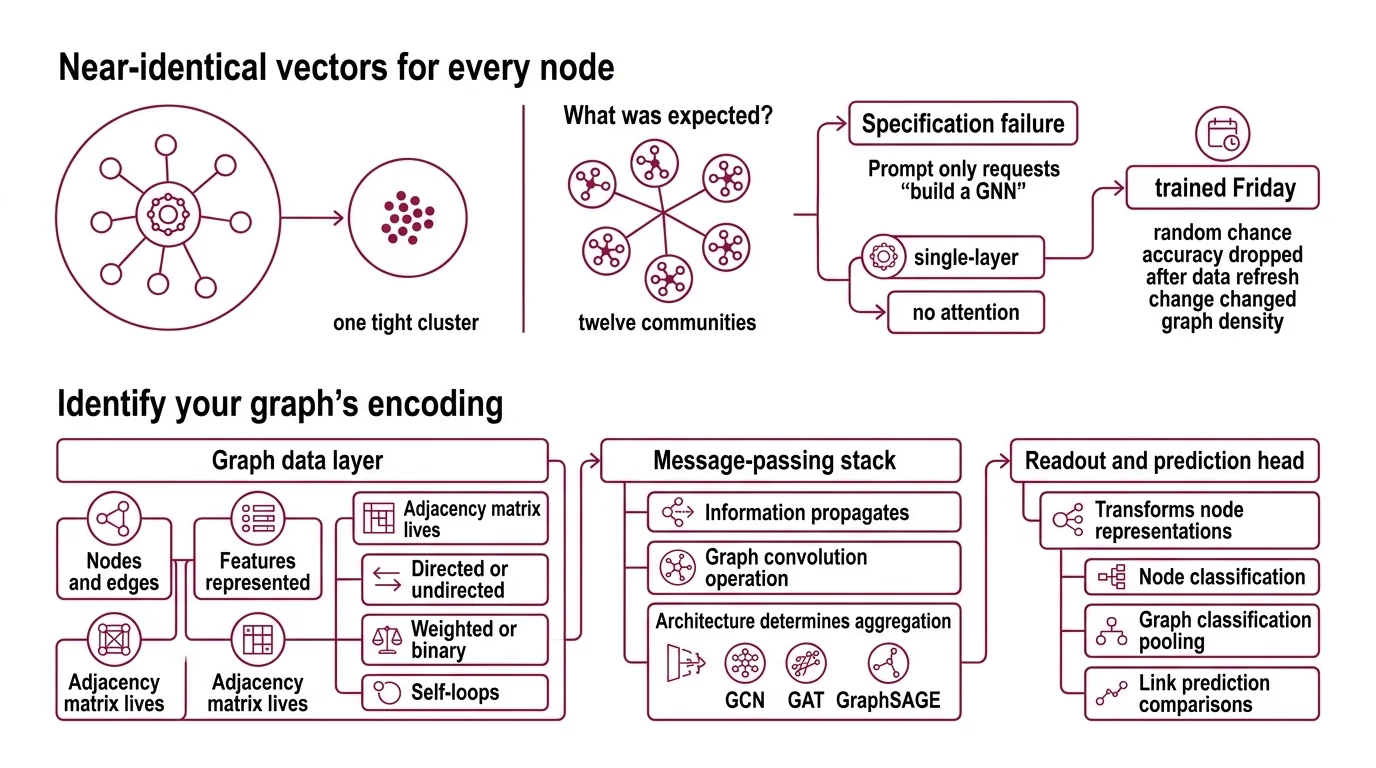
Two days. That’s how long a team spent debugging a Node Embedding pipeline that produced near-identical vectors for every node in a social graph. The model trained. The loss decreased. Everything looked correct — until they visualized the embeddings and saw one tight cluster where there should have been twelve communities.
The root cause: their prompt said “build a GNN for node classification.” It didn’t specify the edge semantics, the feature dimensions, or the expected neighborhood size. The AI defaulted to a single-layer architecture with no attention mechanism. For a graph with twelve distinct communities, that’s a specification failure — not a model failure.
It trained on Friday. On Monday, they added new edges from a data refresh and the accuracy dropped to random chance — because the unspecified assumption about graph density changed overnight.
Step 1: Identify What Your Graph Actually Encodes
A Message Passing neural network has a different data contract than a feedforward network. Your AI tool doesn’t know your graph topology unless you specify it. Decompose first, then tell the tool what each piece does.
Your GNN system has these parts:
- Graph data layer — how nodes, edges, and features are represented. This is where the Adjacency Matrix lives. Directed or undirected. Weighted or binary. Self-loops or not. Every choice changes the math downstream.
- Message-passing stack — how information propagates between connected nodes. A Graph Convolution operation aggregates neighbor features into each node’s representation. The architecture — GCN, GAT, GraphSAGE — determines how that aggregation works.
- Readout and prediction head — transforms the learned node representations into task-specific outputs. Node classification uses the embedding directly. Graph classification needs a pooling step. Link prediction compares pairs.
- Training harness — loss function, optimizer, evaluation splits. For graphs, the split strategy matters: random node splits leak structural information that transductive splits preserve.
The Architect’s Rule: If you can’t name each component’s input shape, output shape, and failure mode in one sentence, the AI tool can’t build it correctly either.
Step 2: Specify the Graph Data Contract
This is where most GNN builds go wrong. The AI tool needs to know your graph before it can process it. Unspecified attributes become silent defaults — and those defaults will break your task.
Context checklist:
- Framework: Pytorch Geometric 2.7.0 or Deep Graph Library — pick one and pin the version
- Python version: 3.10+ required for PyG 2.7 (Python 3.9 support was dropped, per PyG Docs)
- Installation path: pip only for PyG — conda packages were removed for PyTorch >2.5 (PyG Docs)
- Graph type: homogeneous vs. heterogeneous, directed vs. undirected
- Node feature dimensions: continuous features, categorical one-hots, or pre-computed embeddings
- Edge features: present or absent, dimensionality if present
- Task type: node classification, graph classification, link prediction, or molecular property prediction
- Dataset: built-in benchmark (Cora, PPI, OGB) or custom data with specified loader format
- Layer architecture: GCN for smooth feature propagation, Graph Attention Network for heterogeneous importance, or Graphsage for inductive learning on unseen nodes
- Depth constraint: 2-3 layers maximum — deeper stacks cause oversmoothing, where all node representations converge to the same vector (arXiv Survey)
The Spec Test: If your context doesn’t specify whether edges are directed, the AI tool will default to undirected — which doubles the message-passing budget and can halt training on large graphs. One boolean saves you hours.
Step 3: Sequence the GNN Build
Order matters. A GNN pipeline has strict data dependencies between components, and building out of order means your AI tool generates code against the wrong interface.
Build order:
- Data loading first — because everything downstream depends on the graph’s shape. Specify the
Dataobject (PyG) orDGLGraphstructure. Node features go in, edge index goes in, labels go in. Get this right and the rest has a contract to code against. - Model architecture second — because the layer configuration depends on input feature dimensions and the task head depends on the number of classes. Specify the layer type, hidden dimensions, activation functions, and dropout. For Spectral Graph Theory-based approaches like GCN, specify normalization. For attention-based models, specify the number of heads.
- Training loop last — because it depends on model outputs and data splits. Specify the loss function (cross-entropy for classification, MSE for regression), optimizer (Adam with learning rate), and evaluation metric. For node classification, specify the train/val/test mask.
For each component, your context must specify:
- What it receives (tensor shapes, graph attributes)
- What it returns (embedding dimensions, prediction logits)
- What it must NOT do (no in-place operations on shared graph data)
- How to handle failure (NaN detection in message passing, gradient clipping for deep stacks)
Step 4: Catch What the Loss Function Hides
A decreasing loss curve doesn’t mean your GNN learned the graph structure. It may have memorized the training labels without propagating a single message along a single edge. Validate graph computation, not just the loss.
Validation checklist:
- Embedding diversity — failure looks like: all node embeddings within cosine distance 0.01. This is oversmoothing — reduce layers or add skip connections
- Neighborhood sensitivity — failure looks like: removing edges doesn’t change predictions. The model isn’t using the graph structure at all
- Class-specific accuracy — failure looks like: high accuracy overall but zero on minority classes. The model predicted the majority label for every node
- Inductive test — failure looks like: accuracy drops sharply on nodes with unseen neighborhoods. If you need inductive generalization, your spec should have specified GraphSAGE sampling, not full-batch GCN
Common Pitfalls
| What You Did | Why AI Failed | The Fix |
|---|---|---|
| One-shot “build me a GNN” | Too many unspecified graph attributes — AI guessed wrong on edge direction, feature dims, and task type | Decompose into data, model, training. Specify each. |
| No depth constraint | AI generated a deep GCN — oversmoothing killed performance | Add “max 2-3 layers” to your spec. Always. |
| Skipped edge specification | AI treated your graph as unweighted, undirected — wrong for your citation network | State edge type, direction, and weight explicitly |
| Used PyG syntax for DGL | AI mixed framework APIs after seeing both in training data | Pin exactly one framework in your context — never mention both |
| No evaluation mask | AI split nodes randomly, leaking community structure into training | Specify transductive train/val/test masks in the data contract |
Pro Tip
The spec artifact isn’t just for your AI tool. It’s your debugging contract. When the GNN fails — and it will — you check the specification against the runtime state at each component boundary. The answer is always in the gap between what you specified and what the AI assumed.
Frequently Asked Questions
Q: How to build a graph neural network with PyTorch Geometric step by step in 2026? A: Specify your graph’s data contract first — node features and edge index format, task type. Then define a 2-3 layer architecture with explicit hidden dimensions. Pin PyG 2.7.0 with Python 3.10+ and install via pip. Validate that node embeddings show structural diversity before trusting accuracy numbers.
Q: How to use graph neural networks for node classification? A: Specify transductive train/val/test masks on your node set — random splits leak structural signal. Use GCN for homogeneous graphs or GAT when neighbor importance varies. A two-layer GCN on Cora reaches roughly 80-82% accuracy with only 140 labeled nodes out of 2,708 (PyG Docs).
Q: How to use GNNs for molecular property prediction in drug discovery? A: Represent each molecule as a graph — atoms become nodes, bonds become edges. DGL-LifeSci provides seven pre-built models for molecular property prediction, combining DGL with RDKit for chemical featurization (ACS Omega). Specify whether the property is classification or regression in your data contract.
Q: When to choose PyTorch Geometric vs Deep Graph Library for a GNN project? A: PyG 2.7.0 is the default for new projects — NVIDIA recommends it as the preferred GNN backend and is actively migrating PhysicsNeMo away from DGL (NVIDIA Docs). DGL stays strong for molecular workloads through DGL-LifeSci. Note: DGL’s PyPI package (2.2.1) lags behind GitHub releases (2.4.0).
Your Spec Artifact
By the end of this guide, you should have:
- A graph data contract — node feature dimensions, edge index structure, direction, and weight semantics
- A layer specification — architecture type, depth, hidden dimensions, and oversmoothing constraint
- A validation checklist — embedding diversity, neighborhood sensitivity, class-specific accuracy, and inductive test criteria
Your Implementation Prompt
Copy this prompt into your AI coding tool. Replace every bracketed placeholder with the values from your spec artifact. The prompt mirrors Steps 1-4 so the AI tool builds against the same contract you defined.
Build a graph neural network for [TASK TYPE: node classification | graph classification | link prediction] using [FRAMEWORK: PyTorch Geometric 2.7.0 | DGL 2.4.0] with Python [VERSION: 3.10+].

DATA CONTRACT:
- Graph type: [DIRECTION: directed | undirected], [WEIGHT: weighted | unweighted]
- Node features: [FEATURE_DIM] continuous dimensions
- Edge features: [EDGE_FEATURES: none | dimension count]
- Dataset: [DATASET_NAME or custom loader specification]
- Splits: [SPLIT_STRATEGY: transductive masks | random | custom] with [TRAIN/VAL/TEST RATIO]

MODEL ARCHITECTURE:
- Layer type: [ARCHITECTURE: GCN | GAT | GraphSAGE]
- Depth: [NUM_LAYERS: 2-3] layers maximum — do not exceed 3 to avoid oversmoothing
- Hidden dimensions: [HIDDEN_DIM]
- Attention heads: [NUM_HEADS if GAT, otherwise omit]
- Activation: [ACTIVATION: ReLU | ELU]
- Dropout: [DROPOUT_RATE] between layers

TRAINING:
- Loss: [LOSS: CrossEntropyLoss | MSELoss | BCEWithLogitsLoss]
- Optimizer: Adam, lr=[LEARNING_RATE]
- Epochs: [MAX_EPOCHS] with early stopping on validation [METRIC]

VALIDATION — verify all four:
1. Embedding diversity: cosine distance between random node pairs > 0.1
2. Neighborhood sensitivity: removing edges changes predictions
3. Class-specific accuracy: no class below [MIN_CLASS_ACC]% accuracy
4. [If inductive]: test on nodes unseen during training
Ship It
You now have a decomposition framework for specifying GNN projects to AI tools. The graph data contract is the foundation — every architecture decision, every training choice, every validation check flows from that specification. Graphs aren’t tables. Specify them accordingly.
AI-assisted content, human-reviewed. Images AI-generated. Editorial Standards · Our Editors