How to Build a Document Parsing Pipeline with LlamaParse, Unstructured, and Docling in 2026
TL;DR
- Document parsing isn’t one job. It’s four — triage, layout, extraction, and structured handoff
- Pick parsers per document class, not per project. Route easy pages cheap and hard pages expensive
- Frontier VLMs replace dedicated parsers only when the variance bill stays smaller than the token bill
A team I reviewed last month had one parser doing everything. Every PDF — invoices, scanned contracts, slide decks, glossy product manuals — went through the same agentic mode. The bill was four figures a day. The retrieval quality on the easy documents was no better than what Fast mode would have produced for a fraction of the cost. They didn’t have a parser problem. They had a routing problem.
Before You Start
You’ll need:
- A document parser of your choice — LlamaParse, Unstructured, or Docling
- Understanding of Document Parsing And Extraction as a pipeline stage, not a one-shot call
- A representative sample of your real documents — not the three clean PDFs that work everywhere
This guide teaches you: how to decompose document parsing into routable layers so each tool earns its cost on the documents it actually handles well.
The Four-Figure Bill From One Bad Default
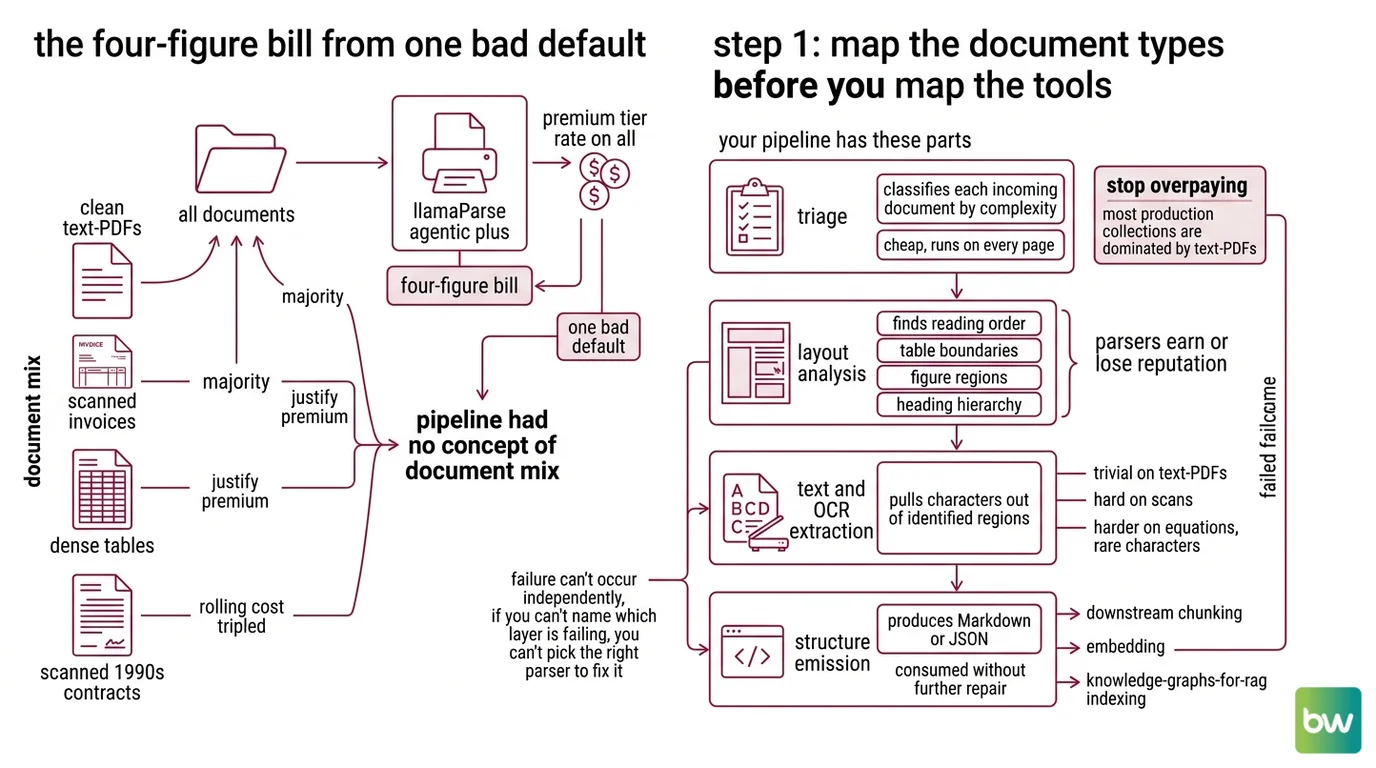
You point your ingestion job at LlamaParse Agentic Plus because the demo looked great. Three weeks in, a finance lead opens the dashboard. The vast majority of the documents are clean text-based PDFs that any cheap parser would handle. The rest are the scanned invoices and dense tables that justify the premium tier. You paid the premium tier rate on all of them.
It worked on Friday. On Monday, the legal team uploaded a batch of scanned 1990s contracts and the rolling cost forecast tripled. Nothing in the prompt or the code changed — only the document mix did, and the pipeline had no concept of “document mix” to begin with.
This is the failure mode the rest of the guide prevents. Parsing is a routing problem before it’s a tool problem.
Step 1: Map the Document Types Before You Map the Tools
A document parsing pipeline has four layers, and they fail independently. If you treat the whole stack as a single call to a single SDK, you won’t know which layer is wrong when the output is wrong.
Your pipeline has these parts:
- Triage — classifies each incoming document by complexity (text-PDF, scanned, table-heavy, slide deck, image-only). Cheap, runs on every page.
- Layout analysis — finds reading order, table boundaries, figure regions, heading hierarchy. This is where most parsers earn or lose their reputation.
- Text and OCR extraction — pulls characters out of identified regions. Trivial on text-PDFs, hard on scans, harder on equations and rare characters.
- Structure emission — produces Markdown or JSON that downstream chunking, embedding, and Knowledge Graphs For RAG indexing can consume without further repair.
The Architect’s Rule: If you can’t name which layer is failing, you can’t pick the right parser to fix it. “The parser is bad” is not a diagnosis.
The triage layer is where you stop overpaying. Most production document collections are dominated by text-PDFs that any Fast tier handles, with a smaller slice — scanned legal documents, financial tables, multilingual manuals — actually justifying premium parsing. Without triage, you pay premium rates on the easy majority to handle the hard minority.
Step 2: Lock the Contract Before You Pick a Tool
The vendor comparison comes after the spec, not before. Walk through this checklist with your team. The answers determine which parser wins on your workload — not somebody else’s blog post benchmark.
Context checklist:
- Document mix profiled — what percentage is text-PDF, scanned, DOCX, PPTX, image-only?
- Output format chosen — Markdown for RAG chunking, JSON for structured indexing, or both?
- Per-page budget defined — in cents per page, including reprocessing on failure
- Latency SLO set — batch overnight, or interactive sub-second per page?
- Data residency constraint stated — can documents leave your VPC?
- Self-host vs managed decision made — who owns GPU capacity if you go self-hosted?
- Failure mode for parser disagreement — when two layers produce different reading orders, which wins?
The Spec Test: if your context doesn’t specify the document mix, the AI will quote you the parser it saw last on Hacker News. The vendor’s headline accuracy number was measured on documents you don’t have.
This matters because the public benchmarks aren’t comparable. Docling reports around 97.9% on complex tables in the boringbot benchmark. Unstructured publishes a 0.844 overall table score on its own benchmark, which is a vendor-run evaluation rather than an independent comparison (Unstructured Blog). LlamaParse posts roughly 17 seconds on a small test set where Docling sat closer to 28 seconds (CodeCut benchmark). Three different methodologies, three different document sets — three numbers that do not stack into a ranking. They tell you each tool can do the job. They do not tell you which tool wins on yours.
Step 3: Wire the Parsers Where They Earn Their Keep
Once the spec is locked, slot the parsers in by where they’re cheapest for the work they’re doing. The build order matters because each layer depends on the previous one’s output contract.
Build order:
- Triage classifier first — a small model or rule set that tags each document with
text_pdf,scanned,table_heavy,slide_deck, orimage_only. No external API call yet. This is your routing key. - Cheap-path parser next — for
text_pdfandslide_deckroutes, send to a low-tier parser. LlamaParse Fast costs 1 credit per page, and 1,000 credits run $1.25 (LlamaIndex pricing page). Unstructured’s Serverless Fast Pipeline runs at $1 per 1,000 pages with a 1,000-page free tier per month (Unstructured pricing page). - Hard-path parser — for
scannedandtable_heavyroutes, route to a layout-aware mode. LlamaParse Agentic costs 10 credits per page; Agentic Plus costs 45 credits per page (LlamaIndex Blog). Unstructured’s Hi-Res Pipeline runs at $10 per 1,000 pages. - Self-hosted path — when documents can’t leave your VPC, route to Docling. Version 2.93.0 ships under MIT license with the Heron layout model released in December 2025 for faster PDF parsing without an accuracy hit (Docling Docs). Pair it with Granite-Docling-258M, IBM’s purpose-built vision-language model, which was released in September 2025 under Apache 2.0 (IBM Granite docs).
- VLM fallback last — for the documents that defeat layer 4, fall back to Gemini 3 Pro. Its 1M-token context window accepts text, images, audio, video, and PDFs natively, with PDFs billed as one image per page (Google Cloud Docs). Use this for the residual hard cases, not as the default.
For each component, your context must specify:
- What it receives — file bytes, MIME type, route tag
- What it returns — Markdown with stable heading levels, JSON tables, image references
- What it must NOT do — silently drop unparseable pages, swallow OCR errors, change reading order between calls
- How to handle failure — escalate to next route, log the document hash, never retry the same tier blindly
The reason “Docling for sensitive docs” earns its slot is governance, not just cost. The project is hosted by Linux Foundation AI & Data and was donated to the Agentic AI Foundation in early 2026 (IBM Research). MIT license, 59.2k GitHub stars, and a vendor-neutral home — that’s the spec line for “we can audit and self-host this for the next five years.”
Step 4: Validate the Output, Not the Vendor’s Pitch
The parser ran. The pipeline emitted Markdown. You’re done? No. You’re at the moment where you find out which of the four layers silently lost data.
Validation checklist:
- Table fidelity check — failure looks like: column headers merged into the first data row, footnotes inlined into cells, multi-row cells flattened
- Reading order check — failure looks like: page footer spliced into the middle of a paragraph, two-column layouts read as one column, sidebar callouts dumped into body text
- OCR accuracy check — failure looks like: em-dashes turned into hyphens, mathematical symbols dropped, ligatures split, rare diacritics replaced
- Heading hierarchy check — failure looks like: every heading collapsed to H2, section IDs unstable across runs, numbered lists dropping their numbers
- Cost-per-1k-pages check — failure looks like: unbudgeted Agentic Plus calls because the triage classifier mislabeled scans as text-PDF
- Latency check — failure looks like: a single 200-page PDF stalling the queue because no per-document timeout fires
Build a 50-document gold set with hand-graded expected output and run the full pipeline against it on every parser version bump. Your eyes get tired at document 12. Assertions don’t.
Common Pitfalls
| What You Did | Why AI Failed | The Fix |
|---|---|---|
| One parser, one tier, all documents | Easy 80% paid premium rate; hard 20% still failed | Add a triage classifier and route by document class |
| Skipped the OCR test on scans | Default mode passed text-PDFs; silently lost characters on scans | Profile your scanned subset separately and pick a Hi-Res or Agentic mode for it |
| Compared LlamaParse vs Docling on vendor benchmarks | Each vendor’s benchmark uses its own document set | Build a 50-document gold set from your own corpus and benchmark against that |
| No latency budget per document | A single 200-page PDF stalled the queue at 3 a.m. | Set a per-document timeout and an escalation route, not just a global timeout |
Used llama-parse PyPI package | Package is deprecated; functionality moved to llama-cloud-services | Migrate the install path before May 1, 2026 (see compatibility note below) |
| Pasted Gemini 2.5 thinking config into Gemini 3 Pro | thinking_budget was removed in the Gemini 3 family | Switch to thinking_level with low or high |
Pro Tip
Document parsing is a routing problem disguised as a tool problem. The minute you accept that, your spec stops asking “which parser is best?” and starts asking “what does each route contribute to total cost and total accuracy?” That second question has an answer. The first one doesn’t.
Cost figures in this guide are indicative as of May 2026 — verify current rates on each provider’s pricing page before locking budget in your spec.
Security & compatibility notes:
llama-parsePyPI package deprecated: Maintenance ends May 1, 2026. Migrate tollama-cloud-servicesfor all new and existing pipelines (PyPI).- LlamaParse v2 parsing modes API: Old “parsing instructions” were replaced by Fast / Cost Effective / Agentic / Agentic Plus tiers, plus split system and user prompt control (December 2025). Code copied from older blog posts will break (LlamaIndex Blog).
- Gemini 3 Pro thinking parameter:
thinking_budgetwas removed in the Gemini 3 family. Usethinking_levelset toloworhigh. Code copied from Gemini 2.5 examples will fail (Google Cloud Docs).
Frequently Asked Questions
Q: How to build a document parsing pipeline for RAG step by step in 2026? A: Map your document mix, lock the output contract, route documents through tiered parsers by complexity, then validate per layer against a hand-graded gold set. The detail most teams miss: build the triage classifier on a held-out 200-document sample first — pipeline cost forecasts are only as good as the routing accuracy on the very first stage.
Q: How to use LlamaParse and Unstructured to extract tables and complex layouts from PDFs? A: Send table-heavy documents to LlamaParse Agentic (10 credits per page) or Unstructured’s Hi-Res Pipeline ($10 per 1,000 pages); both use layout-aware models tuned for nested tables. Watch one specific edge case: rotated tables and tables that span page breaks. Always validate column count and header continuity across the page boundary before trusting the JSON output downstream.
Q: When should you use a frontier VLM like Gemini 3 Pro instead of a dedicated document parser? A: Use Gemini 3 Pro when your residual error rate after a dedicated parser is still too high and the document is small enough to fit cost-effectively in its 1M-token context. Watch the billing model: each PDF page is billed as one image input, and pricing jumps from $2.00 to $4.00 per 1M input tokens above the 200K-context threshold (Google Cloud pricing). On a 100-page PDF this is fine; on a 1,000-page batch you’ve left the cheap tier.
Your Spec Artifact
By the end of this guide, you should have:
- A document mix profile — percentages by class (text-PDF, scanned, table-heavy, slide deck, image-only) on a representative 200-document sample
- A routing contract — which document classes go to which parser tier, with per-page cost and SLO for each route
- A validation checklist — table fidelity, reading order, OCR accuracy, heading hierarchy, per-route cost, and latency, each with a concrete failure symptom
Your Implementation Prompt
Drop this into Claude Code or Cursor when you start the pipeline scaffolding. It encodes the four-layer decomposition above into a spec the AI can build against. Replace each bracketed placeholder with the value from your Step 2 checklist — every bracket maps to a specific spec decision, not a generic field.
You are scaffolding a document parsing pipeline. Follow this spec exactly.

LAYERS (build in order, do not collapse):
1. Triage classifier — input: file bytes + MIME type. Output: route_tag in
   {text_pdf, scanned, table_heavy, slide_deck, image_only}.
2. Layout + extraction parser — input: bytes + route_tag. Output: Markdown
   with stable heading levels and JSON for tables.
3. Structure emitter — input: parser output. Output: chunked Markdown ready
   for embedding.
4. Validator — input: emitter output + gold set. Output: pass/fail per check.

ROUTES (wire each route_tag to exactly one parser):
- text_pdf       → [LlamaParse Fast | Unstructured Fast Pipeline]
- slide_deck     → [LlamaParse Fast | Unstructured Fast Pipeline]
- scanned        → [LlamaParse Agentic | Unstructured Hi-Res | Docling+Granite]
- table_heavy    → [LlamaParse Agentic | Unstructured Hi-Res | Docling+Granite]
- image_only     → [Gemini 3 Pro VLM fallback]

CONSTRAINTS:
- Output format: [Markdown | JSON | both]
- Per-page budget cap: [X cents]
- Latency SLO per document: [X seconds]
- Data residency: [VPC-only | cloud-allowed]
- Per-document timeout: [X seconds] with escalation to [next route]

VALIDATION (run on every parser version bump, not just first deploy):
- Table fidelity vs gold set (column count, header row, footnote handling)
- Reading order vs gold set (no footers in body, no two-column splice)
- OCR accuracy vs gold set (em-dashes, math symbols, diacritics)
- Heading hierarchy vs gold set (H1/H2/H3 stable across runs)
- Cost per 1,000 pages by route (alert if Agentic Plus > [X]% of volume)

DO NOT:
- Send all documents through one tier
- Retry the same tier on failure — escalate to the next route instead
- Use `llama-parse` package — use `llama-cloud-services` (the old one is deprecated)
- Copy `thinking_budget` from Gemini 2.5 code — use `thinking_level` for Gemini 3
Ship It
You now have a four-layer mental model that decouples “which parser?” from “what is this document?” That second question has a routable answer, and routing is what turns a parser bill from a flat tax into a cost curve you can shape. The next time finance asks why the ingestion line item moved, you’ll have a per-route breakdown to point at — not a vendor name.
AI-assisted content, human-reviewed. Images AI-generated. Editorial Standards · Our Editors