How to Build a Code Execution Agent with E2B, Daytona, and Claude Agent SDK in 2026
TL;DR
- A code execution agent has two halves you must wire together — the planning brain (LLM) and the sandboxed runtime (E2B or Daytona). Conflating them is the most common failure.
- The Claude Agent SDK’s built-in
Bashtool runs in your process, not a sandbox. Use it for development. Never expose it to model-generated code in production. - Specify the sandbox contract — lifecycle, network rules, filesystem boundaries, timeout — before you write a single line. The agent only obeys what you wrote down.
Yesterday an agent I was debugging ran rm -rf node_modules in my home directory. The model didn’t malfunction. It did exactly what the spec allowed — execute shell commands locally, no sandbox, no scope. The fix wasn’t a smarter prompt. The fix was a spec that names where code is allowed to run, and where it isn’t.
That’s the gap this guide closes.
Before You Start
You’ll need:
- An Anthropic API key (production agents must run on API-key billing — more on that below)
- A sandbox provider account: E2B or Daytona (both have free tiers)
- Working knowledge of Code Execution Agents and Workflow Orchestration For AI
- A clear picture of what the agent will actually do — file ops, network calls, package installs, persistent state?
This guide teaches you: how to decompose a code execution agent into a brain layer, a tool layer, and a sandbox layer — then write the spec that keeps them honest.
The Agent That Wiped Its Own Dev Box
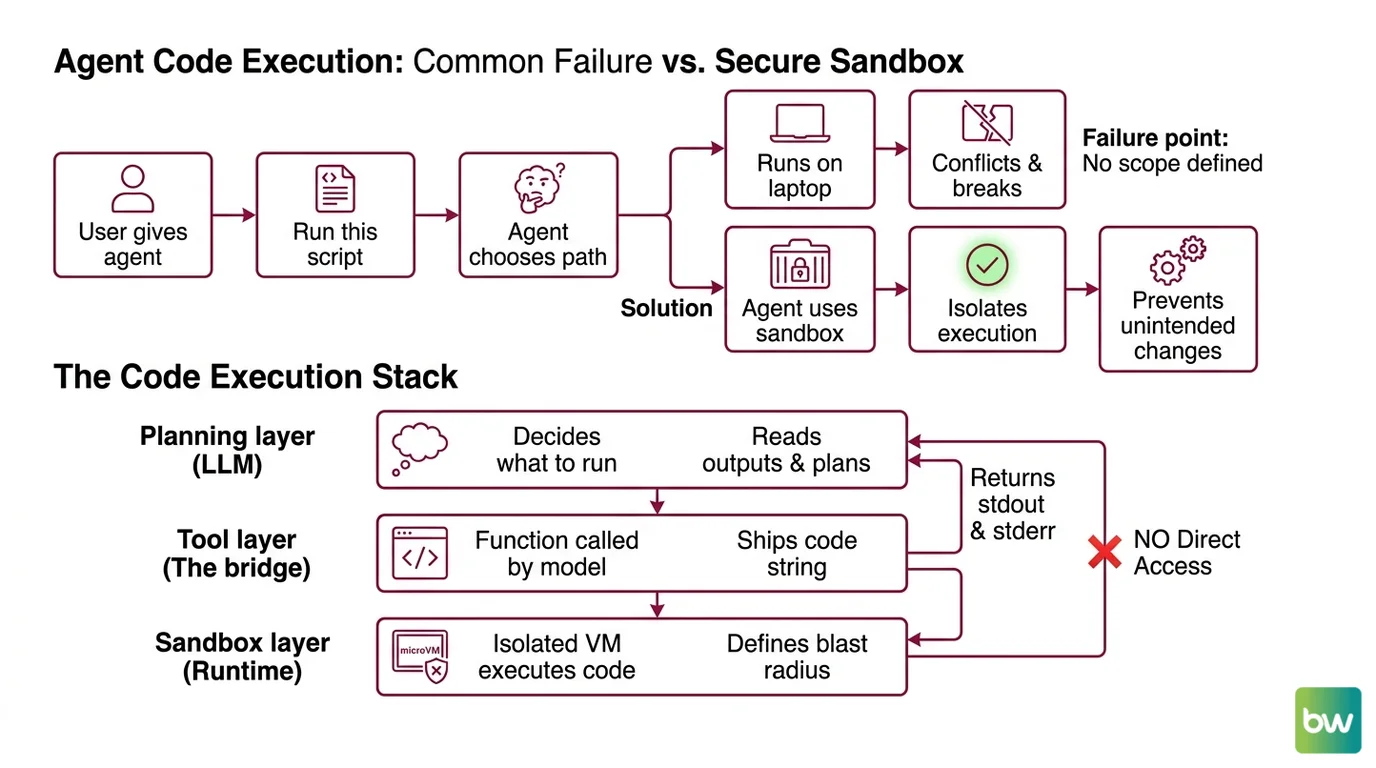
Most code execution agents fail in the same place. The developer asks the LLM to “run this script” and never specifies where “run” actually means. The model picks a path. Sometimes it picks your laptop.
You hand the agent a Bash tool. The model calls pip install --user pandas. Two days later your CI breaks because something in your local Python got bumped. That’s not a hallucination. That’s a spec gap. You never told the agent your local environment was off-limits.
The
Claude Agent SDK ships with Read, Write, Edit, and Bash tools that execute in the caller’s process and filesystem (Claude Agent SDK Docs). That’s by design for interactive development. For an agent that runs arbitrary model-generated code, it’s the wrong primitive. You need a sandbox.
Friday: agent works. Monday: agent installed a package, mutated your dev container, and the next test run is broken because nobody scoped the runtime.
Step 1: Decompose the Execution Stack
Before you pick libraries, decompose. A code execution agent is three layers stacked vertically, and each layer has a different job. Most failed agents collapse two of them into one.
Your system has these parts:
- Planning layer (the LLM) — decides what to run, reads outputs, plans the next step. This is the Claude Agent SDK’s
query()loop. It never touches files directly in your production design. - Tool layer (the bridge) — a function the model calls when it wants to execute code. It takes a code string, ships it to the sandbox, returns stdout, stderr, and an exit code. This is your code. You own it.
- Sandbox layer (the runtime) — an isolated VM or microVM where code actually executes. E2B or Daytona. The blast radius lives here, not in your process.
The planning layer should never have direct filesystem access in production. It only sees the sandbox through the tool layer. That separation is the entire reason this architecture works.
The Architect’s Rule: If your LLM can write a file that your laptop reads next, you don’t have a sandbox. You have a foot-gun with a confidence interval.
Step 2: Specify the Sandbox Contract
Now write the contract before you write code. Every sandbox provider exposes the same primitives — create, execute, persist, destroy. The differences are in pricing, startup latency, and what you can configure. The constraints you specify here decide which provider fits.
Context checklist:
- Lifecycle. Per-task ephemeral, or persistent session across turns? E2B Pro supports 24-hour sessions; the Hobby tier caps at 1 hour and up to 20 concurrent sandboxes (E2B’s pricing page). Daytona spins a fresh sandbox in under 90ms (Daytona Docs), which makes ephemeral-per-task practical.
- Concurrency cap. How many sandboxes run in parallel? E2B Pro starts at 100 concurrent sandboxes, purchasable up to 1,100 (E2B’s pricing page). Daytona uses pay-as-you-go with $200 free compute credits and no monthly base (Northflank).
- Network rules. Outbound calls allowed? Domain allowlist? The model will try to
curlsomething eventually — decide before it does. - Filesystem boundaries. Read-only mounts? Persistent volume per user? Or wiped on every call?
- Timeout. Default kill after N seconds. Models occasionally produce infinite loops. Decide the kill switch up front.
- Billing model. E2B runs at $0.000014/s per vCPU and $0.0000045/GiB/s for RAM (E2B’s pricing page). Daytona’s per-second pricing is not published in their docs — assume you’ll need to measure before you scale.
The Spec Test: If your contract doesn’t say what happens when the model writes a 4 GB file, then the answer is “whatever the sandbox defaults to” — and you won’t know until billing tells you.
Pick one provider. For a managed-cloud, fast-to-prototype path, E2B is the default — its @e2b/code-interpreter (v2.4.2 on npm) is purpose-built for AI-generated code (E2B’s GitHub repository). For self-hosting or sub-100ms startup, Daytona wins.
Step 3: Wire the SDK to the Sandbox
Build order matters. Here’s the sequence that compounds correctly.
Build order:
- Sandbox client first. Get
pip install e2b-code-interpreter(Python) ornpm i @e2b/code-interpreter(JS/TS) talking to your provider. Write a ten-line script — open a sandbox, runprint(1), close the sandbox. Verify billing flows through. Until this works, nothing else matters. - Custom tool wrapper next. Wrap the sandbox client in a function with a stable signature:
execute_code(code: str, language: str)returning{stdout, stderr, exit_code}. The tool layer is the only thing the LLM sees. Keep it boring. - Claude Agent SDK last. Install with
pip install claude-agent-sdkon Python 3.10+ (the Python package is at v0.1.81 as of May 11, 2026, per Anthropic’s GitHub repository) ornpm install @anthropic-ai/claude-agent-sdk. Register your custom tool, scopeallowed_toolsto exactly the tools you need, and run the agent via thequery()async iterator (Claude Agent SDK Docs).
For each layer, your context must specify:
- What it receives — code string, language, optional sandbox ID for session continuity
- What it returns — structured output the model can reason about (stdout, stderr, exit code, optional artifacts)
- What it must NOT do — touch host filesystem, hold open network sockets, expose secrets to logs
- How to handle failure — timeout, OOM, sandbox crash, provider rate limit. Each gets a distinct error path.
Skip the built-in Bash tool in production. The reason is concrete: the SDK’s built-in Bash executes in the caller’s process and filesystem, not in an isolated sandbox (Claude Agent SDK Docs). For development and inspection, fine. For arbitrary model-generated code, replace it with your sandbox-backed custom tool.
If you want Anthropic-hosted sandboxing without managing E2B or Daytona, the Claude API exposes code_execution_20260120 directly, which adds REPL state persistence and programmatic tool calling on Opus 4.5+ and Sonnet 4.5+ (Claude API Docs). Free when paired with the matching web search or web fetch tools; billed at standard code-execution rates otherwise. Trade-off: less control, less portability.
Step 4: Validate That Nothing Leaks
Validation isn’t “the agent finished without an exception.” It’s: did the sandbox actually contain everything it was supposed to?
Validation checklist:
- Filesystem isolation check — Run the agent, then inspect your host filesystem for changes. Failure looks like: new files in
/tmp, mutated~/.cache, anything outside the sandbox. - Network egress check — Capture outbound traffic from the host during a run. Failure looks like: requests originating from your laptop’s IP, not the sandbox VM.
- Process isolation check — Watch
ps auxmid-run. Failure looks like: a Python or Node process spawned by model code running under your user, not under the sandbox. - Timeout enforcement check — Feed the agent code that runs an infinite loop. Failure looks like: the run doesn’t terminate, your billing meter keeps ticking, you pay for hours.
- State persistence check — If you specified session persistence, verify variables survive between calls. Failure looks like: every call starts with a fresh REPL when you specified continuity.
If any check fails, you don’t have a code execution agent. You have an LLM with a shell.
Security & Compatibility Notes
Security & compatibility notes:
- Claude Agent SDK built-in
Bashtool: Executes in the caller’s process and filesystem, not a sandbox. Action: for production agents running model-generated code, replace with a custom sandbox-backed tool (E2B, Daytona, orcode_execution_20260120via the Claude API).- Claude model retirement (June 15, 2026):
claude-sonnet-4-20250514andclaude-opus-4-20250514retire on that date (GitHub Changelog). Action: targetclaude-sonnet-4-6,claude-opus-4-6, orclaude-opus-4-7inmodel=parameters.- Claude Agent SDK on subscription plans (June 15, 2026): Agent SDK usage on subscription plans starts drawing from a separate monthly Agent SDK credit pool (Claude Agent SDK Docs). Action: plan production agents on API-key billing, not interactive subscription limits.
- Claude Agent SDK TypeScript —
options.env(BREAKING): Now replacesprocess.envfor the CLI subprocess instead of overlaying it. Action: if your TS code relied on inherited env vars, pass them throughoptions.envexplicitly.- Claude Agent SDK Python (v0.1.x, pre-1.0): API surface subject to change. Action: use the documented
query()+ClaudeAgentOptionsentry points only; do not import internal types.
Common Pitfalls
| What You Did | Why AI Failed | The Fix |
|---|---|---|
Gave the model the built-in Bash tool in production | It ran code on your host — exactly what the tool does | Replace with a custom tool that calls E2B or Daytona |
| Spun a fresh sandbox per turn for a long task | Lost all REPL state between calls; model re-imports every time | Use session lifecycle (E2B Pro 24h or code_execution_20260120 REPL) |
| No timeout on sandbox execution | Infinite loops billed for hours before discovery | Set a per-call timeout; kill on exceeded |
Hardcoded claude-sonnet-4-20250514 in model= | Will return errors after June 15, 2026 | Target claude-sonnet-4-6, claude-opus-4-6, or 4-7 |
Mixed e2b and @e2b/code-interpreter imports | Two different SDKs, two different APIs | Use @e2b/code-interpreter for AI code execution |
Pro Tip
The sandbox is your security perimeter. Everything you specify upstream — model choice, tool list, prompt structure — only matters if the perimeter holds. Before tuning prompts, run the four isolation checks from Step 4 against a deliberately misbehaving prompt. If the perimeter fails on a test you wrote, it will fail on a model output you didn’t.
This applies past code execution. Specifications protect what the model can’t see. The model can’t see your filesystem. The model can’t see your billing dashboard. The spec is what stands in for the things the model is blind to.
Frequently Asked Questions
Q: How to build a code execution agent step by step in 2026?
A: Decompose into three layers — planning (LLM), tool wrapper (your code), sandbox (E2B or Daytona). Build the sandbox client first, wrap it in a stable tool signature, then bind it to the Claude Agent SDK via query(). The non-obvious step: don’t ship the SDK’s built-in Bash tool to production — it runs on your host, not in the sandbox.
Q: How to use E2B sandboxes for LLM code execution?
A: Install @e2b/code-interpreter (v2.4.2 on npm) or e2b-code-interpreter on PyPI, authenticate with your E2B API key, and call the sandbox runner from inside a custom tool the LLM invokes. Watch the lifecycle: the Hobby tier caps sessions at one hour and 20 concurrent sandboxes. If your agent needs longer sessions or higher concurrency, you’ll need Pro at $150/month base, per E2B’s pricing page.
Q: How to add a Python interpreter tool to an LLM agent?
A: Write a function with the signature execute_python(code: str) returning {stdout, stderr, exit_code} that runs the code in a sandbox — not in-process — then register it as a custom tool with the Claude Agent SDK using allowed_tools. The trap most people fall into is returning the entire sandbox object to the model. Return only the structured output. The model doesn’t need a handle, and exposing one invites it to try things you didn’t spec.
Your Spec Artifact
By the end of this guide, you should have:
- A three-layer architecture diagram — planning, tool, sandbox — labeled with which layer owns what
- A sandbox contract document — lifecycle, concurrency, network, filesystem, timeout, billing model, all decided before any code
- A validation checklist — five isolation checks (filesystem, network, process, timeout, state) that pass before you ship
Your Implementation Prompt
Drop this into Claude Code or Cursor when you’re ready to scaffold the agent. Fill the bracketed placeholders with the decisions you made in Steps 1-4.
Build a code execution agent with the following three-layer architecture.

LAYER 1 — Planning (Claude Agent SDK)
- Language: [Python 3.10+ OR TypeScript]
- Model: [claude-sonnet-4-6 OR claude-opus-4-6 OR claude-opus-4-7]
- Entry point: query() async iterator with ClaudeAgentOptions
- allowed_tools: [exact list — exclude the built-in Bash tool for production]

LAYER 2 — Tool wrapper (custom)
- Function: execute_code(code: str, language: str) returning {stdout, stderr, exit_code}
- Errors to handle: [timeout, OOM, sandbox crash, provider rate limit]
- MUST NOT: touch host filesystem, expose secrets to logs, return sandbox handles to the model

LAYER 3 — Sandbox runtime
- Provider: [E2B with @e2b/code-interpreter v2.4.2 OR Daytona OR code_execution_20260120]
- Lifecycle: [ephemeral per task OR persistent session of N seconds]
- Concurrency cap: [N parallel sandboxes]
- Network rules: [allowlist OR deny-all OR open]
- Filesystem: [ephemeral OR persistent volume scoped to user_id]
- Timeout: [N seconds per call]

VALIDATION — must pass before shipping:
1. Filesystem isolation: host filesystem unchanged after a run
2. Network egress: outbound traffic originates from sandbox, not host
3. Process isolation: no model-spawned processes under host user
4. Timeout enforcement: infinite-loop input terminates at the limit
5. State persistence: matches the lifecycle spec from LAYER 3

Generate the tool wrapper and the SDK initialization. Do not generate code that exposes the built-in Bash tool to the model.
Ship It
You now have a mental model where the agent is three layers, not one. The planning layer plans, the tool layer translates, the sandbox layer contains. Once you can name which layer a bug lives in, debugging stops being guesswork. That’s the framework — apply it the next time someone asks you to build “an agent that runs Python.”
AI-assisted content, human-reviewed. Images AI-generated. Editorial Standards · Our Editors