How to Build a Browser Agent with Anthropic Computer Use, OpenAI Operator, and Browser Use in 2026
TL;DR
- A browser agent is three layers: a decision model, an action surface, and a sandboxed environment. Pick each one independently.
- Anthropic Computer Use, OpenAI’s
computer-useAPI, andbrowser-useare not interchangeable. They differ in control, region, and what they delegate to the model. - The biggest production failures come from missing specs — not missing features. Lock the surface contract before you write a single tool call.
A demo agent clicks through a checkout in 90 seconds and ships to the executive deck. Three weeks later, the same agent silently agrees to a new cookie banner, scrolls past the price change, and books the wrong flight on a real card. Nothing crashed. Nothing logged. The spec just never said what “the right flight” looked like.
That gap — between a working demo and a production Browser and Computer Use Agents — is what this guide is about.
Before You Start
You’ll need:
- An AI coding tool (Cursor, Claude Code, or Codex) and an API key for at least one of: Anthropic, OpenAI, or a model
browser-usesupports. - A sandboxed environment for the agent to act in (a Docker container, a remote browser session, or a dedicated VM). Never point an early agent at your daily desktop.
- A clear picture of what success looks like — not “book a flight” but “open this domain, fill these four fields, and stop if the price exceeds X.”
- A working mental model of Workflow Orchestration For AI — the agent is a worker, not the orchestrator.
This guide teaches you: how to decompose a browser agent into three independent layers — decision, action, and environment — so you can swap any one of them without rewriting the others.
The Hidden Cost of “Just Let It Click Around”
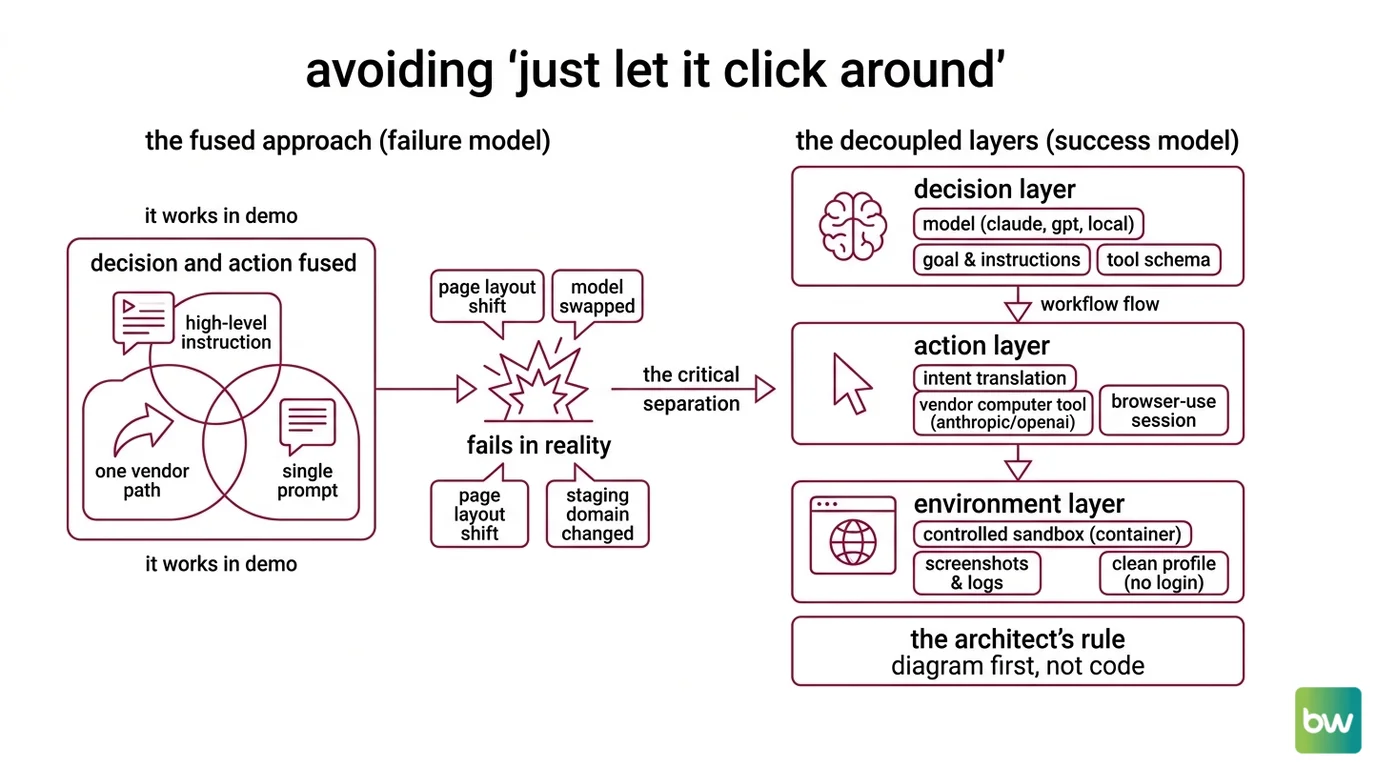
The default failure mode is the same every time. A team picks one vendor’s all-in-one path, treats the model and the action surface as a single product, and writes a single high-level instruction: “complete the user’s task.” It works in the demo. It fails the moment the page layout shifts, the model gets swapped for a cheaper variant, or the agent leaves the staging domain.
It worked on Friday. On Monday, the model upgrade silently changed how the agent interpreted “confirm” and started clicking through irreversible flows because the spec never said which confirm dialogs were safe.
That is one mistake — fusing decision and action — repeated in three different stacks. Once you separate them, every other choice in this guide gets easier.
Step 1: Map the Agent’s Three Layers
Before you pick a tool, decompose the system. A browser agent has three layers, and each one belongs in a different box.
Your system has these parts:
- Decision layer (the model). Reads goals, looks at a screenshot or DOM, and chooses the next action. This is where you swap between Claude, GPT, or a local model. Keep prompt, system instructions, and tool schema here.
- Action layer (the surface). Translates the model’s intent (“click the second result”) into something the browser actually executes — coordinates, keystrokes, JavaScript dispatches. This is Anthropic’s
computer_20251124tool, OpenAI’scomputer-usetool, orbrowser-use’sBrowserSession. - Environment layer (the sandbox). A real browser running in a controlled place — a container, a remote session, a profile with no logged-in accounts. This is also where screenshots, cookies, and network logs live.
The Architect’s Rule: If you cannot point at the file that owns each layer, the AI cannot either. The first artifact you write is a one-page diagram, not code.
The three vendor stacks line up against these layers differently. Anthropic ships a decision-and-action bundle (computer_20251124 is a tool, but only Claude models know how to use it natively) on Opus 4.7, Opus 4.6, Sonnet 4.6, and Opus 4.5 with the zoom action (Claude API Docs). OpenAI’s API exposes the same split — the computer-use tool on the Responses API runs on gpt-5.4 by default (OpenAI Developers). browser-use decouples them entirely: any LLM in the decision layer, a Playwright-based action layer, your choice of environment (Browser Use Docs).
That decoupling is the whole reason to read the rest of this guide.
Step 2: Lock Down the Surface Contract
The fastest way to ship a fragile agent is to skip this step. Most browser agents do not fail because the model is dumb — they fail because nobody wrote down what the action surface is allowed to touch.
Context checklist:
- Allowed actions. Click, type, scroll, screenshot, navigate, and nothing else. No file upload, no clipboard, no opening new tabs unless explicitly listed.
- Allowed origins. A literal list of domains and subdomains the agent may visit. Everything else is a hard refusal at the action layer, not a polite “please don’t” in the prompt.
- Credential boundary. Which sessions, cookies, or tokens are pre-loaded into the browser, and which ones the agent must never see. The model should not be the gatekeeper for credentials.
- Stopping conditions. A maximum step count, a maximum wall-clock time, and an explicit list of UI states that count as “done” or “stop and ask.”
- Cost ceiling. A token budget per run, enforced outside the model. Opus 4.7 in particular: the new tokenizer can consume noticeably more tokens than Opus 4.6 for identical text (Claude API Docs), so old budgets will under-estimate.
The Spec Test: If your context does not name the allowed-origins list, the agent will eventually click a third-party “Continue with…” link, hand a session token to a domain you have never heard of, and call it task completion. The model will sound confident about it.
This is also the right place for the irreversibility rule: any action that costs money, sends a message, or changes a record on a remote server requires a confirmation hook. Build that hook into the action layer, not the prompt. Prompts drift. Action layers do not.
Step 3: Wire the Runner in Safe Build Order
Order matters because every layer constrains the one above it. Build bottom-up.
Build order:
- Environment first. Stand up the sandboxed browser. No agent, no model — just a script that opens a page, takes a screenshot, and tears the session down cleanly. If this is flaky, nothing above it works.
- Action layer next. Wire the chosen surface —
computer_20251124, OpenAI’scomputer-usetool, orbrowser-use’sBrowserSession— into the environment. Run the action layer with hard-coded actions (a literal click coordinate, a literal URL) so you can confirm the surface contract from Step 2 is enforced before any model touches it. - Decision layer last. Plug in the model. Start with the cheapest model that can read screenshots — Sonnet 4.6 at $3 / $15 per MTok or Haiku 4.5 at $1 / $5 per MTok (Claude API Docs). Reserve Opus 4.7 ($5 / $25 per MTok) for the workflows where reasoning quality actually moves the success rate.
For each layer, your context must specify:
- What it receives (inputs — screenshot, DOM snapshot, prior action history).
- What it returns (outputs — a single next action, or a typed “done” / “ask human” signal).
- What it must not do (constraints — no recursion into itself, no calls outside the allowed-origin list).
- How to handle failure (error cases — timeout, blocked navigation, captcha, ambiguous DOM).
For browser-use specifically, the v0.12.0 release (February 2026) matters here: earlier versions pulled in litellm as a transitive dependency, and litellm 1.82.7 and 1.82.8 were backdoored in a supply-chain attack in March 2026 (browser-use GitHub releases). Pin v0.12.0 or higher and verify the lockfile before the first run, not after.
Step 4: Validate with Replay and Assertion Harnesses
A green smoke test is not validation. Your eyes get tired at run twelve. Assertions do not.
Validation checklist:
- Action-log replay — failure looks like: the same agent run produces a different action sequence on a stable page. That means the model is non-deterministic in a place where you needed it deterministic. Lower temperature, tighten the prompt, or pin a model version.
- Origin-violation assertion — failure looks like: any single network request in the run hits a domain outside the allowed list. Fail the run loudly. Do not let this be a warning.
- Stop-condition assertion — failure looks like: the agent ran to step N+1 when N was the cap, or finished without ever emitting a “done” signal. Either the spec is unclear or the model is ignoring it.
- Cost assertion — failure looks like: tokens-per-run exceeds the budget set in Step 2. Cap it at the orchestration layer, not inside the model call.
- Side-effect audit — failure looks like: any state change on a real service (an email sent, a payment authorized, a record written) that lacks a matching confirmation hook. Roll back, then patch the action layer.
For OpenAI’s CUA path, validation gets one extra step: the default model alias gpt-5.4 (OpenAI Developers) is a moving target. Treat the alias as a point-in-time pick, pin the exact model ID in production, and check developers.openai.com/api/docs/models before any release.
Security & compatibility notes:
litellmsupply-chain attack (March 2026):litellmversions 1.82.7 and 1.82.8 were backdoored. Pinbrowser-useto v0.12.0 or higher and verify the lockfile contains nolitellm1.82.7 or 1.82.8 (browser-use GitHub releases).- Anthropic Computer Use, high-stakes tasks: Anthropic explicitly warns against using Computer Use for authenticated banking, medical, or other high-stakes workflows (Claude API Docs). Keep humans in the loop for irreversible actions.
- OpenAI Operator, region: Operator is still a US-only research preview on the $200 / month ChatGPT Pro plan (OpenAI). Non-US teams should target the
computer-usetool on the Responses API — a separate API surface — instead.- Opus 4.7 token accounting: Opus 4.7 uses a new tokenizer that can consume up to ~35% more tokens for identical text vs. Opus 4.6 (Claude API Docs). Budgets inherited from older Claude models will undershoot.
browser-useAPI stability: The library is still pre-1.0 (v0.12.x). Pin the exact version in production and read release notes before upgrading (Browser Use GitHub).
Common Pitfalls
| What You Did | Why AI Failed | The Fix |
|---|---|---|
| One-shot “complete the user’s task” | Goal too broad, no stopping condition, model invents sub-goals | Decompose into named steps with explicit stop signals |
| No allowed-origin list | Agent follows any link, including auth redirects | Enforce origin whitelist at the action layer, not the prompt |
| Same model for demo and production | Demo ran on Opus, production silently uses Sonnet, behavior changes | Pin the exact model ID in production; re-validate on every upgrade |
Trusted Operator for non-US users | Operator is US-only research preview | Route non-US to computer-use on the Responses API |
Untracked transitive deps in browser-use | Backdoored litellm shipped through a stale lockfile | Pin browser-use >= 0.12.0; review dependency changes per release |
Pro Tip
The single most useful habit when working with any browser agent: write the irreversibility contract before you write the happy path. Listing every action that costs money, sends a message, or mutates a remote record — and gating each one behind an explicit confirmation hook — costs a morning. The version that learns this lesson in production costs a Friday night and a rollback.
This carries beyond browser agents. The same pattern applies to Code Execution Agents that run shell commands and to Retrieval Augmented Agents that write back to an index. Decision and action belong in separate boxes, and the action box owns the safety rules.
Frequently Asked Questions
Q: How to build a computer use agent step by step in 2026? A: Treat it as three independent layers (decision model, action surface, sandboxed environment), specify the surface contract before any model call, build bottom-up, and validate with assertions — not eyeballs. The one detail people skip: pin the exact model ID in production. A silent upgrade from Sonnet 4.6 to a newer alias will quietly change how your agent interprets ambiguous instructions.
Q: How to automate browser workflows with Browser Use and Playwright?
A: Use browser-use v0.12.0 or higher (Browser Use Docs) for the decision-and-action loop, and let it drive a Playwright environment underneath — Playwright 1.59.0 on Python 3.9–3.13 (Playwright PyPI). One watch-out: browser-use is pre-1.0, so pin the exact version, and re-check the lockfile for litellm after the March 2026 supply-chain incident.
Q: When should I choose Anthropic Computer Use vs OpenAI Operator for automation?
A: Computer Use is an API surface available globally; Operator is still a US-only consumer research preview on ChatGPT Pro (OpenAI). For programmatic automation outside the US, use the Claude API’s computer_20251124 tool or OpenAI’s computer-use tool on the Responses API. Reserve consumer Operator for hands-on US workflows where no code is involved.
Your Spec Artifact
By the end of this guide, you should have:
- A one-page three-layer diagram of your agent (decision, action, environment) with the chosen vendor for each layer.
- A surface contract listing allowed actions, allowed origins, credential boundaries, stopping conditions, and a cost ceiling.
- A validation harness with assertions for action-log replay, origin violations, stop conditions, cost, and side effects.
Your Implementation Prompt
Paste the prompt below into Claude Code, Cursor, or Codex after you have filled in every bracketed placeholder from your spec artifact. The structure mirrors Steps 1–4 of this guide, so a reader who skips the fill-in step is skipping the guide.
You are pairing with me to build a browser agent. Follow this spec exactly.

## Layer 1 — Decision
- Model: [exact model ID, e.g. claude-sonnet-4-6-20260217 or gpt-5.4-20260311]
- Inputs: screenshot + prior-action history
- Outputs: one typed next action OR a "done"/"ask-human" signal

## Layer 2 — Action surface
- Vendor: [anthropic-computer-use | openai-computer-use | browser-use]
- Allowed actions: [click, type, scroll, screenshot, navigate]
- Allowed origins: [https://example.com, https://app.example.com]
- Irreversible actions requiring confirmation hook: [send_message, submit_payment, ...]

## Layer 3 — Environment
- Sandbox: [docker | remote-browser-session | dedicated-vm]
- Credentials pre-loaded: [list of session cookies the agent may use]
- Credentials forbidden: [list of cookies/tokens the agent must never read]

## Build order
1. Stand up the environment with a no-op script that opens, screenshots, and tears down.
2. Wire the action surface; run with hard-coded actions to prove the origin whitelist holds.
3. Plug in the decision model; start with the cheapest capable model.

## Validation harness
- Assertion: every network request hits an allowed origin.
- Assertion: run terminates within [N] steps and [T] seconds.
- Assertion: tokens per run stay below [B].
- Assertion: every irreversible action has a confirmation hook.

Do not generate code that violates any item above. If a constraint is unclear,
ask before generating.
Ship It
You now have a vocabulary for browser agents that survives a vendor swap and a model upgrade. The three layers — decision, action, environment — are the only abstraction that holds when Operator changes its rollout, when Claude ships a new tokenizer, or when browser-use releases its 1.0. Build the contract first, the agent second.
AI-assisted content, human-reviewed. Images AI-generated. Editorial Standards · Our Editors