How to Benchmark LLMs with lm-evaluation-harness, HELM, and OpenCompass in 2026
Table of Contents
TL;DR
- Define your evaluation criteria before picking a harness — the tool comes after the spec
- lm-evaluation-harness, HELM, and OpenCompass solve different problems — match the harness to your question
- Benchmark scores without contamination checks and metric alignment are noise, not signal
You picked a model last quarter. The Evaluation Harness score looked strong — top-five on the leaderboard, solid reasoning numbers, clean accuracy. Three weeks into production, the model started hallucinating API schemas and formatting every response as a numbered list. The benchmark said one thing. Your users said another.
The benchmark wasn’t wrong. Your evaluation spec was missing.
Before You Start
You’ll need:
- A clear question about your model (not “is it good?” — something specific)
- Access to one of: lm-evaluation-harness, HELM, or OpenCompass
- Basic familiarity with Model Evaluation concepts and Precision, Recall, and F1 Score metrics
- Python 3.10+ (required by lm-evaluation-harness and HELM; OpenCompass requires 3.8+ per OpenCompass PyPI)
This guide teaches you: how to decompose your evaluation question into a specification the harness can answer — and how to read the results without fooling yourself.
The Leaderboard Score That Meant Nothing
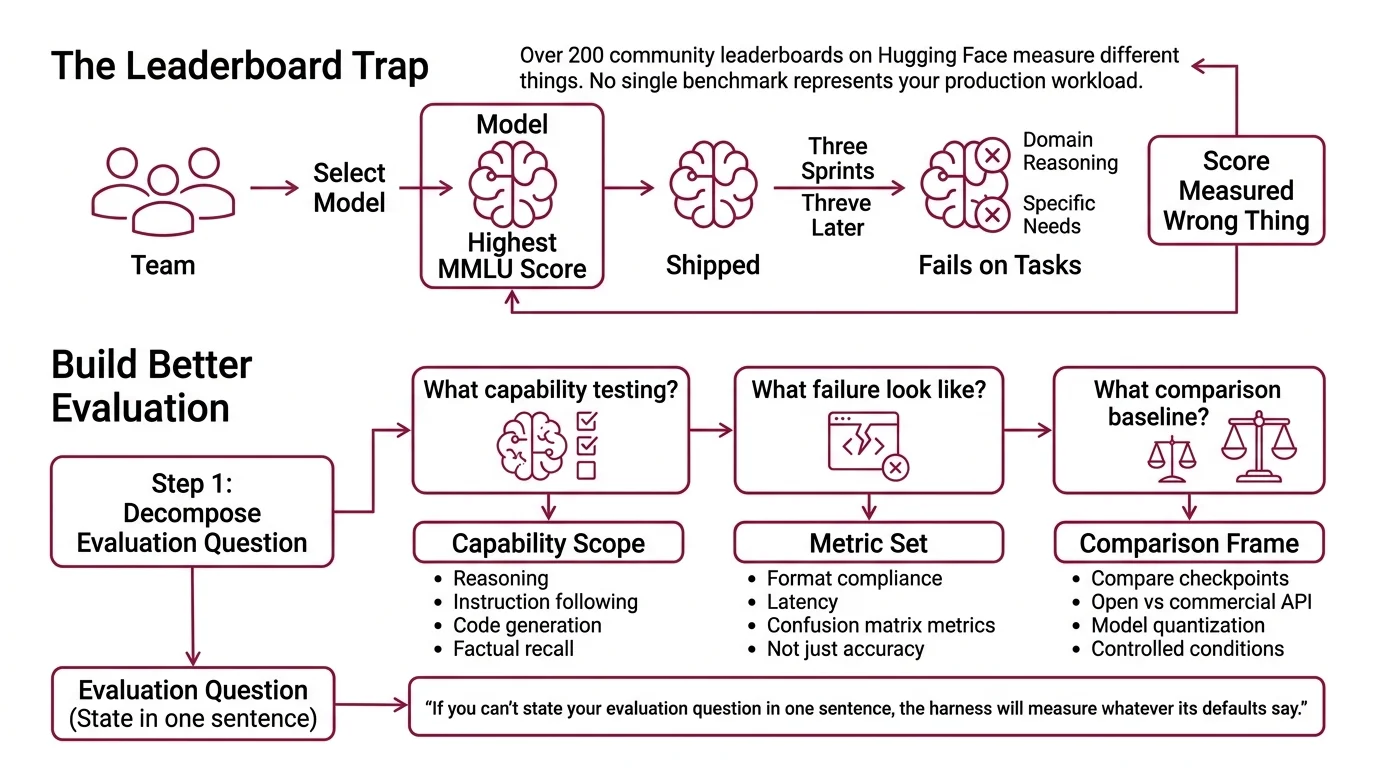
Here’s what happens every month. Team evaluates three candidate models. Team picks the one with the highest MMLU score. Team ships it. Three sprints later, the model fails on domain-specific reasoning — the exact task they needed it for.
The score was real. It just measured the wrong thing.
The Open LLM Leaderboard — which used lm-evaluation-harness as its backend — was retired in March 2025 (Hugging Face). Over 200 community leaderboards have since appeared on Hugging Face, each measuring different things. No single benchmark represents your production workload. If you don’t specify what “good” means for your use case, the harness will measure whatever its defaults say — and you’ll ship on someone else’s criteria.
Step 1: Decompose Your Evaluation Question
Before you touch a harness, answer three questions.
What capability am I testing? Reasoning? Instruction following? Code generation? Factual recall? Each maps to different benchmark tasks. A model that aces HellaSwag may still fail IFEval.
What does failure look like in my system? If your model generates API calls, failure is a malformed schema. If it writes summaries, failure is a missed key fact. Your failure mode determines your metrics — accuracy alone won’t catch format violations.
What’s my comparison baseline? Are you comparing two fine-tuned checkpoints? An open model against a commercial API? A model before and after quantization? Each comparison needs controlled conditions.
Your evaluation has these components:
- Capability scope — the specific tasks your model must perform
- Metric set — measurements that map to your failure modes (not just accuracy — think Confusion Matrix metrics, format compliance, latency)
- Comparison frame — what you’re measuring against and under what conditions
The Architect’s Rule: If you can’t state your evaluation question in one sentence, the harness can’t answer it either.
Step 2: Match the Harness to the Question
Three harnesses. Three different strengths. Pick wrong and you’ll spend a week configuring something that doesn’t measure what you need.
lm-evaluation-harness (v0.4.11, EleutherAI PyPI) is the workhorse. Sixty-plus standard benchmarks, hundreds of subtasks. Supports HuggingFace, vLLM, SGLang, NeMo, OpenVINO, and API backends including OpenAI and TextSynth (EleutherAI GitHub). Best for: standardized academic benchmarks and direct model-to-model comparison on established tasks. Install with pip install lm-eval.
Helm Benchmark (v0.5.14, Stanford CRFM PyPI) takes a wider lens. Where lm-evaluation-harness focuses on task accuracy, HELM evaluates across multiple dimensions — accuracy, bias, toxicity, efficiency — in a single run. It ships with domain-specific variants: MedHELM for medicine, VHELM for vision-language, HEIM for text-to-image (Stanford CRFM GitHub). Best for: multi-dimensional evaluation where you care about more than raw performance. Install with pip install crfm-helm.
OpenCompass (v0.5.2, OpenCompass GitHub) covers the most ground. Seventy-plus datasets, roughly 400,000 evaluation questions, and 20-plus pre-configured model profiles including Llama, Qwen, InternLM, and API models for OpenAI, Claude, and Gemini. The 2.0 release added CompassKit for evaluation toolkits, CompassHub for browsing benchmarks, and CompassRank for leaderboards. Best for: broad coverage evaluations and teams working with diverse model families. Install with pip install -U opencompass.
Note: OpenCompass deprecated its built-in multi-modality evaluation in April 2026 and moved that capability to VLMEvalKit. If you need vision-language benchmarks, use VHELM or VLMEvalKit instead.
Quick decision matrix:
| Your Question | Best Harness | Why |
|---|---|---|
| “How does my model score on standard benchmarks?” | lm-evaluation-harness | Deepest coverage of academic tasks, fastest setup |
| “Is my model safe AND accurate?” | HELM | Multi-metric approach includes bias and toxicity |
| “How does my model compare across dozens of benchmarks at once?” | OpenCompass | Largest benchmark collection, strong multi-GPU support |
| “Does my RAG pipeline produce accurate answers?” | Neither — use Deepeval | Application-level testing with LLM-as-judge metrics |
| “Is my model safe for deployment?” | Inspect AI | UK AISI framework with 100+ pre-built safety evals |
Step 3: Configure Your Evaluation Pipeline
Right harness chosen. Now lock down the specification before you run anything.
Context checklist — specify ALL of these:
- Model identifier — exact model path or API endpoint, not “the latest version”
- Task set — which benchmarks, which subtasks, how many few-shot examples
- Batch size and hardware — results vary with batch size; pin it for reproducibility
- Output format — where results land, what format, what metadata to capture
- Random seed — set it; reproducibility isn’t optional
Build order for each harness:
- Install and verify — confirm the harness runs on a trivial task before configuring your full evaluation
- Select task suite — pick benchmark tasks that map to the capabilities you identified in Step 1
- Configure model backend — connect the harness to your model (local weights, vLLM endpoint, or API)
- Run and capture — execute the evaluation with logging enabled
For HELM, the workflow is three separate commands: helm-run to execute, helm-summarize to aggregate, helm-server to view results in a web dashboard at localhost:8000 (Stanford CRFM GitHub). That separation is a design choice — it lets you re-summarize without re-running expensive evaluations.
The Spec Test: If your evaluation config doesn’t specify the exact few-shot count, the harness will pick a default. That default may not match what the leaderboard used. Your “comparison” just became meaningless.
Step 4: Read the Results Without Fooling Yourself
Numbers are in. Now prove they mean something.
Validation checklist:
- Benchmark Contamination check — did your training data include the benchmark questions? If yes, your accuracy score is memorization, not capability. Failure looks like: suspiciously high scores on well-known benchmarks paired with poor real-world performance.
- Metric alignment — do the metrics you measured actually map to your production failure modes? Failure looks like: high accuracy but users still reporting bad outputs, because accuracy doesn’t capture format compliance or tone.
- Reproducibility — run the same evaluation twice. Same results? If not, check batch size, random seed, and hardware configuration. Failure looks like: score differences between runs that exceed the actual difference between models.
- Baseline sanity — does the score ordering match your qualitative experience? If your best model scores lowest, either your evaluation spec is wrong or your intuition needs updating. Investigate before shipping.
The one thing most teams skip: comparing across harnesses. lm-evaluation-harness and HELM may report different scores for the same model on the same benchmark — different prompt templates, different few-shot formats, different metric implementations. Run your top candidate through two harnesses. If the rankings hold, you have signal. If they flip, you have more work to do.
Common Pitfalls
| What You Did | Why the Evaluation Failed | The Fix |
|---|---|---|
| Picked the harness first | Measured available benchmarks, not your capabilities | Define evaluation question before selecting tools |
| Used leaderboard defaults | Few-shot count and prompt template didn’t match your comparison | Pin every parameter in your evaluation config |
| Skipped contamination check | Training data included benchmark questions | Run contamination detection or use held-out tasks |
| Compared scores across harnesses | Different harnesses use different scoring methods | Compare within the same harness, same config |
| Ignored multi-metric results | Optimized for accuracy, missed bias or format issues | Use HELM’s multi-dimensional reports for safety-critical models |
Pro Tip
Your evaluation spec is a living document. Every time you fine-tune, swap the prompt template, or change the retrieval layer, re-run the evaluation with the same config. One benchmark run means nothing. A trendline across iterations tells you whether your system is improving or drifting. The power of a pinned spec is that it gives you a consistent lens — and consistency turns numbers into engineering data.
Frequently Asked Questions
Q: How to set up and run lm-evaluation-harness to benchmark a language model step by step?
A: Install with pip install lm-eval (requires Python 3.10+), then run a single command specifying model, task, and batch size. The step most tutorials skip: pin your few-shot count and random seed in the command arguments before comparing results. Default parameters shift between harness versions, so explicit configuration prevents silent score changes that invalidate your comparisons across updates.
Q: How to choose between lm-evaluation-harness, HELM, and OpenCompass for model evaluation? A: Start with what you need to measure. lm-evaluation-harness wins on standard academic benchmarks and setup speed. HELM wins when you need safety, bias, and efficiency metrics alongside accuracy. OpenCompass wins on breadth — the largest dataset collection and pre-configured profiles for the widest model range. If you need application-level testing for RAG or agents, none of these three apply — look at DeepEval or Inspect AI instead.
Q: How to use an evaluation harness to compare open-source LLMs before deployment? A: Run every candidate through the same harness, same task set, same config — batch size and random seed included. The mistake that burns teams: comparing Model A’s lm-evaluation-harness score against Model B’s HELM score. Different harnesses use different prompt templates and scoring. Pick one harness, pin every parameter, then compare. Add a contamination check to confirm high scores reflect capability, not memorized benchmark answers.
Your Spec Artifact
By the end of this guide, you should have:
- Evaluation question spec — one sentence stating what capability you’re measuring and what failure looks like
- Harness selection rationale — which tool you chose and why it matches your question
- Pinned evaluation config — model ID, task set, few-shot count, batch size, random seed, output path — every parameter explicit
Your Implementation Prompt
Use this prompt in Claude Code or Cursor to generate your evaluation pipeline configuration. Fill in the bracketed placeholders with the values from your Steps 1-4 work.
I need to set up an LLM evaluation pipeline. Here is my specification:

EVALUATION QUESTION:
- Capability being tested: [specific capability from Step 1 — e.g., instruction following, code generation, factual recall]
- Failure mode in my system: [what bad output looks like — e.g., malformed JSON, missed key facts, wrong API schemas]
- Comparison: [what I'm comparing — e.g., two fine-tuned checkpoints, open vs. commercial model, pre- vs. post-quantization]

HARNESS: [lm-evaluation-harness | HELM | OpenCompass]

CONFIGURATION:
- Model identifier: [exact model path or API endpoint]
- Task set: [specific benchmark tasks that map to my capability — e.g., IFEval for instruction following, HumanEval for code]
- Few-shot count: [exact number — e.g., 5-shot]
- Batch size: [pinned value — e.g., 8]
- Random seed: [fixed seed — e.g., 42]
- Output path: [where to store results]
- Hardware: [GPU type and count]

VALIDATION REQUIREMENTS:
- Run contamination check: [yes/no — specify method if yes]
- Multi-metric evaluation needed: [yes/no — if yes, list dimensions beyond accuracy: bias, toxicity, efficiency]
- Reproducibility: run [N] times and compare score variance

Generate the evaluation script, output parsing logic, and a comparison report template. Flag any conflicts between my configuration and the harness defaults.
Ship It
You now have a framework for turning “which model is better?” into a question with a verifiable answer. The harness is a tool. The spec is the strategy. Get the spec right, and the benchmarks stop being leaderboard theater and start being engineering data you can act on.
AI-assisted content, human-reviewed. Images AI-generated. Editorial Standards · Our Editors