How to Benchmark an LLM on MMLU-Pro, GPQA, and SWE-bench with lm-evaluation-harness in 2026

TL;DR
- Route first: MMLU-Pro and GPQA run through lm-evaluation-harness; SWE-bench needs its own Docker harness. One command cannot do all three.
- Pin everything: lm-eval v0.4.12 no longer bundles backends, GPQA’s dataset is gated, and scores drift unless you log fewshot count, prompt format, and answer extraction.
- Verify before you trust: re-run for reproducibility, then sanity-check for contamination — SWE-bench Verified was retired in 2026 for exactly that reason.
You read the launch post. The new model tops MMLU-Pro, GPQA, and SWE-bench. You want to confirm the numbers yourself, so you pip install lm-eval, point it at all three tasks, and hit run. The harness chews through the first two and then errors out on the third. Different execution model. Different machine. The benchmark you most wanted to reproduce was never lm-eval’s job — and nobody told you before you burned an afternoon on it.
Before You Start
You’ll need:
- An AI coding tool (Claude Code, Cursor, or Codex) to scaffold the run configuration
- A GPU box or an inference API endpoint for the model under test
- A Hugging Face account — one of these datasets is gated, more on that below
- A working understanding of benchmark datasets and what a score actually measures
This guide teaches you: how to route each benchmark to the harness that can actually run it, and what to pin so your numbers reproduce next week.
The One-Command Benchmark Is a Myth
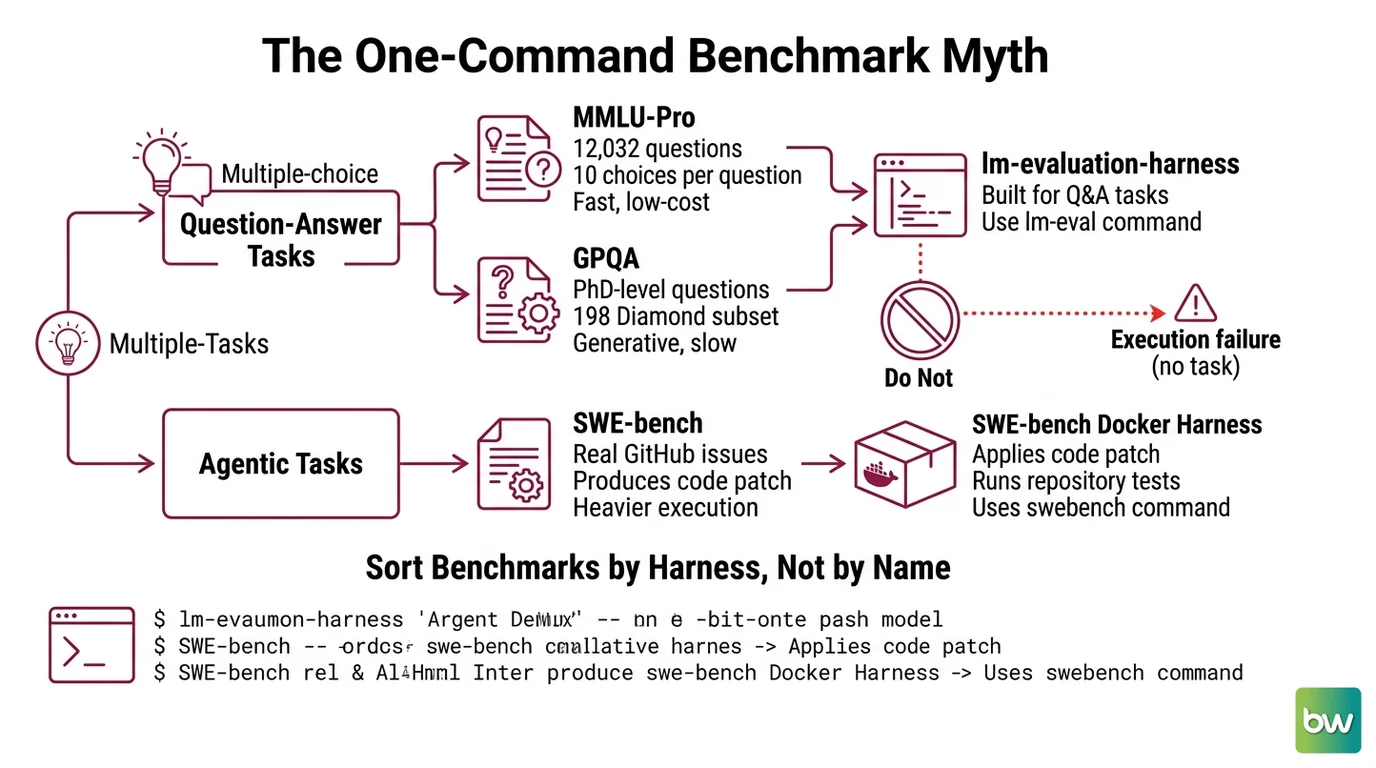
Three benchmarks, two completely different execution models. MMLU-Pro and GPQA are multiple-choice and generative — evaluation-harness tools like EleutherAI’s lm-evaluation-harness were built for exactly this shape of task. SWE-bench is agentic: the model has to produce a code patch that resolves a real GitHub issue, and then a separate Docker harness applies that patch and runs the repository’s own test suite. One asks a question and grades the answer. The other hands over a codebase and checks whether the build goes green.
It worked in the demo. In your pipeline, the SWE-bench task 404s because you assumed a swe_bench task existed inside lm-eval. It never did, and no version will add it. The fix is not a flag — it is understanding that you are running two harnesses, not one.
Step 1: Sort Your Benchmarks by Harness, Not by Name
Before you write a single command, decompose the job by execution model. The dataset name tells you what is being tested. The harness tells you how — and that is what determines whether your run even starts.
Your eval stack is three datasets and two harnesses:
- MMLU-Pro — the
mmlu_protask in lm-eval. It spans 12,032 questions across 14 disciplines, and where the original MMLU offered four answer choices, MMLU-Pro offers ten, which collapses lucky guessing, per the MMLU-Pro paper. Multiple choice, fast, cheap. - GPQA — the
gpqa_diamond_zeroshotfamily in lm-eval. The Diamond subset is 198 PhD-level questions in biology, physics, and chemistry, the hardest of three splits described in the GPQA paper. Generative, gated, slower. - SWE-bench — not an lm-eval task. It ships its own Docker harness, run via
python -m swebench.harness.run_evaluation(or thesb-clicloud runner, or Modal), confirmed in SWE-bench’s GitHub repository. Agentic, heavy, and the one that breaks naive pipelines.
The first two share a harness. The third does not. That single split is the whole reason the “one command” approach fails.
The Architect’s Rule: If you can’t name the harness before the dataset, you can’t reproduce the score.
One more sorting decision lives here. If you are writing a 2026 guide, SWE-bench Verified is legacy — treat its contamination-resistant successor, SWE-bench Pro, as the comparison target you actually report. Why, and the exact version details, come next.
Step 2: Lock Down the Eval Contract
Here is the part people skip, and it is the part that decides whether your number means anything. The eval contract is everything the harness needs pinned before it produces a score you can defend.
Context checklist:
- lm-eval version pinned, and the correct backend extra installed — the install no longer assumes anything
- Backend chosen on purpose: HuggingFace for correctness, vLLM or SGLang for throughput, the API backend for hosted models (lm-eval Docs list HuggingFace, vLLM, SGLang, OpenAI/LiteLLM, NeMo, and TensorRT-LLM)
--num_fewshot, prompt format, and answer-extraction settings recorded, because lm-eval results move when any of them change- Hugging Face authentication configured for the gated GPQA dataset
- For SWE-bench: which split you are reporting (Full, Lite, or Pro) and which agent scaffold generates the patches
The Spec Test: If your run log doesn’t capture fewshot count, prompt format, and extraction settings, your score isn’t a measurement — it’s an anecdote.
Three breaking realities sit underneath that checklist. Consolidate them into one note and put it next to your run config, not in your memory.
Compatibility notes (2026):
- lm-evaluation-harness v0.4.10+: Backends are no longer bundled. A plain
pip install lm_evalwill not run a model — you must installlm_eval[hf],lm_eval[vllm], orlm_eval[api]. Old snippets that reach for attributes likelm_eval.models.huggingface.HFLMnow error, and the CLI was refactored into subcommands. Pin to v0.4.12, released 2026-05-11 (lm-eval’s releases page).- GPQA dataset is gated: Authenticate to the Hugging Face Hub before running
gpqa_diamond_zeroshot, or the task fails to download with no useful score (lm-eval task README).- SWE-bench Verified is legacy: OpenAI stopped reporting it in February 2026 over contamination and now points to SWE-bench Pro (1,865 tasks, 41 repositories, multi-language). Report the successor, per OpenAI.
Step 3: Run in Dependency Order
Sequence matters because the cheap signal should fail fast and the expensive signal should run last. Build the substrate, then the light benchmarks, then the heavy one.
Build order:
- Environment and backends first — install the right
lm_eval[...]extra, authenticate to Hugging Face, and provision the SWE-bench host separately. That host needs real iron: at least 120 GB of free storage, 16 GB of RAM, and 8 CPU cores, per SWE-bench’s GitHub repository. Nothing runs until the substrate is correct. - MMLU-Pro and GPQA next, through lm-eval — they share one harness and one command shape (
lm_eval --model hf --model_args pretrained=<model> --tasks mmlu_pro,gpqa_diamond_zeroshot --batch_size auto, per lm-eval Docs). They are fast and tell you early whether the model is in the right ballpark. - SWE-bench last — this is a two-stage job. First an agent scaffold generates patch predictions; then the
swebenchDocker harness grades them against each repository’s tests. The Full split is 2,294 instances across 12 Python repositories, with Verified at 500 and Lite at 300, per SWE-bench Docs. Lite or Pro is where most teams start.
For each benchmark, your context must specify:
- What it receives — the model handle, the task name, the split
- What it returns — accuracy for the multiple-choice tasks, resolved-issue rate for SWE-bench
- What it must not do — no silent fallback to an unpinned dataset revision
- How it fails — a gated download, an out-of-disk Docker run, a timeout on patch evaluation
Step 4: Prove the Numbers Are Real
A score you cannot defend is worse than no score, because it looks like evidence. Validation is two questions: does the number hold, and does it mean what you think it means.
Validation checklist:
- Reproducibility — re-run each benchmark with the identical config. The scores should match. Failure looks like a different number every run, which means you left something unpinned in Step 2.
- Contamination — ask whether the test questions already live in the model’s training data. Failure looks like an implausibly high score on a benchmark everyone has scraped. This is precisely where SWE-bench Verified fell: OpenAI’s audit traced roughly 32.7% solution leakage and found that 59.4% of audited failures came from flawed tests, per OpenAI. A high score there measures memorization, not capability. Contamination-resistant successors lean on fresher, sometimes synthetically generated test sets to stay ahead of benchmark contamination.
- Config committed — store exact versions, fewshot count, prompt format, and extraction settings next to every score. Failure looks like a leaderboard row nobody can regenerate six months later.
Common Pitfalls
| What You Did | Why It Failed | The Fix |
|---|---|---|
pip install lm-eval and ran a model | v0.4.10+ does not bundle backends | Install lm_eval[hf], lm_eval[vllm], or lm_eval[api] |
| Pointed lm-eval at SWE-bench | SWE-bench is not an lm-eval task | Run the swebench Docker harness instead |
| GPQA task failed to download | The dataset is gated on Hugging Face | Authenticate to the HF Hub before the run |
| Cited a SWE-bench Verified score | Deprecated in 2026 over contamination | Report SWE-bench Pro instead |
| Two runs, two different scores | Fewshot, prompt, and extraction unlogged | Pin and log the full eval contract |
Pro Tip
Treat your eval configuration like a lockfile, not a memory. The version of lm-eval, the backend extra, the fewshot count, the prompt format, the dataset revision — all of it belongs in version control next to the result it produced. A benchmark score without its config is a screenshot of a number. A benchmark score with its config is something another engineer can rebuild from scratch, which is the only definition of a trustworthy result that survives contact with a skeptical reviewer.
Frequently Asked Questions
Q: How do you use benchmark datasets to evaluate a large language model?
A: Pick a dataset that matches the capability you care about, route it to the harness that runs it, then score the model’s outputs against the gold answers. The trap: multiple-choice accuracy and agentic resolve-rate are not interchangeable, so never average them into one number.
Q: How do you choose the right benchmark for evaluating an LLM in 2026?
A: Match the benchmark to the task. MMLU-Pro and GPQA test knowledge and reasoning under multiple choice; SWE-bench tests whether the model can ship a working patch. For coding agents in 2026, prefer SWE-bench Pro; Verified was retired over contamination.
Q: How do you run an LLM benchmark step by step with lm-evaluation-harness?
A: Install the right backend extra, authenticate to Hugging Face for gated tasks, then call lm_eval with your model and tasks. What old guides miss: since v0.4.10 a bare pip install lm-eval installs no backend, so the command has nothing to run the model with.
Your Spec Artifact
By the end of this guide, you should have:
- A benchmark-to-harness map — which dataset runs in lm-eval, which runs in the SWE-bench Docker harness
- A pinned eval contract — versions, backend extra, fewshot count, prompt format, dataset revision, and HF auth
- A reproducibility checklist — re-run match, contamination sanity check, and the full config committed beside each score
Your Implementation Prompt
Hand this to your AI coding tool (Claude Code, Cursor, or Codex) to scaffold the run. It mirrors the four steps above — fill every bracket with your own values from the Step 2 contract.
You are setting up a reproducible LLM benchmark run for 2026. Follow this spec exactly.

CONTEXT
- Model under test: [model name + version, e.g. a HF checkpoint or an API handle]
- Compute: [GPU type and count, or inference API endpoint]
- Hugging Face token available: [yes/no — required for the gated GPQA dataset]

STEP 1 — ROUTE BY HARNESS
- MMLU-Pro and GPQA -> lm-evaluation-harness, tasks: mmlu_pro, gpqa_diamond_zeroshot
- SWE-bench -> its own Docker harness (swebench.harness.run_evaluation), NOT lm_eval
- SWE-bench split to report: [Pro | Lite | Full] (do not use the deprecated Verified split)

STEP 2 — PIN THE CONTRACT
- lm_eval version: [pin, e.g. 0.4.12]; backend extra: [hf | vllm | api]
- num_fewshot: [n]; prompt format: [default | custom]; answer extraction: [default | regex]
- Authenticate to the Hugging Face Hub before running any gated task

STEP 3 — BUILD ORDER
1. Provision env + backends; SWE-bench host needs [>=120 GB disk, >=16 GB RAM, >=8 CPU cores]
2. Run MMLU-Pro + GPQA through lm_eval
3. Generate SWE-bench patches with [agent scaffold], then grade with the swebench harness

STEP 4 — VALIDATE
- Re-run each benchmark with the identical config; the scores must match
- Commit the full config (versions, fewshot, prompt, extraction) next to every score
- Flag any score that looks too high as a possible contamination signal

Output: a runnable project layout and the exact commands per step. Do not collapse the two harnesses into one.
Ship It
You now have a mental model that separates the dataset from the harness, which is the difference between a number you reported and a number you can defend. Route by execution model, pin the contract, run in dependency order, and validate before you trust. Do that, and the next launch-post claim becomes something you can reproduce in an afternoon instead of argue about for a week.
Deploy safe, Max.
AI-assisted content, human-reviewed. Images AI-generated. Editorial Standards · Our Editors