How to Auto-Generate Docstrings, API References, and Living Docs with Mintlify and DocuWriter in 2026
TL;DR
- Decompose your doc surface into three layers — inline (docstrings), reference (API), and living (architecture). Each one needs a different tool.
- The AI cannot guess your stack, your conventions, or what “done” looks like. Specify all three before it writes a single comment.
- Treat docs like code. Generate on PR, validate on merge, regenerate on drift. Anything else is a stale README waiting to happen.
You shipped a feature on Friday. By Tuesday, three engineers have asked the same question in Slack — what does this endpoint return when the user object is null? The function has no docstring. The README hasn’t been touched in six months. The OpenAPI spec exists in two places, and neither matches the actual response. This is not a documentation problem. It’s a specification problem, and AI tools fix it only if you tell them what the spec looks like.
Before You Start
You’ll need:
- An AI coding tool — AI Code Completion via GitHub Copilot or Cursor, or an agentic CLI like Claude Code
- A hosted doc platform — Mintlify, Fern, or DocuWriter.ai (pick one for the reference layer)
- A repo with at least one OpenAPI or TypeScript types file the AI can read
- Familiarity with AI Documentation Generation as a concept, plus the difference between code-coupled and surface-published docs
This guide teaches you: how to decompose your documentation into three independent surfaces, then map each surface to the tool that owns it.
The Friday Feature That Has No Docs by Monday
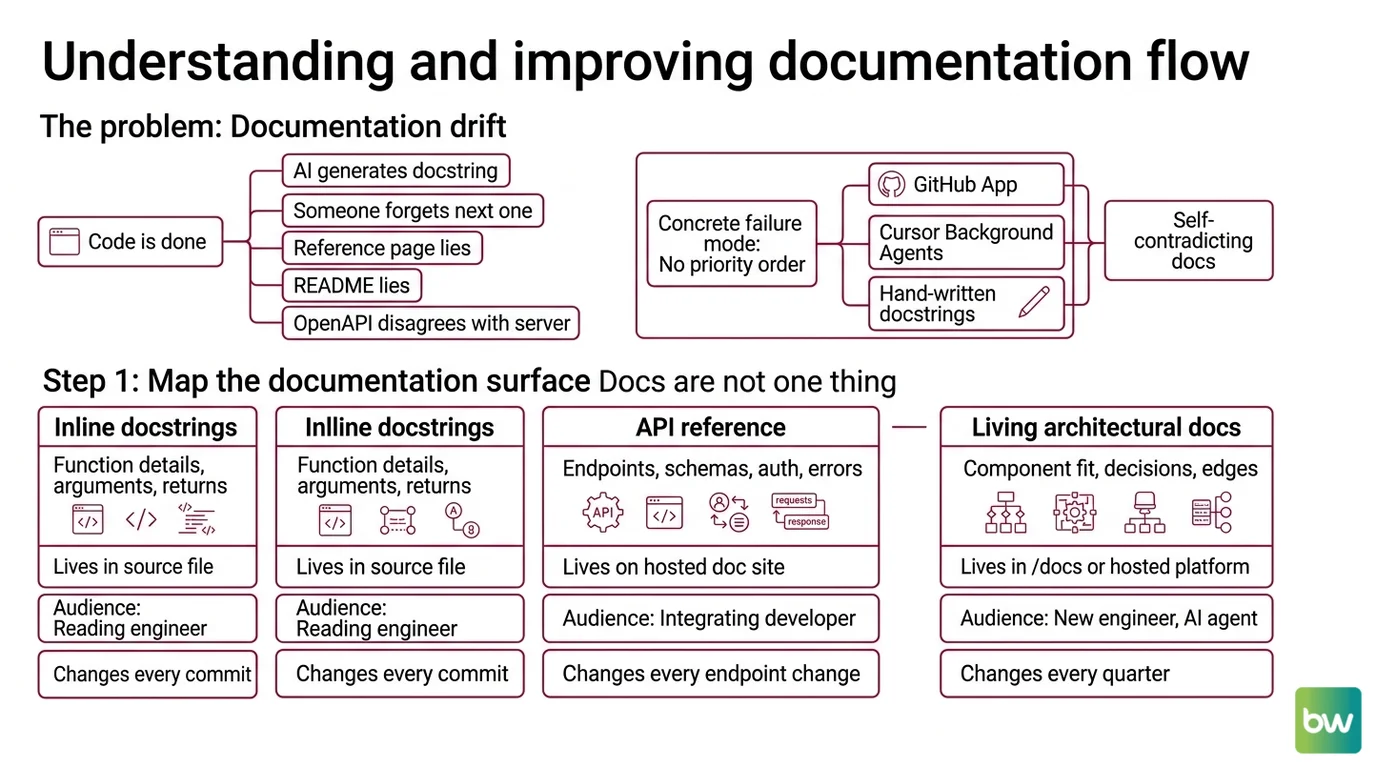
Most teams treat documentation as something that happens after the code is “done.” So the AI generates a docstring for one function, someone forgets the next one, and within a sprint the docs drift. The reference page lies. The README lies. The OpenAPI file disagrees with the running server.
This is not because AI doc tools are bad. It’s because nobody specified which surface owns what, what triggers a regeneration, or what counts as a passing doc. The AI defaulted to “write something plausible” — which it did, beautifully, in the wrong format for the wrong audience.
One concrete failure mode: a team turned on Mintlify’s Continuous Documentation through its GitHub App, then also let Cursor’s Background Agents propose doc PRs, and also kept hand-written docstrings as the source of truth. Three sources, no priority order, no contract for which one wins. The result was a doc site that contradicted itself within a week.
Step 1: Map the Documentation Surface
You cannot point an AI at “the docs” and get a useful result. Docs are not one thing — they are three.
Your system has these surfaces:
- Inline docstrings — what a function does, its arguments, its return type, its raises. Lives in the source file. Audience: the engineer reading the code in their editor right now.
- API reference — endpoints, request/response schemas, auth, error codes. Lives on a hosted doc site. Audience: the developer integrating against you who has never seen your code.
- Living architectural docs — how the components fit together, why decisions were made, where the edges are. Lives in
/docsor a hosted platform. Audience: the engineer joining the team next month, and the AI agent reading the repo next week.
Each surface has a different rhythm. Docstrings change every commit. API references change every endpoint change. Architectural docs change every quarter. If you try to regenerate all three on every commit, you waste tokens. If you regenerate none of them, your docs go stale.
The Architect’s Rule: If you cannot name which surface owns a piece of information, the AI will write it in all three — and they will disagree.
The 2026 wrinkle: there is now a fourth surface emerging. Repos increasingly carry a CLAUDE.md or AGENTS.md file — a “second documentation surface” written for AI agents, not humans. Claude Code Docs treat this as a first-class artifact. Decide whether you need one before you build the pipeline, because the same generator that writes your human-facing architecture doc cannot also produce the agent-facing version without different context.
Step 2: Lock Down the Documentation Contract
This is where most pipelines fail. The AI defaults to whatever doc style appeared most often in its training data — Google-style docstrings for Python, JSDoc for TypeScript, plain prose for everything else. If your team uses a different convention, the AI will quietly overwrite it.
Context checklist for every documentation tool you set up:
- Language and version — Python 3.12 with type hints, TypeScript 5.5 with strict mode, etc.
- Docstring style — Google, NumPy, Sphinx, JSDoc, TSDoc. Pick one. Write it down.
- Required sections per function — Args, Returns, Raises, Examples. Specify which are mandatory.
- API reference source of truth — OpenAPI 3.1 file? Generated from code annotations? Hand-written?
- Architecture doc format — Markdown with Mermaid diagrams, or plain MDX with embedded components?
- Where the docs live — repo
/docs, hosted Mintlify site, Fern-published portal, or all three with a clear priority order - What “stale” means — flagged on every PR? Only when public API changes? Quarterly review?
GitHub Copilot’s /doc slash command will generate docstrings on the fly — type """ below a Python def or /** above a TypeScript function and it triggers Args/Returns/Raises blocks (Microsoft Learn). Useful, but it has no opinion about your convention. If your spec says NumPy-style and the AI emits Google-style, you have one of two choices: rewrite the spec to match what the AI does naturally, or constrain the AI with a custom instructions file the tool actually reads.
The Spec Test: If you cannot hand your contract to a new engineer and have them write a docstring that passes review, the AI will not pass review either.
For API references specifically, the tool determines the contract. Fern takes OpenAPI or AsyncAPI input and outputs SDKs in TypeScript, Python, Go, Java, Ruby, C#, PHP, Swift, and Rust (Fern’s GitHub repository) — which means your contract IS your spec file. Mintlify reads OpenAPI too, but layers an interactive playground and DocChat semantic search on top (AI Tools DevPro). DocuWriter.ai pulls the contract directly from your code, generating language-aware inline docs, full API references, and Mermaid/PlantUML diagrams from source — and it bundles AI Test Generation for Pest/Jest/PyTest/JUnit alongside the docs, plus an AI-Assisted Refactoring cleanup pass on the same code it just documented (DocuWriter.ai).
A note on Swimm: older blog posts still describe Swimm as a $29/month code-coupled docstring tool. That product no longer exists in that form. Swimm pivoted in 2026 to an “agentic modernization platform” focused on COBOL, JCL, and PL/I legacy code transformation, with custom enterprise pricing (Swimm). Its Agentic Context Layer still produces validated knowledge bases that feed Copilot, Cursor, and Claude Code — but if you came here looking for a lightweight docstring generator, substitute DocuWriter.ai or Mintlify in that slot.
Step 3: Wire the Pipeline in the Right Order
Sequence matters. If you turn on Continuous Documentation before the contract is locked, the AI floods the repo with PRs written in a style your team hasn’t agreed to. You will spend the next week reverting commits.
Build order:
- Inline docstrings first — because they live in the code, they need the lowest-priority tool, and they are the easiest to regenerate. Set up Copilot
/docor Cursor in-editor docstring completion. Add a project.cursorrulesor Copilot custom instruction file with your docstring style. Do not enable any background agent yet. - API reference next — because it depends on the code being stable and properly typed. Point Mintlify, Fern, or DocuWriter.ai at your OpenAPI spec or annotated source. This is where the heavy infrastructure lives — domain, search, versioning, auth.
- Living architecture docs last — because they require the most context and break the easiest. Use Claude Code or a Mintlify Agent (its Continuous Documentation feature, which monitors the codebase and proposes doc updates on PRs through a GitHub App) to draft, but keep a human in the loop on merge.
For each tool, your context must specify:
- What it receives — source files, OpenAPI spec, existing docs to update, or a fresh blank slate
- What it returns — file path, format, frontmatter fields, frontend metadata
- What it must NOT do — never delete hand-written sections, never rewrite the changelog, never modify the
CLAUDE.mdwithout a human approval - How to handle failure — when the spec is ambiguous, raise a PR comment instead of guessing
Cursor’s Background Agents (2026) can run async doc-writing tasks while you work in the foreground (NxCode) — useful for batch regeneration after a big refactor, dangerous if you let them touch the API reference without review. Claude Code ships an official GitHub Action (“Claude Code Automatic PR Documentation Generator”) that runs on PR open and produces a doc diff alongside the code diff (GitHub Marketplace). Pick one orchestrator per surface. Do not stack three.
Step 4: Validate That the Docs Actually Work
Generation is not the finish line. A docstring that compiles is not a docstring that helps. Validate at three levels.
Validation checklist:
- Lint-level — does every public function have a docstring? Does every endpoint have a response schema? Failure looks like: CI red, missing-docs error, PR blocked.
- Contract-level — does the docstring match the actual signature? Does the OpenAPI response match what the server returns? Failure looks like: an integrator files a bug because the docs say
id: stringbut the server returnsid: number. - Reader-level — can a new engineer use the doc to make a correct decision in under five minutes? Failure looks like: a Slack question that the docs technically answered, but nobody could find. Treat this check the same way you treat AI Code Review — sample a handful of generated docs each sprint and read them like a reviewer, not an author.
- Debug-level — when an integrator files a bug, does the doc surface enough context for AI-Assisted Debugging to reproduce the failure without spelunking the source? Failure looks like: a one-line bug report that takes an hour to triage because the doc never named the failure modes.
For the contract-level check, Mintlify’s DocChat semantic search and OpenAPI interactive playgrounds let you click-test endpoints from the doc site itself (AI Tools DevPro) — if the playground fails, the doc is wrong. For reader-level, treat your CLAUDE.md or AGENTS.md as the canary. If an AI agent reading the repo cannot answer a basic architectural question, neither can a human.
Security & compatibility notes:
- GitHub Copilot billing (BREAKING): As of June 1, 2026 — about a week after this guide publishes — Copilot moves from request-based to usage-based (token) billing. Every plan gets a monthly AI Credits allotment with overage at published API rates (GitHub Blog). Build cost ceilings into your doc pipeline before that date, or pooled team usage will surprise you.
- Mintlify CLI supply-chain (WARNING): On November 24, 2025, the Mintlify CLI was impacted by the SHA1-Hulud attack via compromised
@asyncapi/parserand@asyncapi/specsnpm packages. Patched. Pin your CLI version and verify checksums in CI.- Mintlify platform CVEs (INFO): Five CVEs disclosed in November 2025 (CVE-2025-67842 through -67846) were patched within hours of disclosure with no evidence of exploitation. Mintlify deprecated internal admin tokens in favor of session auth.
Common Pitfalls
| What You Did | Why AI Failed | The Fix |
|---|---|---|
| Turned on every tool at once | Three sources tried to own the same surface; PRs contradicted each other | Pick one tool per surface. Document the priority order in CLAUDE.md. |
| Skipped the docstring style spec | AI defaulted to its training bias — usually Google-style for Python, JSDoc for TS | Add .cursorrules or Copilot custom instructions naming your style verbatim |
| Pointed Fern at an incomplete OpenAPI spec | SDK generation succeeded; the SDK was wrong | Validate the OpenAPI file against your running server before generation, not after |
| Let Cursor Background Agents touch the API reference | Async edits landed without review; the public doc broke | Restrict background agents to inline docstrings only. Reference docs require synchronous review. |
| Trusted a 2024 review of Swimm | Swimm is no longer a $29/month doc tool — it pivoted to enterprise modernization | Check the vendor’s current site, not blog posts. Swap in DocuWriter.ai or Mintlify for the lightweight slot. |
Pro Tip
The most useful doc your repo can ship in 2026 is not the prettiest API reference. It’s the CLAUDE.md (or AGENTS.md) that tells the next AI agent how the codebase is organized, where the conventions live, and what NOT to touch. Write it like a spec, not a brochure. Every AI tool you point at this repo will read it before it writes anything — which means it doubles as your documentation contract and your guardrail.
Frequently Asked Questions
Q: How to use AI to generate docstrings for an existing Python or TypeScript codebase in 2026?
A: Start with a single file, not the whole repo. For Python, place your cursor below a def and type """ to trigger Copilot’s docstring scaffold (Args/Returns/Raises); for TypeScript, type /** above a function for JSDoc. For batch retrofits, DocuWriter.ai handles a full codebase at $29/month, with language-aware output. Watch for one trap: the AI will happily generate docstrings that match the function name rather than the function behavior — read every third one.
Q: How to use Mintlify, Swimm, and Fern to publish AI-generated API documentation?
A: Pick one platform per project. Mintlify ($250/month Pro, $0 Hobby) covers Continuous Documentation, OpenAPI playgrounds, and DocChat semantic search. Fern ($0 Hobby, $150/month Team) excels at OpenAPI-to-SDK across nine languages. Skip Swimm for this slot — it pivoted in 2026 to enterprise legacy-code modernization with custom pricing, not lightweight API docs. Substitute DocuWriter.ai if you need a low-cost OpenAPI consumer.
Q: How to set up an AI documentation pipeline with GitHub Copilot, Cursor, and Claude in a monorepo?
A: Assign one surface per tool. Copilot handles inline docstrings in the editor. Cursor Background Agents handle batch docstring sweeps after a refactor. Claude Code (via its official PR documentation Action) handles architectural updates and CLAUDE.md maintenance. Put the priority order in a root-level CLAUDE.md so every agent reads the same contract. One gotcha: Copilot’s billing changes June 1, 2026 to usage-based — monitor token spend per package before the cutover.
Your Spec Artifact
By the end of this guide, you should have:
- A documentation surface map — three rows (inline / reference / living), naming which tool owns each, which file format wins, and which trigger regenerates it.
- A documentation contract — language, style, required sections, source of truth, and what “stale” means. Lives in your repo as
.cursorrules,.github/copilot-instructions.md, orCLAUDE.mddepending on stack. - A validation checklist — lint, contract, reader-level checks with the specific failure symptom for each. Lives in CI.
Your Implementation Prompt
Paste the prompt below into Claude Code, Cursor, or Codex at the root of your repo. It encodes the Step 1–4 framework as a spec the AI tool can execute. Fill in the bracketed placeholders with your own values — every placeholder maps to a checklist item from Step 2.
You are setting up an AI documentation pipeline for this repo. Read the existing
code structure before proposing anything. Then produce three artifacts.

1. SURFACE MAP — three rows, naming which tool owns each:
   - Inline docstrings: [Copilot | Cursor | DocuWriter.ai]
   - API reference: [Mintlify | Fern | DocuWriter.ai]
   - Living architecture: [Claude Code | Mintlify Agent | hand-written]

2. CONTRACT FILE — write a CLAUDE.md (or AGENTS.md) at the repo root specifying:
   - Language and version: [e.g., Python 3.12 with type hints]
   - Docstring style: [Google | NumPy | Sphinx | JSDoc | TSDoc]
   - Required docstring sections: [Args, Returns, Raises, Examples]
   - API reference source of truth: [OpenAPI 3.1 file path | annotated source]
   - Architecture doc format: [MDX with Mermaid | plain Markdown]
   - Stale definition: [PR-flagged | quarterly | on public API change]
   - What the AI must NOT modify: [changelog, hand-written sections, etc.]

3. VALIDATION HOOKS — propose CI checks for:
   - Lint-level: missing docstrings on public functions
   - Contract-level: OpenAPI response matches running server
   - Reader-level: CLAUDE.md answers [list 3 questions a new engineer would ask]

Build order: inline docstrings first, then API reference, then living docs. Do
not enable any background or PR-triggered agent until I have approved the
CLAUDE.md file. If any specification is ambiguous, raise it as a question in
the PR description instead of guessing.
Ship It
You now have a way to decompose any codebase's documentation into three surfaces, assign each surface to the right tool, and validate that the result holds together under change. The pattern transfers — next month it’s a different stack and a different vendor, but the surface map, the contract, and the validation gates stay the same. Specify it once. Regenerate it forever.
AI-assisted content, human-reviewed. Images AI-generated. Editorial Standards · Our Editors