How to Augment Image, Text, and Audio Data with Albumentations, nlpaug, and AugLy in 2026
TL;DR
- Augmentation is a specification problem. The spec is the set of transforms that change the input but not the label.
- One augmenter per modality, behind one interface. Albumentations for images, nlpaug for text, AugLy for audio and video.
- Augment the training split only. Oversample the minority class. Then benchmark against a no-augmentation baseline before you trust the number.
You had a classifier at 91% accuracy. You added Data Augmentation to squeeze out a few more points. Accuracy dropped to 84%. Nothing in the model changed — only the data did. That is not a bug. That is a specification gap, and it is the most common one I see when teams reach for augmentation.
Before You Start
You’ll need:
- An AI coding tool (Claude Code, Cursor, or Codex) to scaffold the pipeline once you’ve specified it
- A clear picture of your task: what is the input, what is the label, and which real-world variations your model will face in production
- Working knowledge of Class Imbalance and why it skews a classifier toward the majority class
- The three libraries below, installed and pinned
This guide teaches you: how to decompose augmentation by modality, specify which transforms are label-preserving for your domain, and validate that the augmentation helped instead of assuming it did.
One honesty note before we build. The title says “in 2026,” but these three tools are not equally current. As of June 2026, only Albumentations is actively maintained. nlpaug and AugLy still work, and they are still the canonical choices — but both have been frozen since 2022. I’ll show you how to specify around that, because pretending otherwise is how you end up debugging a dependency conflict at 2 AM.
The 91% Model That Got Worse
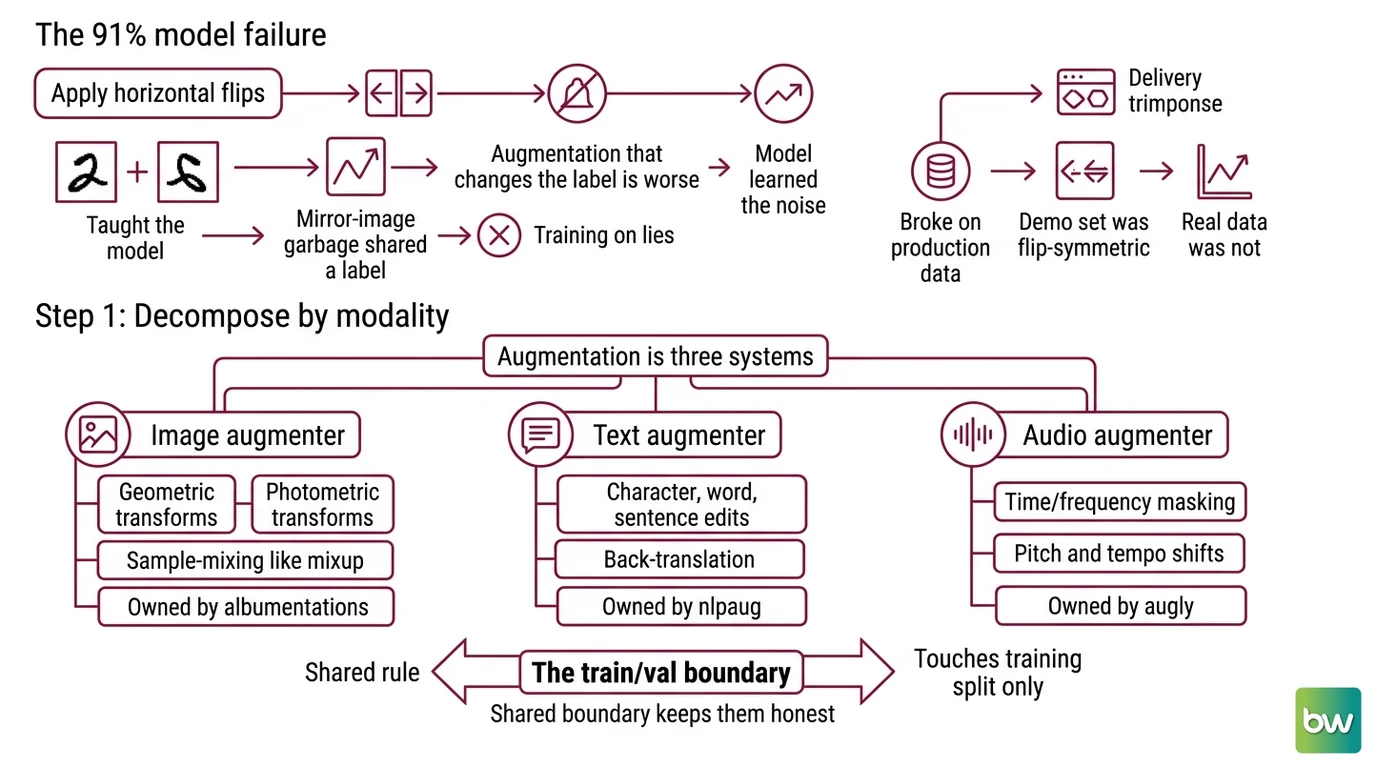
Here is what happened to that classifier. The team applied horizontal flips to every image in the dataset. Reasonable default — except half the images were photographs of handwritten digits, and a flipped “2” is not a “2.” They taught the model that mirror-image garbage shared a label with real examples. The model learned the noise.
The failure mode is always the same. Augmentation that changes the label is worse than no augmentation, because you are now training on examples whose labels are lies.
It worked on the demo dataset Friday. On Monday it broke on production data, because the demo set happened to be flip-symmetric and the real one was not. Nobody specified which transforms preserved the label — so the tool applied all of them.
Step 1: Split the Pipeline by Modality
Augmentation is not one system. It is three, plus a shared boundary. Each modality has its own transform vocabulary, its own library, and its own failure modes. Mixing them into one undifferentiated “augment the data” step is the first mistake.
Your system has these parts:
- Image augmenter — geometric and photometric transforms (crop, rotate, brightness), plus sample-mixing like Mixup and CutMix. Owned by Albumentations.
- Text augmenter — character, word, and sentence-level edits, plus Back Translation for paraphrase-style variation. Owned by Nlpaug.
- Audio augmenter — time and frequency masking in the SpecAugment style, pitch and tempo shifts. Owned by AugLy or nlpaug’s audio module.
- The train/val boundary — the shared rule that augmentation touches the training split and nothing else.
Each augmenter is a separate concern with a separate contract. The boundary is what keeps them honest. Decompose by modality before you write a single transform.
The Architect’s Rule: If you can’t name the modality, the transform, and the label-preservation rule in one sentence, the AI can’t build the augmenter — and neither can you.
Step 2: Specify the Label-Preserving Transform Set
This is the step everyone skips, and it is the whole game. For every transform, you answer one question: does this change the input while keeping the label correct? That answer depends entirely on your domain.
A horizontal flip is label-preserving for cat-vs-dog photos. It is label-destroying for handwritten digits, road-sign classification, or any text in the image. Rotation is fine for satellite imagery and wrong for chest X-rays, where orientation is diagnostic. There is no universal safe set. There is only your set.
Context checklist:
- Each transform tagged label-preserving or label-destroying for this specific task
- Augmentation strength bounded — small datasets overfit to aggressive augmentation as fast as to raw data
- Tool, version, and license pinned per modality
- Per-class augmentation policy defined (see Step 3)
- Edge cases listed: text inside images, orientation-sensitive labels, audio where pitch carries meaning
The Spec Test: If your transform set doesn’t name which operations are forbidden for your domain, the library will happily apply all of them — and your labels will quietly rot.
Now pin the tools, because this is where 2026 reality bites. Treat the following as part of your spec, not an afterthought.
Maintenance & license notes:
- Albumentations (2.0.8): Actively maintained, image only, MIT license (Albumentations on PyPI). The go-forward fork, AlbumentationsX 2.3.1, is dual-licensed AGPL-3.0 or commercial (AlbumentationsX GitHub) — acceptable for research, a hard constraint for proprietary or banking deployments. Pin the MIT original unless you hold a commercial license.
- nlpaug (1.1.11): MIT-licensed and covers text and audio (nlpaug on PyPI), but no release since July 2022 and flagged inactive (Snyk Advisor). It works — expect to pin older
transformersandtorchversions for back-translation and contextual augmenters, since no verified 2026 compatibility matrix exists.- AugLy (1.0.0): Multimodal, MIT, last release March 2022 (AugLy GitHub). Stable but not actively developed. Aggregator pages showing an “updated 2026” date are a false signal — the latest tagged release is from 2022.
Step 3: Wire the Augmenters in Build Order
Order matters, because the modalities are not equally mature and the class policy depends on a clean split. Build the most reliable component first so a failure later doesn’t make you doubt the foundation.
Build order:
- Image augmenter first — because Albumentations is the actively maintained, best-documented piece. Get one modality working end to end before you add the frozen tools.
- Text augmenter next — because nlpaug needs pinned dependencies, and you want a working image baseline before you fight version conflicts.
- Audio augmenter last — because it’s the least common path and AugLy’s 2022 freeze means you validate it most carefully.
The class policy rides on top of all three. To fix imbalance, you oversample the minority class by generating more augmented variants of its examples — not the majority’s. Set per-class multipliers so the rare class reaches rough parity. This is augmentation doing real work: turning one minority example into many plausible ones.
For each augmenter, your context must specify:
- What it receives — raw examples from the training split only
- What it returns — augmented examples with the original label attached, unchanged
- What it must NOT do — touch the validation or test split, apply any transform tagged label-destroying
- How to handle failure — if a dependency won’t pin, fall back to a smaller transform set rather than a different label semantics
That train-only constraint is not optional. Augment before you split and the same source image lands in both train and validation as near-duplicates. Your validation score goes up, your real-world score does not, and you’ve fooled yourself. Run Data Deduplication across the split boundary if you’re unsure.
Step 4: Prove the Augmentation Actually Helped
You do not get to assume augmentation worked because the idea is sound. You measure it. The whole point of treating Training Data Quality as engineering is that you verify the change the same way you’d verify a code change.
Validation checklist:
- Baseline comparison — train once without augmentation, once with, same everything else. Failure looks like: augmented accuracy at or below baseline, meaning your transform set is too aggressive or label-destroying.
- Label preservation spot-check — eyeball 30 augmented examples per class by hand. Failure looks like: a flipped digit, a back-translated sentence that flipped sentiment, an audio clip pitched into a different phoneme.
- Leakage check — confirm no augmented training example derives from a validation source. Failure looks like: validation accuracy far above test accuracy on held-out production data.
Common Pitfalls
| What You Did | Why It Failed | The Fix |
|---|---|---|
| Applied every transform the library offers | Some transforms destroyed the label for your domain | Tag each transform label-preserving or label-destroying before use |
| Augmented before the train/test split | Near-duplicates leaked across the boundary, inflating validation | Split first, augment the training set only |
| Oversampled the whole dataset evenly | Class imbalance stayed exactly the same | Set per-class multipliers; augment the minority class more |
| Used nlpaug on a fresh 2026 stack unpinned | Dependency conflicts on modern transformers/torch | Pin older transformers/torch versions, or fall back to simpler augmenters |
| Shipped AlbumentationsX into a proprietary product | AGPL-3.0 license obligations on closed source | Use the MIT original, or buy the commercial license |
Pro Tip
The transform set is your domain model. Every time you tag an operation label-preserving or label-destroying, you are writing down a piece of knowledge about what your task actually means — what variation is real and what is noise. Keep that list in version control next to your code. The next person who touches the pipeline inherits the reasoning, not just the result. That transfers to every modality and every tool you’ll ever use, long after these specific libraries are retired.
Frequently Asked Questions
Q: How do you use data augmentation to fix class imbalance in a dataset? A: Generate augmented variants only for the minority class, not the majority, using per-class multipliers until the rare class reaches rough parity. Always augment after your train/test split — augmenting before it leaks near-duplicate copies of the same example into both sides and inflates your score.
Q: What are the best data augmentation techniques for small datasets in 2026? A: For images, geometric and photometric transforms in Albumentations plus mixup or cutmix. For text, back-translation and contextual word swaps in nlpaug. For audio, SpecAugment-style masking. Start conservative — small datasets overfit to aggressive augmentation as easily as they overfit to raw data.
Q: How do you build a data augmentation pipeline with Albumentations and nlpaug step by step? A: Decompose by modality first, then specify which transforms preserve labels for your domain. Wire Albumentations for images and nlpaug for text behind one interface, augment the training split only, oversample minority classes, and benchmark against a no-augmentation baseline before trusting any result.
Your Spec Artifact
By the end of this guide, you should have:
- A modality map — image, text, audio — each with its owning library and version pinned
- A label-preservation contract: every transform tagged preserving or destroying for your specific task, plus the per-class augmentation policy
- A validation plan: baseline comparison, manual label spot-check, and a leakage check across the split boundary
Your Implementation Prompt
Use this in your AI coding tool after you’ve filled the brackets with your own task details. It mirrors the four steps above, so the generated pipeline reflects your decomposition — not a generic template.
Build a data augmentation pipeline with the following specification.

TASK: [classification / detection / segmentation] on [your dataset].
Input is [image / text / audio]; the label is [what you predict].

STEP 1 — MODALITIES: Implement one augmenter per modality I use:
- Image: Albumentations (MIT, v2.0.8) — NOT AlbumentationsX (AGPL).
- Text: nlpaug (pin transformers==[version], torch==[version]).
- Audio: AugLy or nlpaug audio module.
Expose them behind a single augment(example, split) interface.

STEP 2 — LABEL-PRESERVING SET: Apply ONLY these transforms:
[list label-preserving transforms].
NEVER apply: [list label-destroying transforms for my domain].
Cap augmentation strength at [bound].

STEP 3 — BUILD ORDER + CLASS POLICY: Build image first, then text,
then audio. Augment the TRAINING split only. Oversample the minority
class [class name] with a per-class multiplier of [n]; leave the
majority class at 1x.

STEP 4 — VALIDATION: Add a routine that trains with and without
augmentation on identical settings and reports both accuracies, and
a check that confirms no augmented training example derives from a
validation-split source.
Ship It
You now have a mental model that survives any tool change: augmentation is a label-preservation spec, decomposed by modality, validated against a baseline. You can look at any transform and ask the one question that matters — does this keep the label true? That question, not the library, is what makes the pipeline work.
AI-assisted content, human-reviewed. Images AI-generated. Editorial Standards · Our Editors