Adding Human Approval Gates to AI Agents Without Killing Throughput
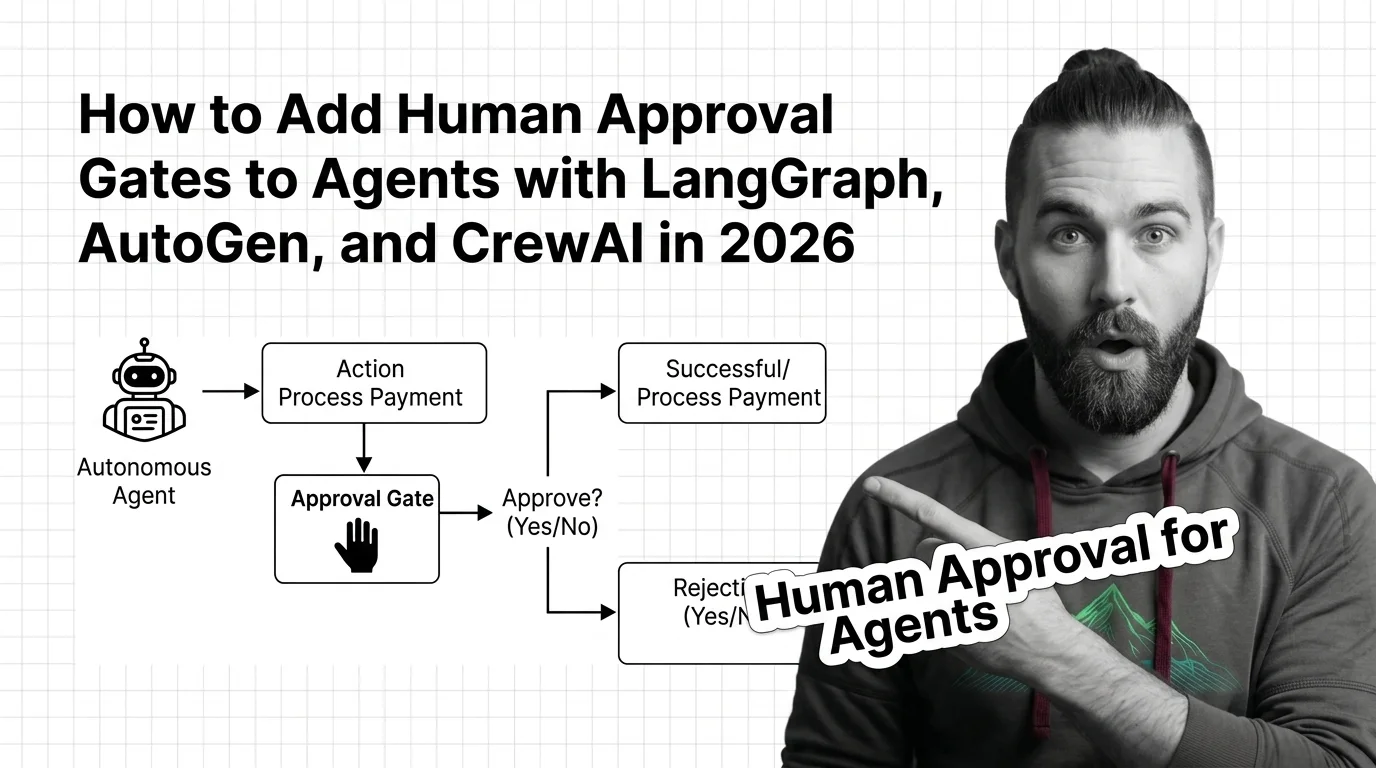
TL;DR
- Approval gates are state machine pauses, not decorators — design where the pause lives before you pick the framework.
- Each framework gates at a different boundary: LangGraph at any node, AutoGen at message turns, CrewAI at task completion.
- A gate without durable state and a clean approve/edit/reject contract is theater — the agent will resume without the human in the loop.
Picture this. Your CrewAI agent is in production. It just sent a $3,400 invoice to the wrong client because the email tool fired before a human ever saw the draft. You added human_input=True to the task. You assumed that meant “pause before sending email.” It didn’t. Same words, different runtime.
Before You Start
You’ll need:
- A working agent in LangGraph, AutoGen, CrewAI, or the OpenAI Agents SDK
- A clear list of the actions your agent can take — read, write, send, pay, delete
- An understanding of Human In The Loop For Agents as an architectural pattern, not a checkbox
This guide teaches you: how to decide which agent actions need a human gate, specify the approval contract, and wire it into the framework you actually use.
When the Agent Just Sent the Email
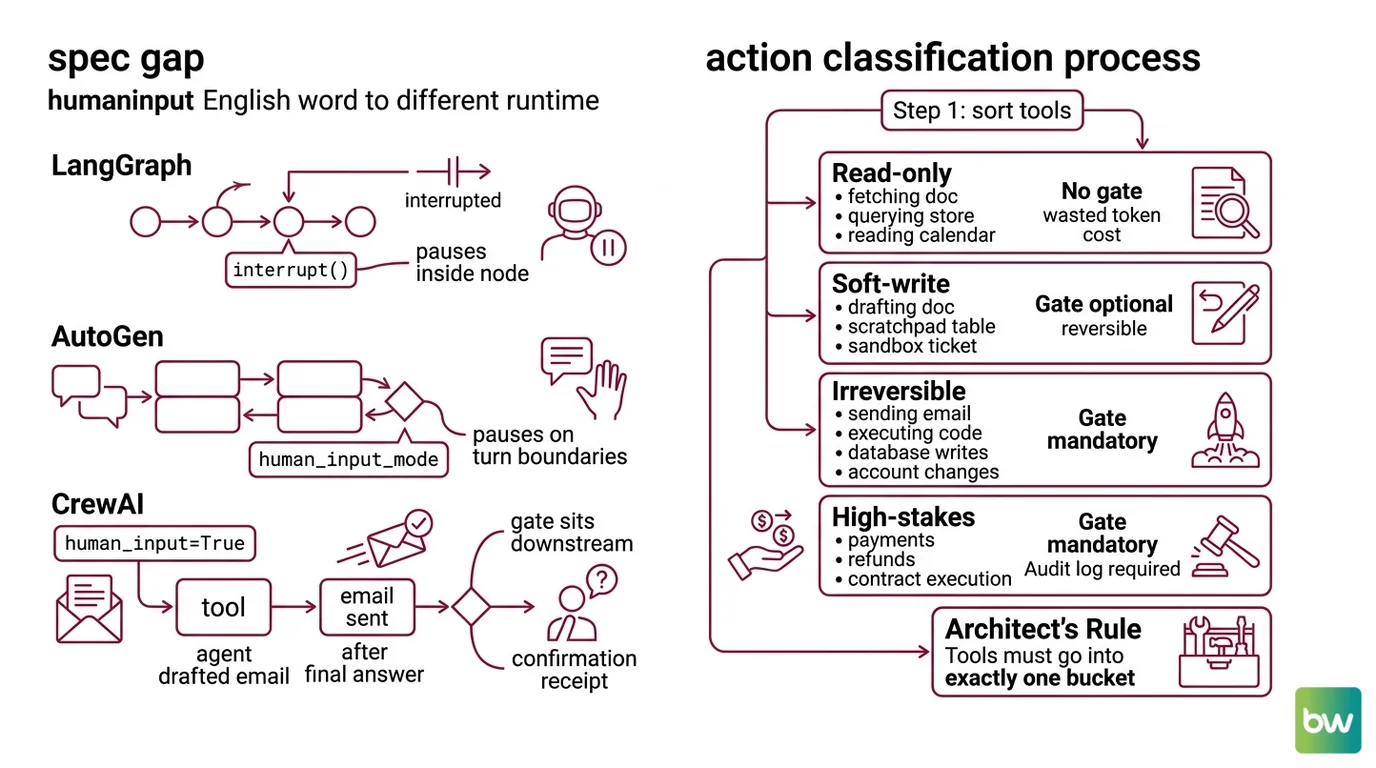
Three frameworks. Three different gate semantics. The same English word — “human input” — points to three different runtime behaviors. That is the spec gap teams keep falling into.
LangGraph pauses anywhere you call interrupt() inside a node. AutoGen pauses on message turn boundaries based on human_input_mode. CrewAI’s task-level human_input=True fires after the agent has produced its final answer — which means the email has already been drafted, but in many setups the tool that sends the email already ran. If your gate sits one step downstream of the irreversible action, you do not have a gate. You have a confirmation receipt.
The fix is not a different flag. It is a clear specification of where the pause needs to happen, what the human sees, and what they can decide.
Step 1: Classify the Actions That Need a Gate
You cannot gate everything. If the agent pauses on every step, you have a chatbot with extra steps. You need to decide which actions are gate-worthy and which are not.
Sort every tool the agent can call into four buckets:
- Read-only — fetching a doc, querying a vector store, reading a calendar. No gate. The cost of a mistake is a wasted token, not a wasted dollar.
- Soft-write — drafting a doc, writing to a scratchpad table, creating a ticket in a sandbox. Gate optional. Reversible inside one human action.
- Irreversible — sending email or chat, executing code in production, writing to the prod database, modifying account state. Gate mandatory.
- High-stakes — payments, refunds, contract execution, anything that touches a regulator or a customer’s money. Gate mandatory plus an audit log entry on both approve and reject.
The standard list of gate-worthy actions across frameworks maps to this same set: payments, outbound emails, code execution, database writes, account changes.
The Architect’s Rule: If you cannot put each tool into exactly one bucket, you do not have a tool inventory yet — you have a wishlist. Finish the inventory before you write a single approval handler.
Step 2: Specify the Approval Contract
The approval contract is what the gate looks like from the human’s side. Get this wrong and reviewers either rubber-stamp everything or block on every call.
Contract checklist — every gate needs each of these specified before you write code:
- Trigger — exact tool name and argument shape that fires the pause
- Payload — what the human sees: action description, target, amount or content, agent’s stated reason
- Decision set — which decisions the human can return
- Timeout — what happens if no decision arrives in N minutes
- Audit row — what gets written to the log on each decision, including reject and timeout
- Resume contract — what state the agent sees when it picks up
LangGraph standardizes the decision set into four canonical decisions (LangChain Docs): approve, edit (returns an edited_action), reject (returns a message), and respond (replaces the tool result with a human-authored message). That four-way contract is a useful spec even if you are on a different framework — it forces you to decide whether your reviewers can edit, push back with a comment, or only thumbs-up/thumbs-down.
The Spec Test: If the approval UI cannot show the human the exact arguments the tool is about to be called with, the gate is upstream of the wrong boundary. Move it.
Step 3: Wire the Gate in Your Framework
Now you pick the framework primitive that fits the boundary you specified. Each framework gates at a different point. The right one depends on where your irreversible action sits.
LangGraph — interrupt at the action boundary.
The current pattern (LangChain Docs) is from langgraph.types import interrupt, Command. You call interrupt(payload) inside the node that wraps the high-stakes tool. The graph pauses, persists state through a checkpointer, and surfaces the payload to the caller. To resume, the caller invokes agent.invoke(Command(resume={...}), config=config) with the same thread_id. The persistence layer is mandatory — InMemorySaver for tests, AsyncPostgresSaver for production (LangChain Docs). LangGraph 1.1.0 is the current Python release, with the v2.0 series in active rollout (LangGraph PyPI).
AutoGen — UserProxyAgent and human_input_mode.
The original HITL primitive is UserProxyAgent, a subclass of ConversableAgent with llm_config=False by default and a human_input_mode of ALWAYS, TERMINATE, or NEVER (AutoGen Docs). ALWAYS prompts on every message; TERMINATE prompts only on a termination message or when max_consecutive_auto_reply is hit. The catch: AutoGen v0.4 is a full async-first rewrite under the AG2 brand (Microsoft Research Blog). The v0.2 UserProxyAgent patterns still run, but new projects should adopt the AgentChat API.
CrewAI — human_input=True at task completion.
You set human_input=True on the Task and the agent prompts the user before delivering its final answer (CrewAI Docs). This is a final-answer gate, not a per-tool-call gate. If the agent’s tools include “send email” and the email goes out before the final answer, the gate fires after the damage is done. For mid-execution approval, you wrap the tool itself with custom approval logic or use Crew Plus approval flows.
OpenAI Agents SDK — needs_approval per tool.
Decorate the tool with @function_tool(needs_approval=True) or pass an async callable for per-call decisions (OpenAI Agents SDK Docs). It also works on Agent.as_tool, ShellTool, ApplyPatchTool, and MCP servers. Pending approvals surface as RunResult.interruptions; you call result.to_state(), then state.approve(...) or state.reject(...), and resume with Runner.run(agent, state). For durability, state.to_json() and RunState.from_json(...) survive a process restart.
Security & compatibility notes:
- LangGraph migration: The legacy
raise NodeInterrupt(...)exception pattern is deprecated. Pinlanggraph>=1.1.0, importinterruptandCommandfromlanggraph.types, and runlangchain migrate langgraphif you have older code.- AutoGen API split: v0.2 examples on the linked docs page still describe
UserProxyAgentaccurately, but new projects should target the v0.4 / AG2 AgentChat API for async, event-driven execution.- CrewAI gate scope:
human_input=Trueis a final-answer gate only. For mid-task approvals, wrap the tool or move to Crew Plus — confirm in current CrewAI docs before claiming finer-grained control.
Step 4: Prove the Gate Fires
A gate that hasn’t been tested under failure is not a gate. Testing it is a Agent Evaluation And Testing problem, not a unit-test afterthought. A gate is only real once it has survived a process restart with the human still in the loop.
Validation checklist:
- Gate fires on the trigger — call the agent with an input that should hit the gated tool. Confirm execution pauses before the side effect, not after.
- Reject path actually rejects — return a
rejectdecision and confirm the side-effecting tool was never called. Log shows the rejection reason. - Edit path uses the edited payload — return an
editwith modified arguments. Confirm the tool ran with the human’s values, not the agent’s original ones. - Durability across restart — pause the agent, kill the process, restart it, resume with the same
thread_id(orRunState). Confirm state was not lost. - Timeout is graceful — let a pending approval expire. Confirm the agent does not silently auto-resume and that the audit row reflects the timeout.
- Audit log is complete — every gate trigger has exactly one terminal row: approved, edited, rejected, or timeout. No orphan triggers.
If any of these checks fail in a staging environment, do not ship. The cost of an undetected gate failure is paid in the production incident queue, not the test suite.
Common Pitfalls
| What You Did | Why AI Failed | The Fix |
|---|---|---|
Set human_input=True in CrewAI to gate email | Flag fires at task completion, after the email tool already ran | Wrap the email tool itself or move to per-tool approval |
Used NodeInterrupt in LangGraph 2.0 | Pattern is deprecated in current versions | Switch to from langgraph.types import interrupt, Command |
| Skipped the checkpointer in LangGraph | Graph state lost on resume; agent restarts from scratch | Configure InMemorySaver for dev, AsyncPostgresSaver for prod |
Gated every tool call in AutoGen with ALWAYS | Reviewers rubber-stamp everything; gate becomes noise | Reserve ALWAYS for irreversible tools; use TERMINATE elsewhere |
| Treated approve/reject as the only decisions | Reviewers cannot edit bad arguments, only veto | Implement the four-decision contract: approve, edit, reject, respond |
Pro Tip
Treat the gate as a tool, not a feature. The agent calls a tool. The tool happens to be named “ask the human.” That mental model gives you the same primitives — input shape, output shape, error handling, timeout — for the gate as for every other tool in your inventory. It also stops you from inventing a parallel approval system that nobody else can debug. Agent Guardrails are most reliable when they look like the rest of the agent’s machinery, not like a special case bolted to the side.
Frequently Asked Questions
Q: How to implement human-in-the-loop in LangGraph and AutoGen step by step?
A: In LangGraph: import interrupt and Command from langgraph.types, configure a checkpointer, call interrupt(payload) inside a node, and resume with Command(resume={...}) on the same thread_id. In AutoGen: instantiate UserProxyAgent with human_input_mode="ALWAYS" for irreversible tools and "TERMINATE" for everything else. Watch the version split — AutoGen v0.4 / AG2 is the production target in 2026, not v0.2.
Q: How to use human-in-the-loop for high-stakes agent actions like payments and emails?
A: Wrap the side-effecting tool itself, never the surrounding task. The gate must fire before the payment API call or SMTP send, not at the end of the agent’s reasoning loop. CrewAI’s human_input=True does not satisfy this — it gates final answers. Use OpenAI’s @function_tool(needs_approval=True), LangGraph’s interrupt(), or a custom tool wrapper that calls back into your approval queue.
Q: When should you require human approval versus letting an agent run autonomously?
A: Gate every irreversible or high-stakes action; never gate read-only actions. The middle category — soft writes — is the judgment call. A useful test: if a wrong action takes more than one human action to undo, gate it. Drafts, sandbox tickets, and scratchpads usually do not need a gate. Outbound messages, payments, and prod database writes always do.
Your Spec Artifact
By the end of this guide, you should have:
- A tool inventory sorted into four buckets — read-only, soft-write, irreversible, high-stakes
- An approval contract per gate — trigger, payload, decision set, timeout, audit row, resume contract
- A validation checklist that includes the durability test (kill-process-then-resume), not just the happy path
Your Implementation Prompt
Drop this into Claude Code, Cursor, or your AI coding tool of choice once you have completed the tool inventory in Step 1. Replace every bracketed placeholder with the values from your spec artifact — the prompt assumes you did the decomposition first, not the AI.
You are helping me wire a human approval gate into an agent built with [framework: langgraph | autogen | crewai | openai-agents-sdk].

ACTION CLASSIFICATION (Step 1)
Here is my full tool inventory, sorted:
- Read-only (no gate): [list tool names]
- Soft-write (no gate): [list tool names]
- Irreversible (gate required): [list tool names]
- High-stakes (gate + audit row): [list tool names]

APPROVAL CONTRACT (Step 2)
For each gated tool, the contract is:
- Trigger: [exact tool name and argument shape]
- Payload shown to human: [fields, formatted human-readable]
- Decision set: [approve | edit | reject | respond — pick subset]
- Timeout: [N minutes] — on timeout, do [auto-reject | escalate | hold]
- Audit row schema: [fields written on every terminal decision]
- Resume contract: [what state the agent sees on resume]

FRAMEWORK WIRING (Step 3)
Generate the gate using the canonical primitive for [framework]:
- langgraph: interrupt() + Command(resume=...) with [InMemorySaver | AsyncPostgresSaver]
- autogen: UserProxyAgent with human_input_mode=[ALWAYS | TERMINATE]
- crewai: per-tool wrapper (NOT human_input=True — that fires too late)
- openai-agents-sdk: @function_tool(needs_approval=True) + RunState serialization

Constraints:
- Gate must fire BEFORE the side-effecting call, not after
- State must persist across process restart
- Reject path must guarantee the side-effecting tool is never invoked
- Do not invent helper libraries; use only the framework's documented primitives

VALIDATION (Step 4)
Generate test cases that exercise:
- Gate fires on trigger (positive)
- Reject path blocks the side effect (negative)
- Edit path uses the edited arguments
- Process restart with resume on same thread_id / RunState
- Timeout produces a clean audit row

Output: framework-specific code plus the test cases. Flag any place
where my contract is ambiguous before generating code.
Ship It
You now have an approval gate that lives at the right boundary, holds a real contract, and has been tested under restart. You can decompose any new agent into gated and ungated actions before you write a line of orchestration code. That is the difference between agents that survive procurement review and agents that quietly send the wrong email on a Friday afternoon.
AI-assisted content, human-reviewed. Images AI-generated. Editorial Standards · Our Editors