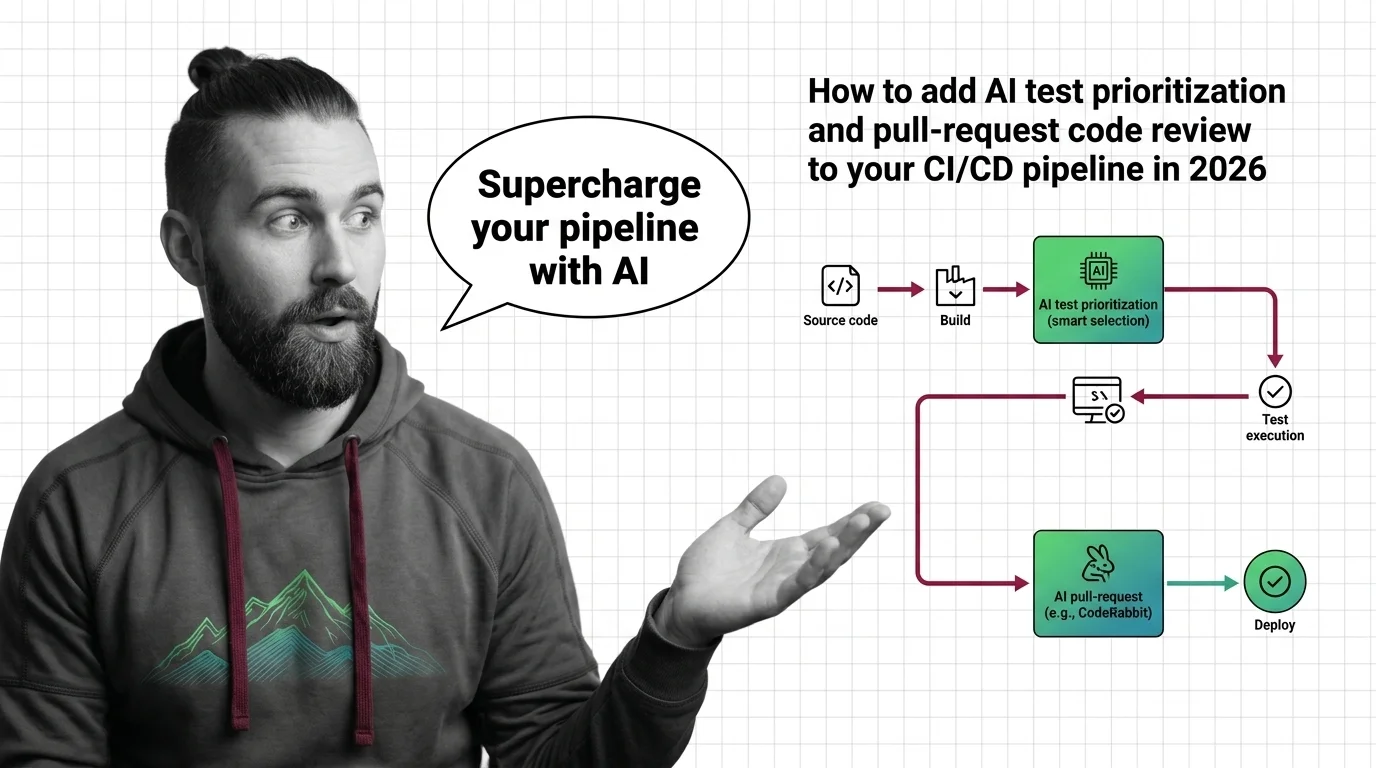
How to Add AI Test Prioritization and Pull-Request Code Review to Your CI/CD Pipeline in 2026
TL;DR
- AI in CI/CD lives in two distinct places — the merge gate and the test stage. Spec them separately.
- A review bot is only as good as the context you hand it. Scope, suppression rules, and a cost cap are part of the spec, not afterthoughts.
- The cost math changed in 2026. Price each AI step before you wire it in, not after the invoice lands.
You add an AI reviewer to your pull requests. The demo looked great. Two weeks later the bot is posting forty comments per PR — most of them restating what your linter already caught — and the team has quietly muted it. Meanwhile your test suite still runs end to end on every push, and the AI you added to “speed things up” is now a line item nobody can explain. The tool wasn’t broken. The integration never had a spec.
Before You Start
You’ll need:
- A git platform with PR/MR pipelines — GitHub, GitLab, Bitbucket, or Azure DevOps
- An AI review tool account: Qodo Merge, CodeRabbit, GitHub Copilot code review, or GitLab Duo
- A working grasp of Continuous Integration and Continuous Deployment
- A clear picture of which pipeline stage you’re actually trying to improve
This guide teaches you: how to treat AI in CI/CD Pipelines as two separate subsystems — review at the gate, test selection in the stage — and write a spec for each before you connect anything.
The 40-Minute Pipeline That Reviewed Nothing
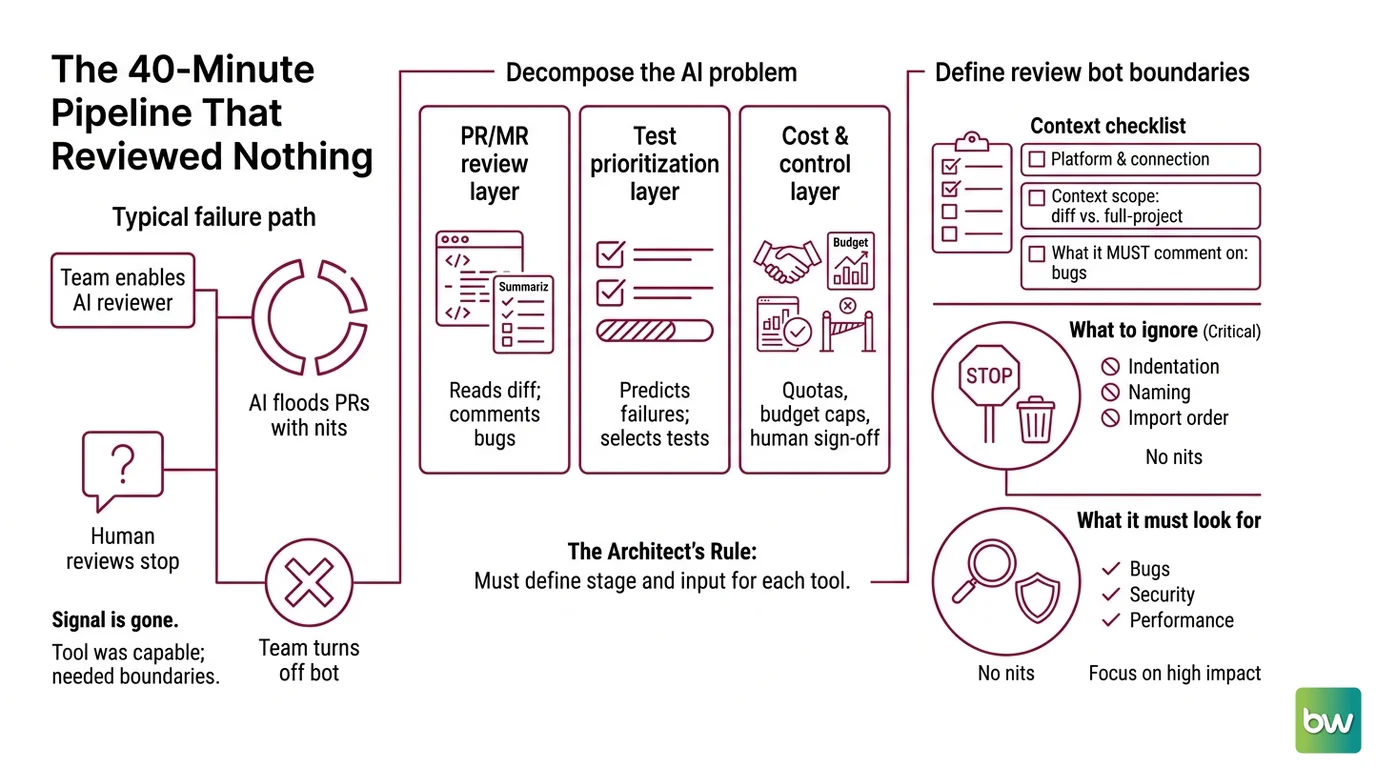
Here’s the failure I see most. A team enables an AI reviewer on every pull request with default settings. The bot comments on indentation, naming, and import order — all the things a linter owns — and buries the one genuine security issue under thirty cosmetic nits. Reviewers stop reading. The signal is gone.
It worked in the demo. In production, the bot flagged every PR with the same cosmetic complaints, and within a week the team turned it off. The tool was capable. Nobody told it what to ignore.
Step 1: Separate the Two Jobs AI Does in a Pipeline
Before you pick a tool, decompose the problem. AI shows up in a CI/CD pipeline doing two jobs, not one, and they live in different stages with different inputs and different cost models. Collapse them into “add AI to the pipeline” and you’ll spec neither one well.
Your system has these parts:
- PR/MR review layer — runs at the merge gate. It reads the diff, comments on bugs, security, and performance, and summarizes the change for a human reviewer.
- Test prioritization layer — runs inside the test stage. It predicts which tests are most likely to fail for a given change and runs those first, or selects a subset, instead of running everything blindly.
- Cost & control layer — quotas, budget caps, and the points where a human still has to sign off. This is not optional in 2026.
The Architect’s Rule: If you can’t say which stage a tool runs in and what it reads as input, you can’t spec it — and the AI will fill the gap with its own defaults.
Step 2: Lock Down What the Review Bot Sees
The review layer fails when it has no boundaries. Your job is to tell it what to read, what to comment on, and what to leave alone — before it ever posts.
Context checklist:
- Platform and connection method — how the bot authenticates and which repos it watches
- Context scope — diff-only, or full-project context
- What it must comment on — bugs, security, performance regressions
- What to suppress — style and formatting that your linters already own
- Existing static analysis in the pipeline — so the bot doesn’t duplicate it
- A cost cap per review
The tools differ in how they fill this spec. Qodo Merge is an AI PR-review agent that posts inline comments, generates a PR summary, and suggests tests across GitHub, GitLab, Bitbucket, and Azure DevOps (Qodo Docs). Its Teams plan runs $30 per user per month billed annually, or $38 monthly, with a quota of 20 PRs per user per month (Qodo’s pricing page); a free Developer plan covers PR review plus the IDE plugin. If you’d rather self-host, the open-source PR-Agent runs in Docker with your own model key at no license cost (Qodo’s GitHub repository).
CodeRabbit gives line-by-line feedback on bugs, security, and performance with one-click fixes, and it bundles a stack of static analysis — ESLint, Ruff, Pylint, golangci-lint, Clippy, Biome, Trivy, and secret scanning (CodeRabbit Docs). Pro is $24 per user per month annually, or $30 monthly, with a $12 Lite tier and a free tier (CodeRabbit’s pricing page). GitHub Copilot code review has been generally available since April 2025 and moved to an agentic architecture with full project context in March 2026 (GitHub Docs). GitLab Duo adds automatic MR summaries, reviewer recommendations, and diff-aware feedback right inside the merge request (GitLab Docs).
Under the hood, every one of these runs on Code LLMs that predict the most likely useful comment — which is exactly why scope matters. A model with no suppression rules optimizes for volume, not relevance.
The Spec Test: If your context doesn’t tell the bot that ESLint already owns style, it will spend its budget restating what your linter caught — and bury the one security bug that mattered.
Step 3: Wire the Test Stage to Run the Risky Tests First
The second job lives in the test stage, and the principle is simple: when you have hundreds of tests and a small diff, you don’t need to run them in arbitrary order. Test Prioritization uses a model to run the risky tests first — the ones most likely to fail for this specific change — so failures surface in the first minute, not the fortieth.
CloudBees Smart Tests is the leading named platform here. It uses machine learning to predict which tests are most likely to fail and reorders or selects them accordingly, built on the Launchable technology CloudBees acquired in 2024. CloudBees claims this makes testing 30–50× faster (CloudBees) — treat that as a vendor figure, not an independent benchmark, and measure your own pipeline before you believe it.
Order matters when you build this:
Build order:
- PR review at the gate first — it’s the cheapest to add and changes no test infrastructure.
- Test prioritization next — it needs historical test-run data before the model has anything to learn from.
- Cost controls last — once you’ve seen real PR and test volume, you know where the caps belong.
For the test-selection component, your context must specify:
- What it receives — test-run history, the diff, changed file paths
- What it returns — an ordered test list or a selected subset
- What it must NOT do — never skip tests on release or main branches
- How to handle uncertainty — fall back to the full suite when model confidence is low
This is also where Flaky Test Detection earns its keep: a model that ranks tests by failure likelihood needs to separate genuine regressions from tests that fail at random, or it will keep prioritizing noise. If your pipeline is defined as Pipeline As Code, encode the fallback-to-full-suite rule directly in the config so it survives the next refactor.
Step 4: Prove the AI Earned Its Place
Adding the tool is not the finish line. You need evidence each layer earned its place, and each metric has a failure signature you can watch for.
Validation checklist:
- Review precision — failure looks like: comments ignored, threads unresolved, the bot muted within a sprint
- Cost per merged PR — failure looks like: the bill scales with PR count faster than with team size
- Test-selection recall — failure looks like: a bug ships because the model deprioritized the test that would have caught it
- Time-to-merge — failure looks like: no measurable change versus the pipeline you had before
Cost & availability notes (2026):
- GitHub Copilot code review: From June 1, 2026, each review consumes a 13× premium-request multiplier and also bills against your GitHub Actions minutes (GitHub’s changelog). Price a single review before enabling it org-wide.
- GitLab Duo: Agentic code review is a flat $0.25 per automated review, size-independent, but it requires GitLab.com, Dedicated, or self-managed 18.8.4+ (GitLab Blog). Legacy Duo Pro and Duo Enterprise seat licenses are being phased out for a credits model, so qualify any per-seat budget you build.
- All prices are indicative as of May 2026 — check the provider’s current pricing before you commit budget.
Common Pitfalls
| What You Did | Why AI Failed | The Fix |
|---|---|---|
| Pointed the bot at every PR with default settings | It commented on style your linter already owns; signal drowned | Suppress lint-class comments; scope to bugs and security |
| Enabled Copilot review org-wide without pricing it | The 2026 multiplier plus Actions minutes blew the budget | Price one review first, then cap volume |
| Turned on test selection with no run history | The model had nothing to learn from; rankings were noise | Collect test-run history before enabling selection |
| Treated it as set-and-forget | No metric proved it helped; the bot drifted into noise | Track precision, cost per PR, and test recall weekly |
Pro Tip
Every AI step in a pipeline is a cost center with a quota knob. Spec the quota the same day you spec the behavior — because if you don’t, the invoice will spec it for you, and you’ll be reverse-engineering your own pipeline at the end of the billing cycle.
Frequently Asked Questions
Q: How to use AI for test prioritization and test selection in CI/CD? A: Feed a model your test-run history plus the current diff so it ranks tests by failure likelihood and runs the risky ones first. CloudBees Smart Tests does this with ML. The watch-out: never let it skip tests on release branches — pin a full-suite fallback for anything you ship.
Q: How to use AI-powered code review in pull request pipelines with Qodo or CodeRabbit? A: Both connect to your git platform and comment on the diff at the merge gate. Qodo Merge adds PR summaries and test suggestions; CodeRabbit bundles linters and secret scanning. The key move most teams skip: suppress style comments so the bot spends its budget on bugs, not formatting your linter already flags.
Q: How to integrate AI into a CI/CD pipeline step by step in 2026? A: Wire PR review at the gate first — it changes no test infrastructure. Add test prioritization once you have run history. Add cost caps last, after you’ve seen real volume. Watch the 2026 billing shifts: Copilot’s per-review multiplier and GitLab Duo’s flat-rate model both change the math.
Your Spec Artifact
By the end of this guide, you should have:
- A two-layer map of your pipeline — review gate and test stage — with one tool chosen per layer
- A review-bot context spec: scope, comment categories, suppression rules, and a cost cap
- A validation scorecard: review precision, cost per merged PR, test-selection recall, and time-to-merge
Your Implementation Prompt
Drop this into your AI coding or DevOps assistant (Claude Code, Cursor, Codex) when you’re ready to plan the integration. Fill every bracket with your own values — each one maps to a checklist item from the steps above.
You are configuring AI assistance for our CI/CD pipeline. Treat this as TWO
separate subsystems and produce a config plan for each.

LAYER 1 — PR/MR REVIEW (merge gate)
- Platform: [GitHub | GitLab | Bitbucket | Azure DevOps]
- Tool: [Qodo Merge | CodeRabbit | GitHub Copilot | GitLab Duo]
- Context scope: [diff-only | full-project]
- Comment on: [bugs, security, performance]
- Suppress (owned by linters): [style, formatting — list your linters, e.g. ESLint, Ruff]
- Cost cap per review: [your ceiling, e.g. $X or N reviews per PR]

LAYER 2 — TEST STAGE (test selection)
- Tool: [CloudBees Smart Tests | other]
- Inputs available: [test-run history window, diff, changed paths]
- Output: [ordered test list | selected subset]
- Hard constraint: [never skip tests on branches matching: release/*, main]
- Fallback: [run full suite when model confidence < your threshold]

BUILD ORDER
1. Wire Layer 1 first (no test-infrastructure change).
2. Add Layer 2 once [N] weeks of test-run history exist.
3. Add cost caps once real PR and test volume is measured.

VALIDATION
After [2 weeks], report: review comments accepted vs muted, cost per merged
PR, test-selection recall (bugs caught vs bugs shipped), and change in
time-to-merge versus the previous pipeline.
Ship It
You now see AI in a pipeline the way it actually works: two subsystems, not one feature. Review lives at the gate and answers to scope and cost; test selection lives in the stage and answers to run history and recall. Spec each one, measure each one, and the AI stops being a mystery line on the invoice and starts being infrastructure you can reason about.
AI-assisted content, human-reviewed. Images AI-generated. Editorial Standards · Our Editors