GPTQ vs AWQ vs GGUF vs bitsandbytes: Quantization Formats and Their Tradeoffs Explained
Table of Contents
ELI5
Quantization shrinks LLM weights from 16-bit to 4-bit or lower, cutting memory by 75% so large models run on smaller hardware — at the cost of some precision.
Take a 70-billion-parameter model. Strip three-quarters of the numerical precision from every weight. Run it. The outputs are nearly identical to the original — so close that most benchmarks barely register the difference. You discarded information, and nothing visible broke. That gap between expectation and outcome is where the interesting engineering lives, and the four dominant quantization formats exploit it in fundamentally different ways.
The Arithmetic Underneath
Every parameter in a large language model is a floating-point number, and the format of that number determines how much memory it consumes. Before comparing specific quantization formats, three foundational concepts shape everything that follows.
What concepts do you need to understand before learning about LLM quantization?
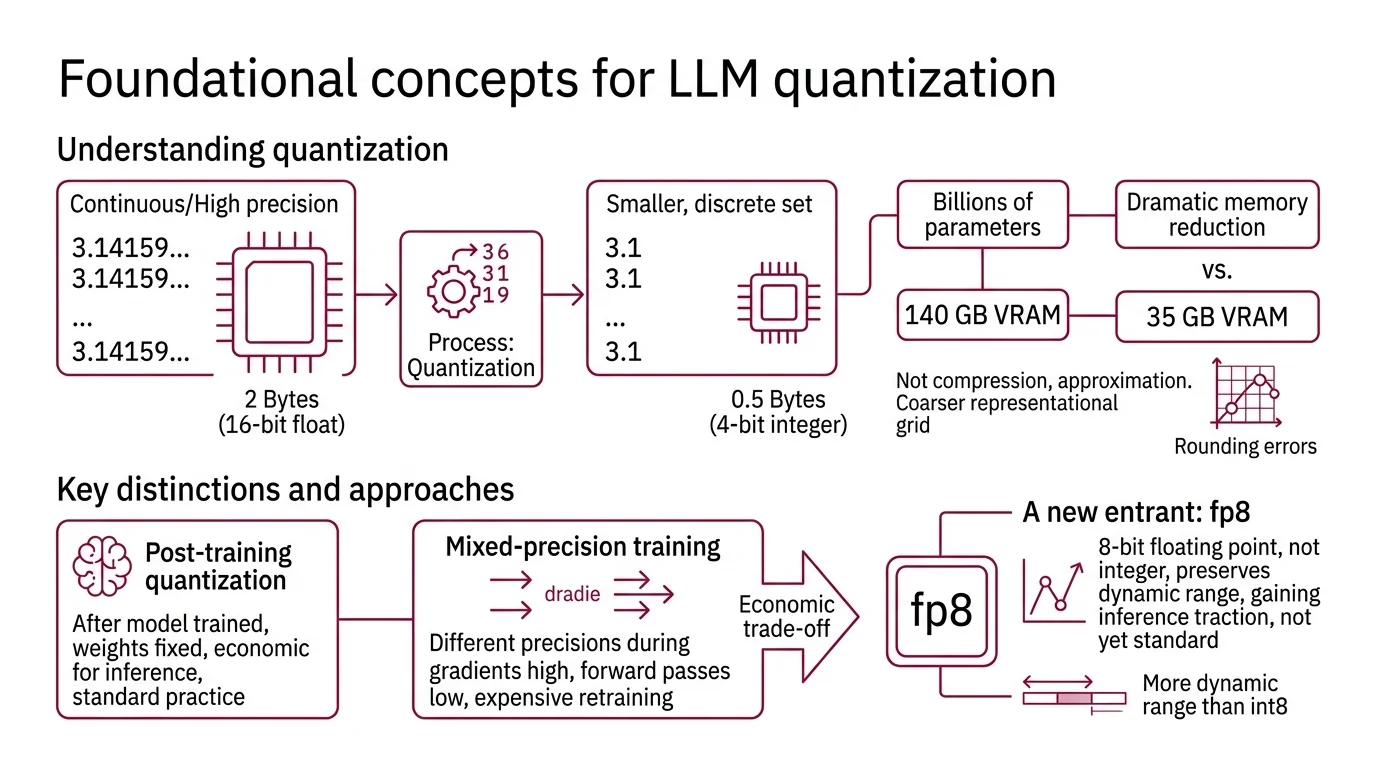
Quantization is the process of reducing the numerical precision of model weights — mapping continuous or high-precision values onto a smaller, discrete set. A weight stored in 16-bit floating point occupies two bytes; the same weight in 4-bit integer occupies half a byte. Multiply that difference across billions of parameters and you are looking at the gap between needing 140 GB of VRAM and needing 35 GB.
Not compression. Approximation.
The mechanism does not shrink files the way a zip algorithm does. It narrows the representational grid — choosing coarser steps to place numbers on, then accepting the rounding errors that follow. The art is in deciding which rounding errors you can tolerate.
Post Training Quantization applies this precision reduction after a model has already been trained; the weights are fixed, and you are approximating them with fewer bits. Mixed Precision Training, by contrast, uses different precisions during training itself — keeping gradients in higher precision while running forward passes in lower precision. Most LLM quantization today is post-training. The reason is economic: retraining a 70-billion-parameter model in reduced precision costs nearly as much as training it in the first place.
A newer entrant, Fp8, uses 8-bit floating point rather than integer representation, preserving more dynamic range than INT8 at the same memory cost. It is gaining traction for Inference but has not yet consolidated into a standard quantization format the way the four we are comparing here have.
Four Formats, Four Philosophies
The four dominant formats solve the same problem — fit a large model into less memory — but their engineering assumptions diverge sharply. That divergence determines when each one excels and when it fails.
What are the main LLM quantization formats and how do GPTQ AWQ GGUF and bitsandbytes differ?
GPTQ (Frantar et al., ICLR 2023) treats quantization as an optimization problem. It uses approximate second-order information — the Hessian of the loss — to decide which rounding errors matter most, then compensates for each weight’s error across the row before moving to the next. The result: 3-bit and 4-bit models with negligible accuracy loss on most text tasks, delivering a 3.25x to 4.5x speedup over FP16 depending on the GPU (GPTQ Paper). The tradeoff is calibration time; GPTQ needs a small representative dataset to compute those error-compensation steps. One thing to know: AutoGPTQ, the original Python toolkit, was archived in April 2025. Its successor, GPTQModel v5.8.0, now covers GPTQ, AWQ, GGUF, FP8, and EXL3 under one roof.
Awq (Lin et al., MLSys 2024 — Best Paper) starts from a different observation. Not all weights contribute equally to output quality. Roughly 1% of weight channels — those connected to high-magnitude activations — account for a disproportionate share of model accuracy. AWQ identifies those salient channels using offline activation statistics and scales them before quantization, giving the critical weights more of the precision budget while letting the rest be rounded aggressively. No backpropagation, no reconstruction loss — just a one-pass scaling operation followed by standard quantization (AWQ Paper). The llm-awq repository has no formal version releases; updates track by commit rather than semver.
GGUF — Georgi Gerganov Universal Format — is the odd one out. It is not a quantization algorithm; it is a file format designed for distribution and local inference. Introduced in August 2023 by the Llama Cpp project, GGUF packages model weights into a single file that runs on CPU, Apple Metal, CUDA, AMD HIP, Vulkan, and a growing list of backends (llama.cpp GitHub). The quantization itself happens through llama.cpp’s quantize tool, offering a spectrum from 1.58-bit to 8-bit — including importance-matrix-aware quants like IQ2_XS and IQ4_XS. GGUF’s advantage is reach: any machine with a CPU can run inference. No GPU required.
bitsandbytes takes a different position entirely. It quantizes dynamically at load time — no calibration data, no preprocessing step. Load a model from Hugging Face, pass a quantization flag, and the weights are converted on the fly to 8-bit (LLM.int8()) or 4-bit (NF4 or FP4). Nested quantization saves an additional 0.4 bits per parameter (HF Docs). But the distinctive feature is not compression — it is training. bitsandbytes is the only format in this comparison that supports fine-tuning through QLoRA, making it the default choice when you need to adapt a quantized model, not just serve it. Version 0.49.2 supports NVIDIA CUDA, AMD ROCm, Intel XPU, and Apple Metal — though Metal performance remains noticeably slower, not yet production-grade on macOS.
| Format | Bit Widths | Calibration Needed | Training Support | Primary Platform |
|---|---|---|---|---|
| GPTQ | 2/3/4-bit | Yes (small dataset) | No | GPU (CUDA) |
| AWQ | INT3/INT4 | Yes (activation stats) | No | GPU (CUDA) |
| GGUF | 1.58-bit to 8-bit | Optional (importance matrix) | No | CPU + GPU (multi-backend) |
| bitsandbytes | 4-bit / 8-bit | No | Yes (QLoRA) | Multi-platform |
The Calibration Divide
The distinction between how these formats arrive at their quantized weights is more consequential than the bit widths themselves.
What is the difference between post-training quantization and quantization-aware training?
All four formats use post-training quantization — they reduce weight precision after training is complete. But they differ in how much information they bring to the rounding decision.
GPTQ uses the most information: second-order derivatives that estimate how much each weight’s error will propagate through the network. This makes it the most accurate weight-for-weight at the same bit width, but also the most expensive to prepare. AWQ uses less information — just activation magnitudes — but applies it more surgically: protect the critical 1%, let everything else be rounded hard. GGUF’s quantize tool can optionally use an importance matrix computed from a calibration dataset, but most users skip this step and accept the default rounding. bitsandbytes skips calibration entirely; NF4 quantization assumes a theoretically optimal distribution for normally distributed weights, which works surprisingly well without seeing any data at all.
Quantization-aware training (QAT) takes the opposite approach. It inserts simulated quantization nodes during training, letting the model learn to compensate for precision loss through gradient updates. QAT typically yields better accuracy than PTQ at the same bit width. But for models with tens of billions of parameters, QAT’s memory cost undermines its purpose — you need full-precision gradients alongside the quantized forward pass, which can exceed the memory savings you were trying to achieve (NVIDIA Blog). This is why PTQ dominates the LLM quantization space; the models are too large for QAT to be practical outside specialized research.
The closest working approximation is QLoRA through bitsandbytes: load the base model in 4-bit, then train small adapter matrices in full precision. The base weights stay frozen — it is not true QAT — but it captures some of the same benefit by letting the model learn around its own quantization errors.
What the Throughput Numbers Predict — and Where They Mislead
On a Qwen2.5-32B model served through vLLM, the performance hierarchy is stark: AWQ with Marlin kernels reaches 741 tokens per second, GPTQ with Marlin hits 712, FP16 (unquantized) delivers 461, bitsandbytes manages 168, and GGUF trails at 93 (PremAI Guide). These numbers are hardware-specific — measured on a particular GPU generation — and absolute throughput will shift across different setups.
The pattern, though, is instructive. AWQ and GPTQ with optimized kernels outperform even unquantized FP16 because the memory bandwidth savings offset the dequantization overhead. The model spends less time waiting for weights to arrive from VRAM and more time computing. If your bottleneck is memory bandwidth — and for most GPU-served LLMs, it is — quantization does not just save memory. It makes inference faster.
bitsandbytes pays a throughput penalty for its dynamic quantization and training capability. GGUF’s numbers through vLLM are misleading; GGUF was not designed for GPU serving farms — it was designed for local machines, laptops, and CPUs, where Continuous Batching is irrelevant and the alternative is not running the model at all.
Quality retention tells a complementary story. At 4-bit precision, AWQ retains roughly 95% of original model accuracy, bitsandbytes holds at 95% or above, GGUF’s Q4_K_M sits around 92%, and GPTQ comes in near 90% (PremAI Guide). These are aggregate numbers across general text tasks — GPTQ’s quality varies more sharply by domain, with code generation showing larger degradation than conversational text. The Temperature And Sampling parameters interact with these precision losses; higher temperatures explore the probability distribution’s tails, where quantized weights are least accurate and rounding errors compound.
Rule of thumb: if you need GPU throughput, choose AWQ or GPTQ with Marlin kernels. If you need to run on a laptop or CPU, choose GGUF. If you need to fine-tune, bitsandbytes is the only option. If you are unsure, AWQ at 4-bit is the safest default for serving.
When it breaks: all four formats degrade on tasks requiring precise numerical reasoning, rare-token generation, or long code sequences — domains where rounding errors accumulate rather than average out. The lower the bit width, the steeper the degradation curve on these edge cases.
Compatibility notes:
- AutoGPTQ (archived): Archived April 2025; replaced by GPTQModel v5.8.0 covering GPTQ, AWQ, GGUF, FP8, and EXL3. Hugging Face Transformers is deprecating AutoGPTQ integration. Migrate to GPTQModel.
- vLLM legacy quant formats: An active RFC proposes deprecating 19 legacy quantization kernels, including AWQ Marlin/Triton and GPTQ Marlin/BitBLAS. Monitor vLLM #30136 before locking your serving stack.
The Data Says
Quantization is not a lossy shortcut — it is a precision-engineering tradeoff where the format you choose reveals what you value: raw GPU speed (AWQ, GPTQ), hardware reach (GGUF), or the ability to keep training (bitsandbytes). The models are more redundant than their parameter counts suggest, and the right format exploits that redundancy without touching the knowledge that matters.
AI-assisted content, human-reviewed. Images AI-generated. Editorial Standards · Our Editors