Domain-Specific Prompting for Legal, Medical, and Code AI: Applied Patterns in 2026
TL;DR
- Domain-specific prompting works by injecting jurisdiction, role context, and document type into the system prompt — the model cannot guess what your domain requires.
- Legal and medical benchmarks reward structured few-shot chains; classification tasks respond to prompting faster than open-ended reasoning.
- Fine-tuning wins above roughly a thousand requests per day with a narrow, stable task scope — below that threshold, prompting plus retrieval usually wins on iteration speed.
Your legal team just sent a contract to a general-purpose LLM. It came back with five bullet points summarizing the document. No flagged clauses. No jurisdiction analysis. No risk tiers. Run the same contract through a domain-specified prompt and you get three high-risk clauses surfaced with clause-level citations. The model is identical. The difference is that the second prompt told it who it is, what it knows, and what “done” looks like. The first said nothing. That gap — between what you intended and what you specified — is exactly what Domain-Specific Prompting closes.
Before You Start
You’ll need:
- A strong instruction-following model — Claude Opus 4.8 or GPT-5 for legal and medical tasks; GitHub Copilot Enterprise for code
- Working knowledge of Prompt Engineering and System Prompts
- A concrete definition of what “correct output” looks like in your domain before you write a single prompt
This guide teaches you: how to decompose domain-specific tasks into three specification layers — role, context, and output contract — then validate the result so the AI produces professional-grade output without fine-tuning.
Compatibility notes:
- Claude Opus 4.1 (Deprecated — BREAKING): Retiring August 5, 2026 (Anthropic Docs). Migrate to Claude Opus 4.8 for all domain tasks.
- OpenAI v1/prompts endpoint (BREAKING): Shutting down November 30, 2026 (OpenAI Docs). Move prompt content out of managed prompt objects into application code and use git for versioning.
The NDA That Missed the Auto-Renewal Clause
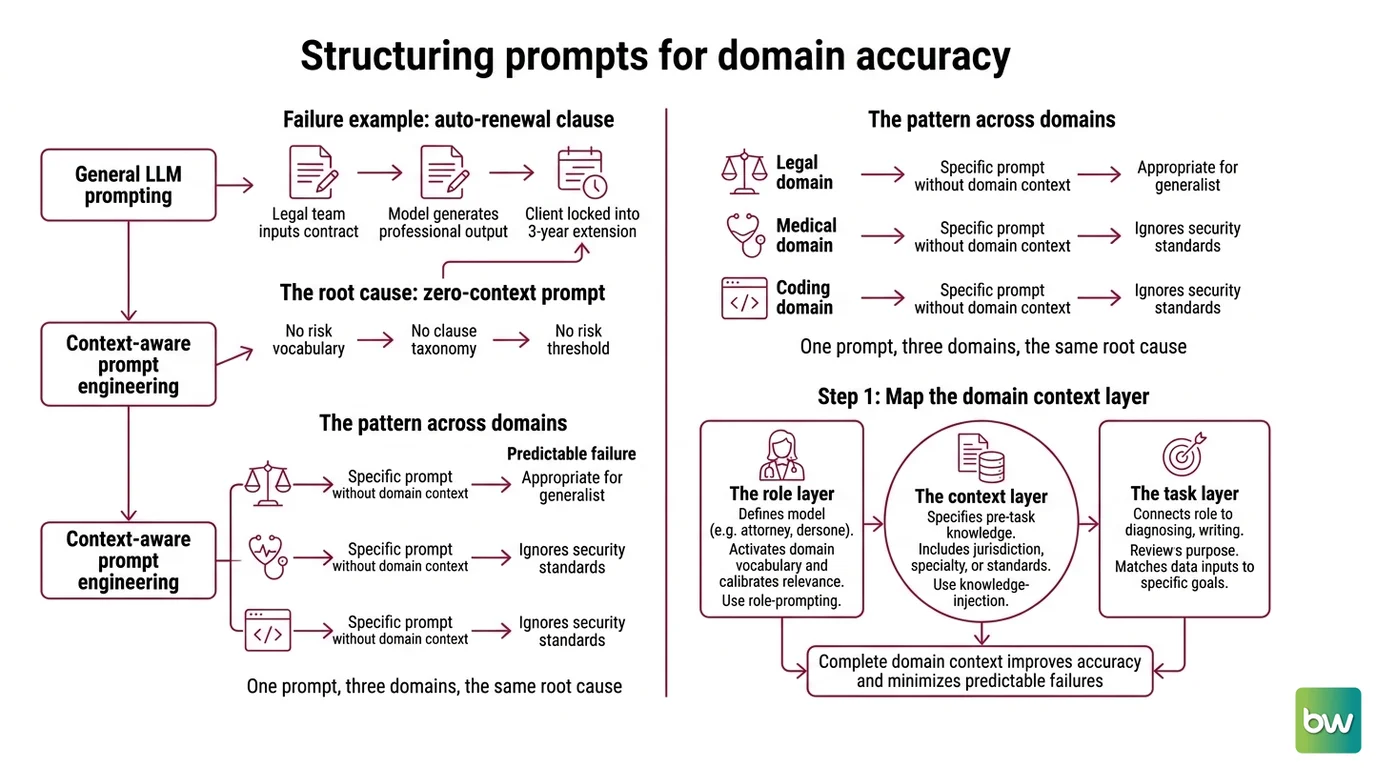
The failure mode is predictable. A legal team sends thirty pages of contract language to a general LLM. The output looks professional — organized, coherent, fluent. It misses an auto-renewal clause that locks the client into a three-year extension.
The model is not wrong — the specification is empty. No risk vocabulary. No clause taxonomy. No threshold for what “high-risk” means in this transaction. The AI optimized for fluent summarization because that is what a zero-context prompt signals.
The same pattern appears across domains. Medical: a clinical decision tool prompted without specialty context produces differentials appropriate for a generalist, not a cardiologist reviewing chest pain. Code: GitHub Copilot without a domain rules file generates code that passes syntax checks but ignores your team’s security standards. One prompt, three domains, the same root cause.
Step 1: Map the Domain Context Layer
Every domain prompt needs three components. Skip any one and accuracy drops.
The Role Layer defines who the model is. Not “you are a helpful assistant” — that is a placeholder, not a role. “You are a senior commercial contract attorney licensed in New York, reviewing an asset purchase agreement for a technology company” is a role. Role Prompting is not decoration. It activates domain vocabulary and calibrates what the model treats as relevant before it reads a single word of your document.
The Context Layer specifies what the model knows before it starts the task. For legal work: jurisdiction, governing law, deal type, counterparty type, risk tier definitions. For medical: clinical specialty, patient demographics, symptom timeline, guideline version. For code: language and framework version, coding standards, security requirements. Use Knowledge Injection here — paste clause definitions, diagnostic criteria, or security policies directly into the system prompt rather than assuming the model has current, accurate domain knowledge.
The Output Contract defines what “done” looks like. A contract review returns a JSON array of {clause_text, risk_level, recommendation}. A clinical differential returns an ordered list of diagnoses with confidence and reasoning. A code review returns annotated line-level comments. No output contract means the model picks a format. It will pick the wrong one.
Context Engineering is the discipline of fitting these three layers into your Context Window efficiently. Domain context competes with document length. A compressed system prompt — role, key definitions, output contract — typically runs 800 to 1,200 tokens, leaving the rest of the window for the actual document.
Step 2: Define Domain Constraints and Safety Boundaries
Once you have the three layers, add constraints. These are the rules that stop the model from doing things you did not ask for.
Context checklist — legal:
- Jurisdiction and governing law declared
- Document type specified (NDA, asset purchase, SaaS agreement)
- Risk tiers defined with examples — critical: liability cap absent; high: auto-renewal without notice period; standard: boilerplate limitation
- Forbidden outputs: “do not provide legal advice — flag clauses for attorney review, do not recommend a course of action”
- Required outputs: clause-level citation for every risk flag; if a clause cannot be located in the document, state that it is absent — do not infer it
Context checklist — medical:
- Clinical specialty and patient context specified before the case notes
- Guideline version referenced — CPGPrompt-style decision trees convert clinical guidelines into LLM-executable decision steps, as published in JAMIA (April 2026)
- Differential format: ordered list, not free-text narrative
- Forbidden outputs: “do not recommend treatments or dosages — provide differentials for clinician review only”
- Clinical review is a required system component, not a disclaimer. Top models reached approximately 91–96% on MedQA USMLE as of April 2026 (Awesome Agents) — but those are standardized test conditions, not real patient populations with incomplete histories. Scores at that level do not establish autonomous clinical deployment safety. The clinician review gate is non-negotiable.
Context checklist — code:
- Language and framework version locked
- Security standard specified — reference your company security policy or OWASP Top 10 directly in the system prompt
- Error handling pattern declared
- For GitHub Copilot: add domain constraints to
.github/copilot-instructions.mdin your repo root; for Cursor: use.cursor/rules/*.mdcfiles (GitHub Docs)
One important constraint for code AI: preliminary research found that prompt engineering does not significantly reduce the frequency or severity of code vulnerabilities across tested LLMs and languages — all p > 0.05 across five LLMs and four languages (arxiv code security, May 2026 preprint). Prompts shift which vulnerability categories appear, not the overall count. Static analysis and security review remain mandatory after AI-generated code, regardless of how well-specified your domain prompt is.
Multi-Turn Prompt Design matters for complex documents. A single-pass review of a 150-page agreement loses coherence. Break it into section batches: a system prompt that persists across turns, per-section user messages with the clause batch, and a synthesis pass that aggregates risk flags at the end. You can also use Multimodal Prompting when documents include scanned pages or embedded tables — pass the image alongside the text extraction so the model can reconcile discrepancies between the two.
Step 3: Sequence the Domain Prompt Architecture
Build order matters. Do not assemble all three layers at once and hope.
Build order:
- System prompt only — role plus output contract, no document yet. Send it with a synthetic test case. Does the output match the contract? If format is wrong now, document length is not your problem. Fix the contract first.
- Add few-shot examples — two to three domain-specific input-output pairs. For contract review: one low-risk clause correctly classified, one high-risk clause correctly flagged with citation. Three diverse examples beat ten identical ones. Diversity in your few-shot set teaches format generalization; repetition teaches the model to expect one type of input.
- Add the document — the actual contract, clinical notes, or codebase section, positioned after the system prompt and examples.
- Add per-document constraints — deal size threshold, patient age range, or module scope. These are instance-specific and belong in the user message, not the system prompt.
The MedPrompt framework demonstrated what a disciplined version of this sequence produces. kNN-based few-shot selection, chain-of-thought generation, and answer-shuffled ensembling — all prompt-based, no fine-tuning. GPT-4 scored 90.2% on MedQA using this approach, versus 86.5% for Med-PaLM 2 with full medical fine-tuning, reducing specialist model error rates by approximately 27% (Microsoft Research). The sequence is the specification.
Step 4: Validate Domain-Specific Output
Visual inspection fails at scale. You need domain-aware assertions.
Legal validation checklist:
- Clause coverage — failure: model reports no risk flags on a document you know has three
- Citation accuracy — failure: model cites “Section 4.2(b)” that does not exist in the document. Lexis+ with Protégé — rebranded from Lexis+ AI in February 2026 (LexisNexis) — flags AI-generated citations that cannot be verified against authoritative sources. Build the equivalent assertion into your pipeline: every cited section number must exist in the input before the output leaves the system.
- Format conformance — failure:
risk_levelfield contains “medium-high” instead of “medium” or “high”
Medical validation checklist:
- Differential completeness — failure: model produces one diagnosis where clinical guidelines require ruling out three
- Guideline adherence — failure: output contradicts the decision pathway for the specified condition
- Assertion-based validation, not visual scanning. The clinician review gate is the final assertion — it must fire before output reaches any patient-facing system.
Code validation checklist:
- Static analysis after every AI-generated file — do not skip because the code looks clean
- Security linter against every modified file
- Existing test suite — AI output that passes syntax but breaks tests is not done
Common Pitfalls
| What You Did | Why AI Failed | The Fix |
|---|---|---|
| Sent document without role or jurisdiction | Model uses generalist interpretation of every clause | Add role layer before the document in every request |
| Used “be accurate and thorough” as instruction | No domain vocabulary, no risk thresholds | Replace with explicit clause taxonomy and risk tier definitions |
| One-shot an entire contract | Context dilution; model loses track of early clauses | Break into section batches with a synthesis pass |
| Skipped few-shot examples to save tokens | Model defaults to pretraining output format | Use 2–3 examples; they fix format permanently |
| Assumed domain prompts eliminate code security risk | Vulnerability frequency unchanged per preliminary research | Layer security assertions and static analysis after every AI output |
| Referenced “Lexis+ AI” in your specification | Product rebranded to “Lexis+ with Protégé” in February 2026 | Update the name in documentation and integration prompts |
Pro Tip
Your domain spec is a version-controlled asset, not a sticky note.
The single biggest efficiency gain in domain AI is treating your system prompt like your codebase. Every change gets a commit. Every format revision gets a version bump. When your team asks why contract review output changed this week, you can show the diff. Teams that do not version their prompts spend weeks diagnosing regressions they cannot trace back to a specific change.
Context-engineering is not a one-time setup. Start with the minimum viable spec — role, output contract, two examples — test against your hardest edge cases, and iterate from the first failure. The spec is the product. The model is the runtime.
Frequently Asked Questions
Q: How to use domain-specific prompting for legal document analysis and contract review with LLMs?
A: Build a three-layer system prompt: attorney role with jurisdiction, a clause risk taxonomy with concrete tier definitions, and a JSON output contract. Add two or three few-shot examples showing correctly classified clauses. For documents over thirty pages, use section-batch processing with a final synthesis pass to prevent context dilution. The specific edge case to watch: indemnification clauses with cross-references to defined terms. Include a constraint requiring the model to trace every cross-referenced definition before assigning a risk level — models frequently classify indemnification clauses in isolation and miss the chain.
Q: How to use domain-specific prompting for medical reasoning and clinical decision support?
A: Start with the MedPrompt pattern (Microsoft Research): build a case library, select the nearest matching examples by embedding similarity, generate chain-of-thought reasoning per match, and ensemble the results. For clinical guideline adherence, convert the relevant guideline into a decision-tree prompt following the CPGPrompt approach, published in JAMIA. Every output path must include a “requires clinician review” flag as a required field in the output contract — not a disclaimer, but a validation assertion that blocks routing to patient records without sign-off. Benchmark scores do not guarantee clinical deployment safety.
Q: When should you fine-tune an LLM instead of using domain-specific prompting for specialized tasks?
A: The decision sequence runs: prompt → retrieval-augmented generation → fine-tune using methods like PPO (Proximal Policy Optimization)-based RLHF or LoRA adapters → distill, per BigData Boutique’s 2026 analysis. Fine-tuning wins when you are above roughly a thousand requests per day, your task scope is narrow and stable, and you have labeled data. A 7B fine-tuned model outperformed a prompted large model on a narrow classification task — 88% versus 31% accuracy — with significant inference cost reduction (llm-stats.com). Medical fine-tuning saturates around a hundred thousand domain-specific samples with a maximum gain of roughly 13.5 percentage points (PMC/NCBI). Below those thresholds, prompting plus retrieval wins on iteration speed.
Your Spec Artifact
By the end of this guide, you should have:
- A three-layer system prompt template for your domain (role context, knowledge injection, output contract)
- A domain constraint checklist covering required outputs, forbidden outputs, format conformance, and safety gates
- A validation assertion list with specific failure modes and what each failure tells you about the specification gap
Your Implementation Prompt
Paste this into Claude Opus 4.8, GPT-5, or your preferred instruction-following model when starting a domain-specific prompting project. Replace every bracketed value with your domain specifics before running.
You are [ROLE: e.g., "a senior commercial contract attorney licensed in [JURISDICTION],
reviewing [DOCUMENT_TYPE] for [CLIENT_TYPE]"].

Domain context:
- Risk vocabulary: [RISK_TIERS: define critical, high, standard with concrete examples]
- Governing standard: [STANDARD: jurisdiction / clinical guideline version / security policy]
- Key definitions: [DEFINITIONS: paste the 3–5 domain terms the model must use correctly]

Output contract:
- Format: [FORMAT: e.g., JSON array of {clause_text, risk_level, recommendation}]
- Required fields: [REQUIRED: e.g., clause-level citation for every risk flag]
- Forbidden outputs: [FORBIDDEN: e.g., "do not provide legal advice or treatment recommendations"]
- Absent content rule: "If [ELEMENT] cannot be located in the provided document,
  state it is absent — do not infer it."

Examples:
[EXAMPLE_1: input → correct output at RISK_TIER_A]
[EXAMPLE_2: input → correct output at RISK_TIER_B, different document section]

Task:
[DOCUMENT_OR_CASE_INPUT]

Per-document constraints:
[INSTANCE_SPECIFIC: deal size threshold / patient age / module scope]
Validation step: assert that (1) output format matches the contract exactly, (2) every citation references a section that exists in the input document, and (3) every required field is present with a valid value before the output leaves the system.
Ship It
You now have a decomposition framework that transfers across legal contracts, medical reasoning, and codebase review. Role layer defines the model’s priors. Context layer specifies what it knows. Output contract defines done. Validation assertions prove it. Start with the minimum viable spec and iterate from the first case where output disagrees with your domain knowledge — that failure is your most precise specification feedback.
— Deploy safe, Max.
AI-assisted content, human-reviewed. Images AI-generated. Editorial Standards · Our Editors