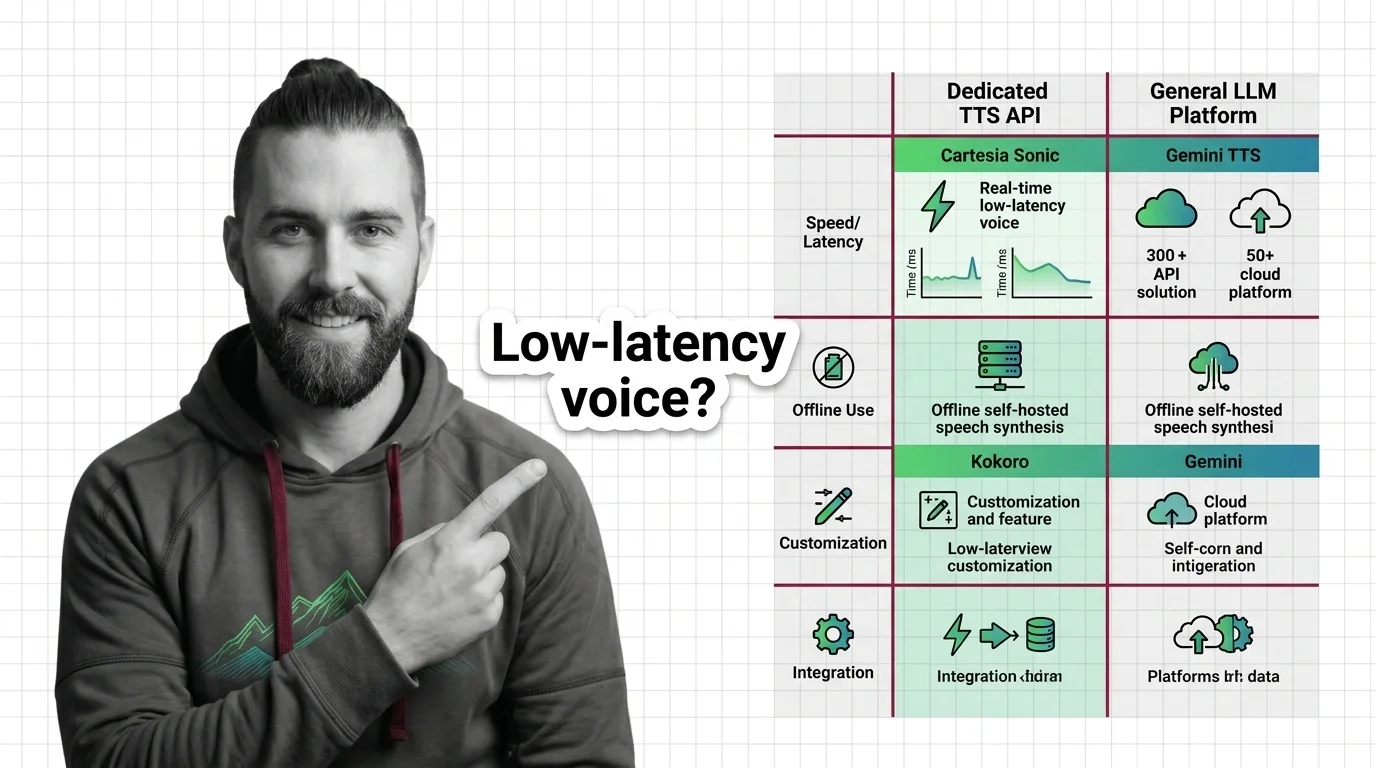
Dedicated TTS API vs. General LLM Platform: When to Use Cartesia Sonic, Kokoro, or Gemini TTS in 2026
TL;DR
- Dedicated TTS APIs win on latency and compliance; general LLM platforms win when your speech needs to stay inside an LLM conversation — same context, same API call.
- The decision is a constraint-matching problem. Specify your latency budget, deployment environment, and compliance requirements before comparing providers.
- Cartesia Sonic is your production default for real-time voice agents. Kokoro TTS is your offline/air-gap option. Gemini TTS belongs in workflows where the LLM controls both what to say and how to say it.
You reached for Gemini TTS because Gemini is already in the stack. The API call looked simple. Then your voice agent hit 280ms time-to-first-audio. The product team asked why the conversation felt laggy. You checked the docs and found the model is still labeled “preview” — the ID might change without notice. That wasn’t a Gemini problem. That was a spec problem. You hadn’t written down what the voice pipeline actually needs before choosing a provider.
Before You Start
You’ll need:
- A project with a concrete TTS requirement — voice agent, async audio generation, or self-hosted deployment
- Working knowledge of Text-to-Speech fundamentals and optionally Voice Cloning if your use case requires speaker adaptation
- A clear picture of where audio gets generated and consumed in your system
This guide teaches you: How to map your voice architecture constraints first — latency budget, deployment environment, compliance, cost model — so the provider choice follows from the spec rather than from habit.
When the Stack Choice Becomes the Architecture Mistake
You have a voice requirement. You pick the provider that’s already in the stack, or the one from the demo, or the one the blog post recommended. Then you discover the requirements you didn’t write down.
The latency budget you assumed was fine is 250ms over target. The model ID you hardcoded is deprecated. The language your new user base speaks isn’t in the supported list. It worked in the demo on Friday. In production, the latency was the first thing everyone noticed — because the constraint was never in the spec.
Step 1: Map Your Voice Architecture
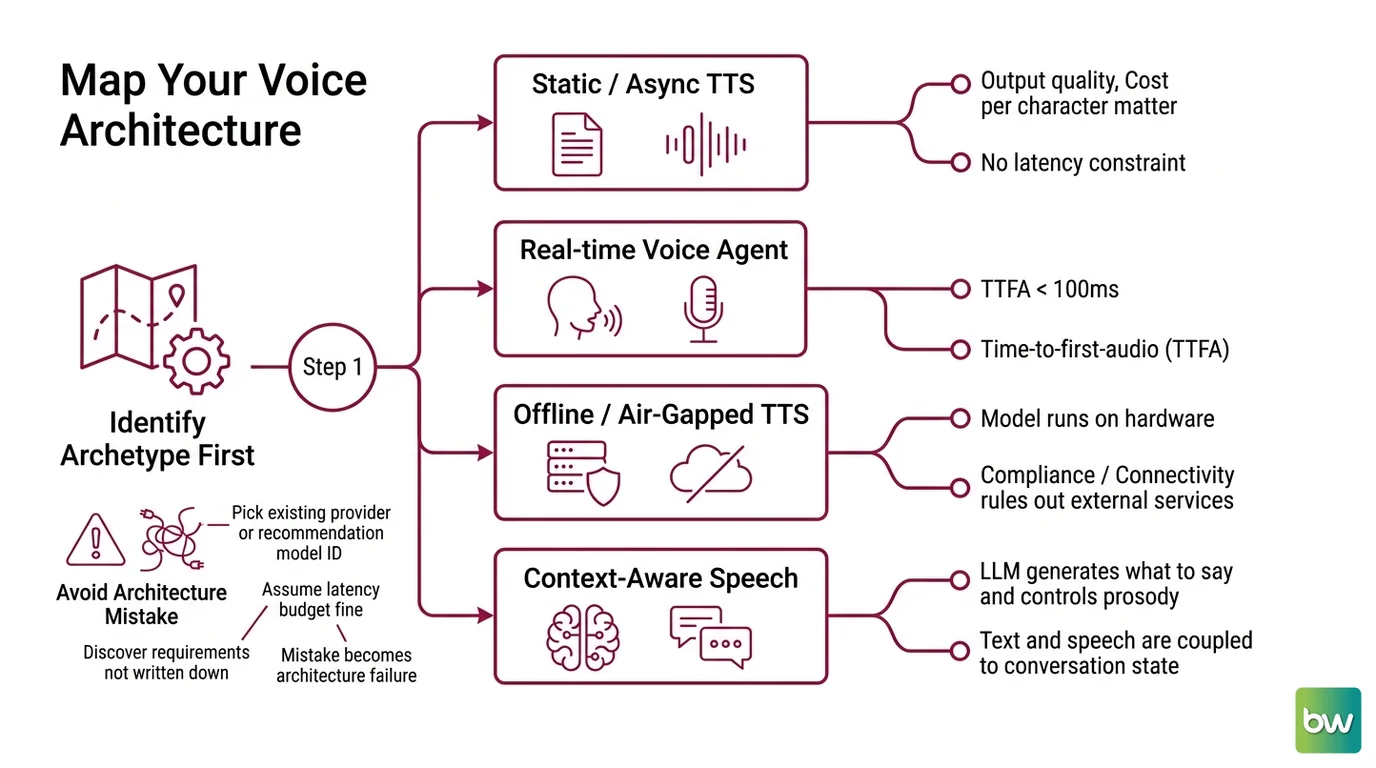
Before comparing APIs, identify which type of voice problem you’re solving. Four archetypes cover most production use cases.
The reason this matters: a Mel Spectrogram intermediate representation pipeline designed for batch audio generation has completely different constraints than a streaming voice agent that needs to start speaking within 90ms. Knowing your archetype tells you which of those shapes your problem is before you look at a single pricing page.
Your voice architecture is one of these:
- Static / async TTS — you have finished text and need audio files. No latency constraint. Batch is fine. Output quality and cost per character matter most.
- Real-time voice agent — the user speaks, the LLM responds, the response must be spoken back within a conversation turn. Time-to-first-audio (TTFA) under 100ms is the hard constraint.
- Offline / air-gapped TTS — no cloud API. The model runs on your hardware. Compliance or connectivity requirements rule out external services. A lightweight Vocoder component and CPU-runnable weights matter more than benchmark rankings.
- Context-aware speech — the LLM generates what to say and controls Prosody — tone, pacing, emphasis — in the same API call. The text and speech are coupled to conversation state.
The Architect’s Rule: If you can’t place your use case in one of these four archetypes, your constraint list isn’t complete yet. The wrong archetype leads to the wrong tool — and no amount of tuning a general-purpose API will fix a structural mismatch.
Step 2: Define Your Constraints
Each constraint narrows the viable provider set. Work through this list before you open a pricing page.
Context checklist:
- Latency budget — hard real-time (<100ms TTFA), soft real-time (<500ms), or async (seconds acceptable). This is the single most decisive constraint.
- Language requirements — Kokoro TTS officially supports 8 languages, with English quality strongest (Kokoro HuggingFace). Fish Audio S2.1 Pro covers 83. Know your actual user base — don’t discover a language gap after launch.
- Compliance — HIPAA, SOC 2, GDPR, PCI? Cartesia Sonic-3.5 carries all four certifications (Cartesia Sonic page). All Gemini TTS models remain in “preview” status as of June 2026, which affects what compliance documentation you can produce (Google AI Pricing).
- Deployment environment — cloud API, self-hosted on your infrastructure, or edge/air-gapped. Kokoro-82M runs on CPU with under 2GB VRAM on GPU, and the full model weighs ~327MB (TextToLab). If cloud APIs are out, Kokoro is the realistic option for most teams.
- Voice cloning requirement — Kokoro does not support voice cloning natively. Fish Audio S2.1 Pro charges $0.10 per voice with a 15-second minimum sample (Fish Audio Pricing). Note that Cartesia’s older voice embedding API endpoints —
POST /voices/clone/clip,POST /voices/mix,POST /voices— were discontinued June 1, 2026 (Cartesia Docs). Check current Sonic-3.5 capabilities before building a cloning workflow. - Cost model — per-second (Cartesia: 15 credits per second of audio, per Cartesia Pricing), per-character (ElevenLabs: $0.05 per 1K characters, per ElevenLabs Pricing), or per-token (Gemini: 25 tokens per second of audio, at $10 per 1M output tokens for Gemini 2.5 Flash TTS, per Google AI Pricing). These compound differently at scale. Run the math before assuming cheaper-looking rates.
- Model stability — are you comfortable with a “preview” model ID in production? Gemini TTS model IDs may change without notice. That’s fine for experiments; it’s a risk for systems that pin dependencies.
Prices shown are indicative and may vary. Always verify current pricing with each provider before building cost constraints into your specifications.
Step 3: Match Tool to Constraint
With your constraints mapped, the provider decision becomes pattern matching rather than a feature bake-off.
Real-time voice agent (TTFA <100ms, production-stable): Cartesia Sonic-3.5 is the right starting point. Sub-90ms TTFA (Cartesia Sonic page), production GA since May 2026, available as sonic-3.5 or sonic-3-latest (Cartesia Docs). The SSM architecture is the latency advantage — Cartesia uses State Space Models rather than transformer-based attention, which changes how the model handles streaming audio at the inference level. ElevenLabs Flash v2.5 is the alternative at 75ms latency if language coverage is the binding constraint (32 languages per ElevenLabs Docs vs. Cartesia’s 14+ confirmed at launch, per Cartesia Launch).
Offline / air-gapped / self-hosted: VITS-based models and XTTS have been the standard self-hosted choices for years, but Kokoro-82M (Apache 2.0, 82M parameters) is the current best-quality-to-size option. Runs on CPU with no API dependency. 54 voices across 8 languages. No voice cloning — if you need that capability, this is the wrong tool. Use the kokoro-web wrapper for an OpenAI-compatible REST interface (kokoro-web GitHub).
Context-aware speech (LLM controls text and prosody): Gemini TTS or OpenAI. When the LLM conversation context must carry into the speech — multi-speaker exchanges, tone that depends on what was just said, voice agents where combining LLM + TTS into one API call is a genuine simplification — a general platform is the right fit. Gemini 2.5 Flash TTS at 25 tokens/second comes to roughly $0.02 per minute at $10/1M output tokens (Google AI Pricing), which is cost-effective for moderate volume. Account for the preview label and the token cost model before committing.
Highest language coverage: Fish Audio S2.1 Pro at 83 languages with approximately 70ms TTFA (Fish Audio Blog) is the strongest option when the language list is the binding constraint. Note that the free API tier under Fair Use expires July 24, 2026 — pricing will change after that date.
Step 4: Validate Before You Commit
Testing the wrong thing gives you false confidence. Here’s what to actually check.
Validation checklist:
- TTFA, not total duration — measure time to first audio chunk in your actual streaming path, not how long a full clip generates. These are different numbers. Failure looks like: “latency felt fine in testing, broken in prod” — because you measured the wrong metric.
- Model ID stability — confirm the alias you’re targeting is stable, not a preview pointer that can change. Failure looks like: requests returning 404 or voice characteristics shifting after an unannounced provider update.
- Language quality with real content — test with actual sentences in the target language, not a demo phrase. Failure looks like: English quality passes QA but the Spanish output has unnatural rhythm that users notice.
- Monthly cost projection — calculate at expected volume in seconds or characters, not abstract API calls. Failure looks like: cost assumptions from a single benchmark call don’t hold at 10,000 calls per day.
Security & compatibility notes:
- Cartesia deprecated models:
sonic,sonic-english,sonic-multilingual,sonic-2, andsonic-turbowere all discontinued June 1, 2026. Usesonic-3.5orsonic-3-latest. Any codebase referencing these legacy aliases will fail.- Cartesia Voice Embedding API:
POST /voices/clone/clip,POST /voices/mix, andPOST /voicesendpoints also discontinued June 1, 2026. Audit any voice management code before deploying.- Fish Audio S2.1 Pro free tier: Fair Use unlimited access expires July 24, 2026. Plan for the paid pricing structure before that date if you are currently on the free tier.
Common Pitfalls
| What You Did | Why It Failed | The Fix |
|---|---|---|
| Chose Gemini TTS because it’s already in the stack | Preview model IDs can change; token pricing compounds faster than per-second billing | Specify stability requirements before choosing. Preview = acceptable? Write it down explicitly. |
| Called a discontinued Cartesia endpoint | sonic, sonic-english, sonic-2, and sonic-turbo retired June 1, 2026 | Audit API calls. Migrate to sonic-3.5 or sonic-3-latest |
| Picked Kokoro expecting voice cloning | Kokoro-82M doesn’t support speaker cloning natively | Use Fish Audio or ElevenLabs when cloning is required |
| Benchmarked total audio generation time, not TTFA | Long clips make slow streaming look fast until you’re in a real conversation loop | Measure first-chunk latency in your actual streaming path |
| Assumed per-token pricing was cheaper at scale | At 25 tokens/second, a token-based model’s costs compound differently from per-second billing | Calculate monthly cost at realistic volume before selecting the provider |
Pro Tip
Your TTS spec should include the cost model alongside the provider name. “We use Cartesia” is incomplete. “We use Cartesia Sonic-3.5 at 15 credits per second on the Startup plan for streaming synthesis, with fallback to async batch generation for non-real-time jobs” is a specification. The next engineer doesn’t have to reverse-engineer the billing model from an invoice three months from now. One paragraph in the spec prevents an entire class of optimization bugs.
Frequently Asked Questions
Q: How to use Cartesia Sonic for real-time low-latency voice generation in a production app?
A: Use the API alias sonic-3.5 or sonic-3-latest — never a hardcoded legacy model name (Cartesia Docs). Enable streaming and configure your client to begin playback on the first audio chunk, not after the full response arrives. One edge case: Cartesia bills at 15 credits per second, so utterances under 1 second still cost 15 credits minimum — factor this into high-volume designs with many short phrases.
Q: How to use Kokoro TTS for offline self-hosted speech synthesis?
A: Kokoro-82M (Apache 2.0, ~327MB) runs on CPU with no external API dependency. Use kokoro-web for an OpenAI-compatible REST interface (kokoro-web GitHub). Specify your synthesis path as async — Kokoro reaches up to 210x realtime speed on GPU for batch jobs (TextToLab). True real-time voice response under 100ms requires GPU deployment with a streaming-optimized serving layer; CPU-only works for pre-rendering and low-throughput workflows, not live voice agents.
Q: When should you choose a dedicated TTS API over a general platform like Gemini TTS or OpenAI Realtime-2?
A: Choose dedicated when you have a hard latency constraint under 100ms, need stable model identifiers, or require explicit compliance certifications. Choose a general platform when speech is inseparable from LLM context — multi-speaker exchanges, contextual tone, or architectures where one API call simplifies two. OpenAI GPT-Realtime-2 at $64 per 1M audio output (OpenAI Blog) is highest-cost here — right when lowest-latency voice agents are the goal and cost-per-call is secondary.
Your Spec Artifact
By the end of this guide, you should have:
- A voice architecture archetype for your use case — static/async, real-time agent, offline, or context-aware
- A constraint map covering latency budget, language requirements, compliance certifications, deployment environment, voice cloning need, cost model, and model stability tolerance
- A provider decision with rationale and one documented alternative — so the next engineer understands the reasoning, not just the outcome
Your Implementation Prompt
Use this prompt in Claude Code, Cursor, or any AI coding tool when you’re ready to specify the TTS integration. Fill in every bracketed placeholder from your constraint map before you paste it.
I need to specify a TTS integration for [voice architecture type: static-async / real-time-agent / offline-self-hosted / context-aware] serving [brief system description].

Voice architecture constraints — your answers become the integration spec:
- Latency budget: [target TTFA in ms, or "async / batch acceptable"]
- Languages required: [list — e.g., "English, Spanish, French"]
- Compliance requirements: [HIPAA / SOC 2 / GDPR / none]
- Deployment environment: [cloud API / self-hosted / edge]
- Voice cloning needed: [yes — speaker-adaptive / no — standard voices]
- Monthly volume: [estimated seconds or characters per month]
- Model stability requirement: [production-stable only / preview acceptable]

Selected TTS provider: [Cartesia Sonic-3.5 / Kokoro-82M / Gemini 2.5 Flash TTS / Fish Audio S2.1 Pro / ElevenLabs Flash v2.5]
Provider-specific constraints:
- API model alias or endpoint: [e.g., sonic-3.5 / gemini-2.5-flash-tts / kokoro-web]
- Streaming mode: [on — begin playback on first chunk / off — return full audio]
- Deprecated endpoints to remove: [list any legacy aliases found in existing code]

For each component in the voice pipeline, specify:
- What text arrives and from where (LLM output / pre-written template / user input)
- What audio format is needed downstream (PCM / MP3 / streaming chunks)
- The TTFA budget for this specific component
- Failure handling: [fallback provider / retry with backoff / silence / surface error to user]

End with validation criteria:
- How to measure TTFA in your streaming path (not total audio duration)
- How to confirm language quality with real content
- Monthly cost projection at expected volume in seconds or characters
Ship It
You now have the four-archetype framework that turns a vague “TTS requirement” into a provider spec. The decision isn’t Cartesia vs. Gemini — it’s real-time agent vs. context-aware speech vs. offline. Get the archetype right, and the constraints fall out. Get the constraints right, and the tool choice follows without a feature-comparison bake-off. Deploy safe.
Deploy safe, Max.
AI-assisted content, human-reviewed. Images AI-generated. Editorial Standards · Our Editors